FreeQAs
 Request Exam  Contact
  • Home
  • View All Exams
  • New QA's
  • Upload
PRACTICE EXAMS:
  • Oracle
  • Fortinet
  • Juniper
  • Microsoft
  • Cisco
  • Citrix
  • CompTIA
  • VMware
  • ISC
  • SAP
  • EMC
  • PMI
  • HP
  • Salesforce
  • Other
  • Oracle
    Oracle
  • Fortinet
    Fortinet
  • Juniper
    Juniper
  • Microsoft
    Microsoft
  • Cisco
    Cisco
  • Citrix
    Citrix
  • CompTIA
    CompTIA
  • VMware
    VMware
  • ISC
    ISC
  • SAP
    SAP
  • EMC
    EMC
  • PMI
    PMI
  • HP
    HP
  • Salesforce
    Salesforce
  1. Home
  2. CompTIA Certification
  3. 220-1102 Exam
  4. CompTIA.220-1102.v2024-09-17.q504 Dumps
  • ««
  • «
  • …
  • 32
  • 33
  • 34
  • 35
  • 36
  • 37
  • 38
  • 39
  • 40
  • 41
  • …
  • »
  • »»
Download Now

Question 176

A technician connects an additional monitor to a PC using a USB port. The original HDMI monitor is mounted to the left of the new monitor. When moving the mouse to the right from the original monitor to the new monitor, the mouse stops at the end of the screen on the original monitor. Which of the following will allow the mouse to correctly move to the new monitor?

Correct Answer: B
Explanation
The correct answer is B. Swapping the cables for the monitors. When the second monitor is connected with the HDMI port, it is necessary to swap the cables for the monitors so that the mouse can move from the original monitor to the new monitor. This is because the HDMI port is designed to only support one monitor, and the mouse will not be able to move from one to the other without the cables being swapped.
According to CompTIA A+ Core 2 documents, "When connecting multiple displays to a system, the cables used to connect the displays must be swapped between the displays. For example, if a monitor is connected to a system using a VGA cable, the VGA cable must be moved to the next display to allow the mouse to move between the two displays."
insert code

Question 177

A user reports that after a recent software deployment to upgrade applications, the user can no longer use the Testing program.
However, other employees can successfully use the Testing program.
INSTRUCTIONS
Review the information in each tab to verify the results of the deployment and resolve any issues discovered by selecting the:
* Index number of the Event Viewer issue
* First command to resolve the issue
* Second command to resolve the issue
BSOD

Commands:

Event Viewer:

System Error:


Correct Answer:
see the answer below in explanation.
Explanation:

The user is experiencing a system error that prevents them from using the Testing program. The error message indicates that the file MSVCP100.dll is missing from the computer. This file is part of the Microsoft Visual C++ 2010 Redistributable Package, which is required by some applications to run properly. The error may have occurred due to a corrupted or incomplete software deployment.
To resolve this issue, the user needs to restore the missing file and register it in the system. One possible way to do this is to copy the file from another computer that has the Testing program installed and working, and then use the regsvr32 command to register it. The steps are as follows:
* On another computer (User-PC02) that has the Testing program installed and working, locate the file MSVCP100.dll in the folder C:\Program Files\Testing.
* Share the folder C:\Windows\System32 on User-PC02 by right-clicking on it, selecting Properties, then Sharing, then Advanced Sharing, then checking Share this folder, then clicking OK.
* On the user's computer (User-PC01), open a command prompt as an administrator by clicking Start, typing cmd, right-clicking on Command Prompt, and selecting Run as administrator.
* In the command prompt, type the following command to copy the file MSVCP100.dll from User-PC02
* to User-PC01: copy "C:\Program Files\Testing\msvcp100.dll" "\\User-PC02\C$\Windows\System32"
* After the file is copied, type the following command to register it in the system: regsvr32 msvcp100.dll
* Restart the user's computer and try to run the Testing program again.
Therefore, based on the instructions given by the user, the correct answers are:
Select Event Viewer Issue: 2187
Select First Command: copy "C:\Program Files\Testing\msvcp100.dll" "\\User-PC02\C$\Windows\System32" Select Second Command: regsvr32 msvcp100.dll
insert code

Question 178

Which of the following could be used to implement secure physical access to a data center?

Correct Answer: C
Explanation
Badge readers are used to implement secure physical access to a data center. They are used to read the identification information on an employee's badge and grant access to the data center if the employee is authorized2.
This system requires individuals to have an access badge that contains their identification information or a unique code that can be scanned by a reader. After the badge is scanned, the system compares the information on the badge with the authorized personnel database to authenticate if the individual has the required clearance to enter that area. The other options listed, such as a geofence, alarm system, or motion sensor are security measures that may be used in conjunction with badge readers, but do not provide identification and authentication features.
insert code

Question 179

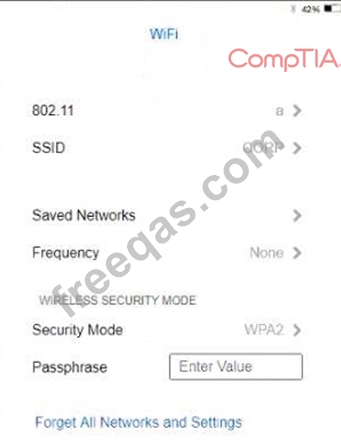
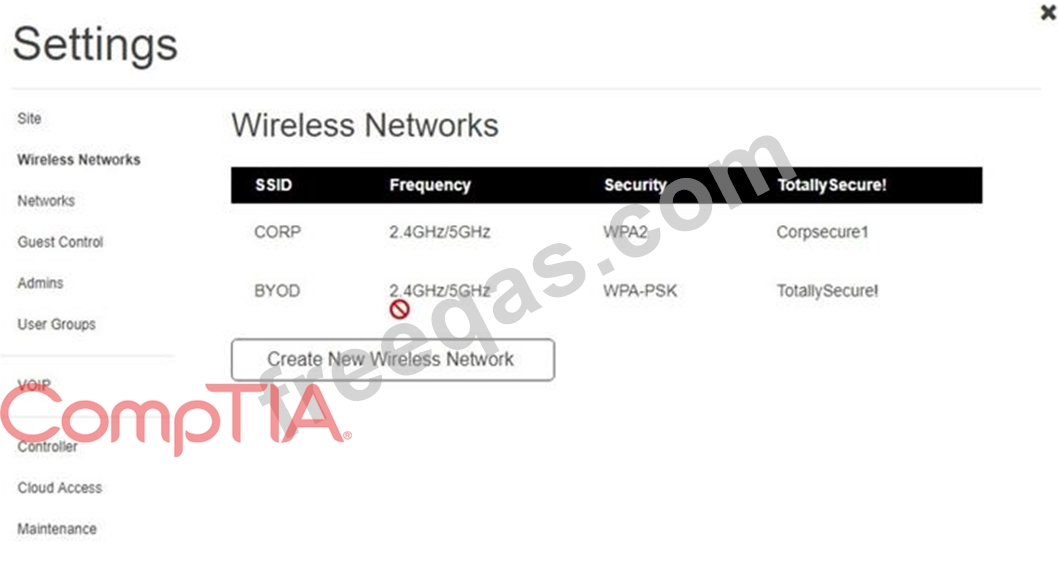
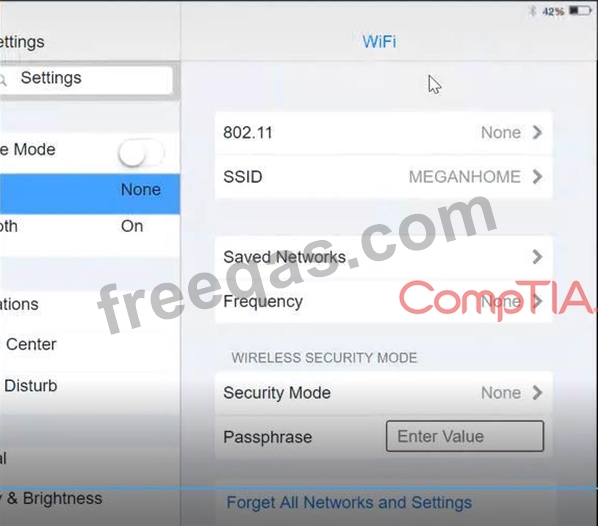
Ann, a CEO, has purchased a new consumer-class tablet for personal use, but she is unable to connect it to the company's wireless network. All the corporate laptops are connecting without issue. She has asked you to assist with getting the device online.
INSTRUCTIONS
Review the network diagrams and device configurations to determine the cause of the problem and resolve any discovered issues.
If at any time you would like to bring back the initial state of the simulation, please click the Reset All button.



Correct Answer:
See the Explanation below:
Explanation
Graphical user interface, application Description automatically generated

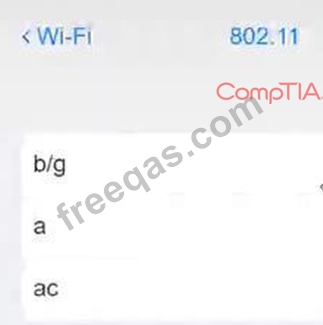
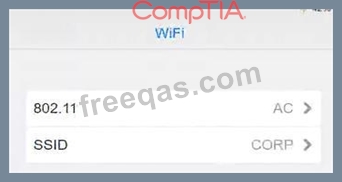
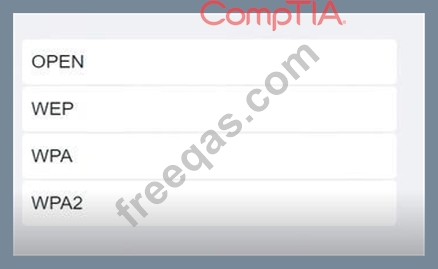
Click on 802.11 and Select ac

Graphical user interface, application Description automatically generated Click on SSID and select CORP Graphical user interface, text, application, Teams Description automatically generated

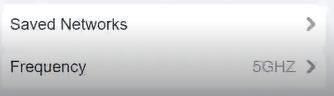
Click on Frequency and select 5GHz
A picture containing background pattern Description automatically generated

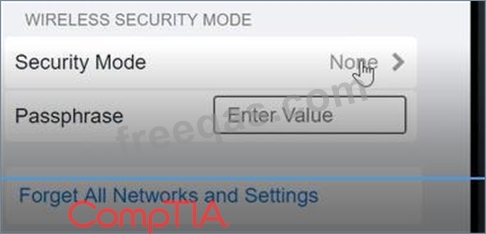
At Wireless Security Mode, Click on Security Mode
Graphical user interface, text, application Description automatically generated

Select the WPA2
Graphical user interface, application, Teams Description automatically generated with medium confidence

Ann needs to connect to the BYOD SSID, using 2.4GHZ. The selected security method chose should be WPA PSK, and the password should be set to TotallySecret.
Graphical user interface, application Description automatically generated
insert code

Question 180

Which of the following would most likely be used to extend the life of a device?

Correct Answer: C
Proper ventilation is a factor that can extend the life of a device by preventing overheating and thermal damage to the device's components. Proper ventilation means ensuring that there is enough airflow around and inside the device to dissipate heat and maintain a suitable temperature for optimal performance. Proper ventilation can be achieved by using fans, heat sinks, vents, or liquid cooling systems, as well as avoiding placing the device near heat sources or in enclosed spaces. Battery backup, electrostatic discharge mat, and green disposal are not factors that can extend the life of a device.
insert code
  • ««
  • «
  • …
  • 32
  • 33
  • 34
  • 35
  • 36
  • 37
  • 38
  • 39
  • 40
  • 41
  • …
  • »
  • »»
[×]

Download PDF File

Enter your email address to download CompTIA.220-1102.v2024-09-17.q504 Dumps

Email:

FreeQAs

Our website provides the Largest and the most Latest vendors Certification Exam materials around the world.

Using dumps we provide to Pass the Exam, we has the Valid Dumps with passing guranteed just which you need.

  • DMCA
  • About
  • Contact Us
  • Privacy Policy
  • Terms & Conditions
©2026 FreeQAs

www.freeqas.com materials do not contain actual questions and answers from Cisco's certification exams.