Your organization has a centralized logging solution, such as Splunk. Will this configure a Docker container to export container logs to the logging solution? Solution: docker system events --filter splunk
Correct Answer: B
Explanation Using docker system events --filter splunk does not configure a Docker container to export container logs to the logging solution. The docker system events command shows real-time events from the server, such as container creation, image deletion, network connection, etc. It does not show or export container logs to any external service. The --filter option allows filtering events by type, action, image, container, etc., but it does not accept splunk as a valid filter value. References: https://docs.docker.com/engine/reference/commandline/system_events/, https://docs.docker.com/config/containers/logging/
Question 52
Which networking drivers allow you to enable multi-host network connectivity between containers?
Correct Answer: D
Explanation The networking drivers that allow you to enable multi-host network connectivity between containers are bridge, macvlan, ipvlan, and overlay. These drivers create networks that can span multiple Docker hosts, and therefore enable containers on different hosts to communicate with each other. The other drivers, such as host, user-defined, and none, create networks that are either isolated or limited to a single host. Here is a brief overview of each driver and how it supports multi-host networking: *bridge: The bridge driver creates a network that connects containers on the same host using a Linux bridge. However, it can also be used to create a network that connects containers across multiple hosts using an external key-value store, such as Consul, Etcd, or ZooKeeper. This feature is deprecated and not recommended, as it requires manual configuration and has some limitations. The preferred driver for multi-host networking is overlay1. *macvlan: The macvlan driver creates a network that assigns a MAC address to each container, making it appear as a physical device on the network. This allows the containers to communicate with other devices on the same network, regardless of the host they are running on. The macvlan driver can also use 802.1q trunking to create sub-interfaces and isolate traffic between different networks2. *ipvlan: The ipvlan driver creates a network that assigns an IP address to each container, making it appear as a logical device on the network. This allows the containers to communicate with other devices on the same network, regardless of the host they are running on. The ipvlan driver can also usedifferent modes, such as l2, l3, or l3s, to control the routing and isolation of traffic between different networks3. *overlay: The overlay driver creates a network that connects multiple Docker daemons together using VXLAN tunnels. This allows the containers to communicate across different hosts, even if they are on different networks. The overlay driver also supports encryption, load balancing, and service discovery. The overlay driver is the default and recommended driver for multi-host networking, especially for Swarm services4. References: *Use bridge networks *Use macvlan networks *Use ipvlan networks *Use overlay networks
Question 53
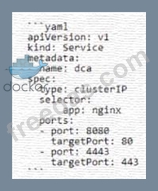
The Kubernetes yaml shown below describes a clusterIP service. Is this a correct statement about how this service routes requests? Solution: Traffic sent to the IP of this service on port 8080 will be routed to port 80 in a random pod with the label aPP: nginx.
Correct Answer: A
Explanation The statement is correct. In the provided Kubernetes YAML, it's defined that traffic sent to the IP of this service on port 8080 will be routed to port 80 in a random pod with the label app: nginx. This is because it's a ClusterIP service type which is meant for internal communication within the cluster, and it uses selectors to route traffic to the correct pods. References: Docker Certified Associate Guide, DCA Prep Guide
Question 54
A company's security policy specifies that development and production containers must run on separate nodes in a given Swarm cluster. Can this be used to schedule containers to meet the security policy requirements? Solution: node taints
Correct Answer: B
Question 55
A users attempts to set the system time from inside a Docker container are unsuccessful. Could this be blocking this operation? Solution: inter-process communication
Correct Answer: B
Explanation (Please check the official Docker site for the verified answer) Comprehensive Explanation: = (Please check the official Docker site for the comprehensive explanation) References: (Some possible references from the web search results are) * Docker Security - Docker Documentation * Docker Security Best Practices - Medium * Docker Security Cheat Sheet - GitHub * Docker Security: A Comprehensive Guide - Snyk * Docker Security: Tips and Tricks to Secure Your Containers - DevSecOps I hope this helps you in your exam preparation. Good luck!