An LTM Specialist is troubleshooting an issue with a new virtual server. When connecting through the virtual server, clients receive the message "Unable to connect" in the browser, although connections directly to the pool member show the application is functioning correctly. The LTM device configuration is:
ltm virtual /Common/vs_https {
destination /Common/10.10.1.110:443
ip-protocol udp
mask 255.255.255.255
pool /Common/pool_https
profiles {
/Common/udp { }
}
translate-address enabled
translate-port enabled
vlans-disabled
}
ltm pool /Common/pool_https {
members {
/Common/172.16.20.1:443 {
address 172.16.20.1
}
}
}
What issue is the LTM Specialist experiencing?
How should a BIG-IP Administrator control the amount of traffic that a newly enabled pool member receives.
-- Exhibit -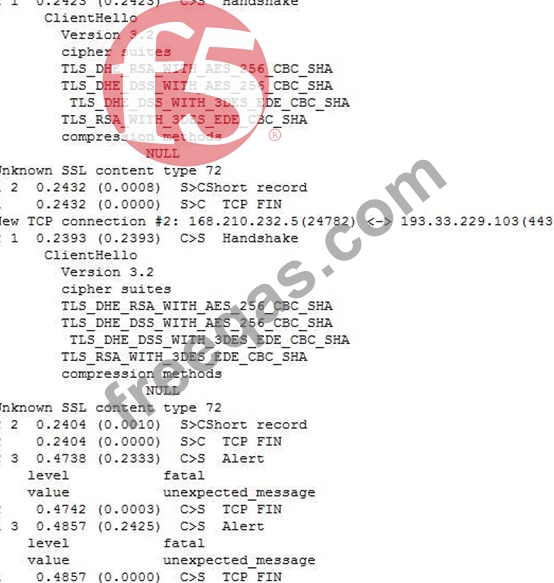
-- Exhibit --
Refer to the exhibit.
A client attempts to connect from a Google Chrome browser to a virtual server on a BIG-IP LTM. The virtual server is SSL Offloaded. When the client connects, the client receives an SSL error. The client receives the same errors when trying Mozilla Firefox and Internet Explorer browsers.
The LTM Specialist does an ssldump on the virtual server and receives the results as per the exhibit.
How should this be resolved?
What do the following iRule commands do when they are used in the same iRule?
set hsl [HSL::open -proto UDP -pool syslog_server_pool]
HSL::send $hsl "<190> [HTTP::host] from [whereis [IP::client_addr] country continent state city zip] , IP:
[IP::client_addr]"
A BIG-IP Administrator finds the following log entry:
tnm tmm[7141]: 011e0002:4: sweeperjjpdate: aggressive mode activated.
Which action should the BIG-IP Administrator to mitigate this memory issue?

