FreeQAs
 Request Exam  Contact
  • Home
  • View All Exams
  • New QA's
  • Upload
PRACTICE EXAMS:
  • Oracle
  • Fortinet
  • IBM
  • Juniper
  • Microsoft
  • Cisco
  • Citrix
  • CompTIA
  • VMware
  • ISC
  • SAP
  • EMC
  • PMI
  • HP
  • Salesforce
  • Other
  • Oracle
    Oracle
  • Fortinet
    Fortinet
  • IBM
    IBM
  • Juniper
    Juniper
  • Microsoft
    Microsoft
  • Cisco
    Cisco
  • Citrix
    Citrix
  • CompTIA
    CompTIA
  • VMware
    VMware
  • ISC
    ISC
  • SAP
    SAP
  • EMC
    EMC
  • PMI
    PMI
  • HP
    HP
  • Salesforce
    Salesforce
  1. Home
  2. Fortinet Certification
  3. FCP_FMG_AD-7.4 Exam
  4. Fortinet.FCP_FMG_AD-7.4.v2025-11-17.q58 Dumps
  • ««
  • «
  • …
  • 3
  • 4
  • 5
  • 6
  • 7
  • 8
  • 9
  • 10
  • 11
  • 12
  • …
  • »
  • »»
Download Now

Question 31

Refer to the exhibit.

Given the configuration shown in the exhibit, which two conclusions can you draw from the installation targets in the Install On column? (Choose two.)

Correct Answer: A,D
* Option A: Policy seq.S will be installed on all managed devices and VDOMs that are listed under Installation Targets.This is correct. The "Install On" column indicates that the policy is targeted for installation on all listed managed devices and VDOMs under Installation Targets.
* Option D: Policy seq.# 1 will be installed on the ISFW device root[NAT] and Student[NAT] VDOMs only.This is correct. Policy sequence #1 specifies that it will be installed only on the ISFW device and the VDOMs 'root[NAT]' and 'Student[NAT]' as indicated by the "Install On" column.
Explanation of Incorrect Options:
* Option B: Policy seq.# 3 will be skipped because no installation targets are specifiedis incorrect because it is clearly listed under "Installation Targets," which means it will be installed according to the specified configuration.
* Option C: Policy seq.# 2 will not be installed on the Local-FortiGate root VDOM because there is no root VDOM in the Installation Targetis incorrect as the exhibit does not show any specific exclusion for seq.# 2 on the Local-FortiGate root VDOM.
FortiManager References:
* Refer to the FortiManager Administration Guide sections on "Policy Packages" and "Policy Installation Targets" for more details.
insert code

Question 32

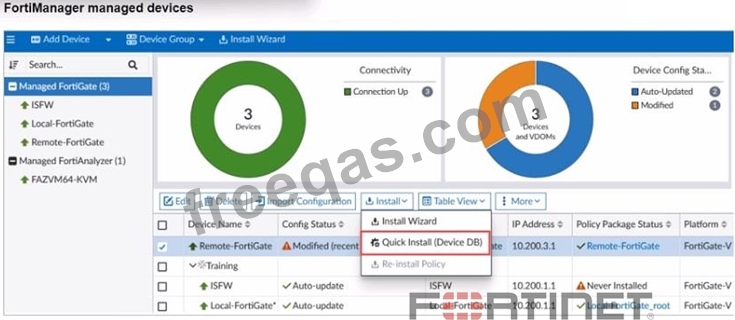
Refer to the exhibit.

You are using the Quick Install option to install configuration changes on the managed FortiGate.
Which two statements correctly describe the result? (Choose two.)

Correct Answer: B,D
* Option B: It provides the option to preview only the policy package changes before installing them.This is correct. The Quick Install option in FortiManager provides a preview of policy changes before they are applied, allowing administrators to review and confirm the changes.
* Option D: It installs device-level changes on the FortiGate device without launching the Install Wizard.This is correct. Quick Install allows for the immediate installation of device-level changes, such as interface or routing configurations, directly onto the FortiGate without going through the full Install Wizard.
Explanation of Incorrect Options:
* Option A: It installs provisioning template changes on the FortiGate deviceis incorrect because Quick Install does not specifically deal with provisioning templates.
* Option C: It installs all the changes in the device database first and the administrator must reinstall the changes on the FortiGate deviceis incorrect because Quick Install directly applies changes to the FortiGate device, not requiring a separate reinstall step.
FortiManager References:
* Refer to "FortiManager Administration Guide" for details on "Quick Install" functionality under
"Device Management."
insert code

Question 33

Refer to the exhibit.

Which two results occur if the script is run using the Device Database option? (Choose two.)

Correct Answer: A,D
If the script is run using the "Device Database" option on FortiManager, the following occurs:
* A.You must install these changes on a managed device using the Install Wizard.
* Running the script on the Device Database updates only the configuration in the FortiManager's database, not on the actual FortiGate device. To apply the changes, you need to use the Install Wizard to push these configurations to the managed device.
* D.The device Config Status is tagged as Modified.
* After running the script on the Device Database, FortiManager tags the device's configuration status as "Modified," indicating that there are pending changes that have not yet been installed on the device.
Options B and C are incorrect because:
* Bsuggests a new revision history is created, but this only happens when changes are actually installed on the managed device.
* Cimplies the script is directly executed on the FortiGate, which is not the case when using the Device Database option.
FortiManager References:
* Refer to FortiManager 7.4 Administrator Guide: Scripting and Configuration Management.
insert code

Question 34

Push updates are failing on a FortiGate device that is located behind a NAT device. Which two settings should the administrator check? (Choose two.)

Correct Answer: A,D
When push updates are failing on a FortiGate device behind a NAT device, the administrator should check:
* A.That the override server IP address is set on FortiManager and the NAT device.
* The override server IP should be configured to ensure that FortiManager uses the correct IP address that can traverse the NAT to reach the FortiGate device.
* D.That the virtual IP address and correct ports are set on the NAT device.
* The NAT device must have the correct virtual IP (VIP) configured to map the FortiGate's internal IP to an external address, along with the correct ports needed for communication.
Options B and C are incorrect because:
* Bsuggests setting the external IP on the NAT device to DHCP, which is not relevant to solving the push update issue.
* Cimplies configuring NAT device IP and ports on FortiManager, which is less likely needed compared to configuring the correct VIP and ports.
FortiManager References:
* Refer to FortiManager 7.4 Administrator Guide: Device Management and NAT Configuration.
insert code

Question 35

Refer to the exhibit. An administrator is about to add the FortiGate device to FortiManager using the discovery process. FortiManager is operating behind a NAT device, and the administrator configured the FortiManager NATed IP address under the FortiManager system administration settings.

What is the expected result?

Correct Answer: D
You can configure the FortiManger NATed IP address on FortiGate under the central management configuration. This allows FortiGate to announce itself to FortiManager and try to re- establish the FGFM tunnel, if it is torn down. Configuring the FortiManager NATed IP address on FortiGate allows both FortiManager and FortiGate to re-establish the FGFM tunnel. Also, if you configure the FortiManager NATed IP address under the FortiManager system administrator settings, FortiManager sets this address on FortiGate during the discovery process.
insert code
  • ««
  • «
  • …
  • 3
  • 4
  • 5
  • 6
  • 7
  • 8
  • 9
  • 10
  • 11
  • 12
  • …
  • »
  • »»
[×]

Download PDF File

Enter your email address to download Fortinet.FCP_FMG_AD-7.4.v2025-11-17.q58 Dumps

Email:

FreeQAs

Our website provides the Largest and the most Latest vendors Certification Exam materials around the world.

Using dumps we provide to Pass the Exam, we has the Valid Dumps with passing guranteed just which you need.

  • DMCA
  • About
  • Contact Us
  • Privacy Policy
  • Terms & Conditions
©2026 FreeQAs

www.freeqas.com materials do not contain actual questions and answers from Cisco's certification exams.