FreeQAs
 Request Exam  Contact
  • Home
  • View All Exams
  • New QA's
  • Upload
PRACTICE EXAMS:
  • Oracle
  • Fortinet
  • Juniper
  • Microsoft
  • Cisco
  • Citrix
  • CompTIA
  • VMware
  • ISC
  • SAP
  • EMC
  • PMI
  • HP
  • Salesforce
  • Other
  • Oracle
    Oracle
  • Fortinet
    Fortinet
  • Juniper
    Juniper
  • Microsoft
    Microsoft
  • Cisco
    Cisco
  • Citrix
    Citrix
  • CompTIA
    CompTIA
  • VMware
    VMware
  • ISC
    ISC
  • SAP
    SAP
  • EMC
    EMC
  • PMI
    PMI
  • HP
    HP
  • Salesforce
    Salesforce
  1. Home
  2. Fortinet Certification
  3. FCSS_SOC_AN-7.4 Exam
  4. Fortinet.FCSS_SOC_AN-7.4.v2025-09-04.q46 Dumps
  • «
  • 1
  • 2
  • 3
  • 4
  • 5
  • 6
  • 7
  • 8
  • 9
  • 10
  • …
  • »
  • »»
Download Now

Question 16

Refer to the Exhibit:
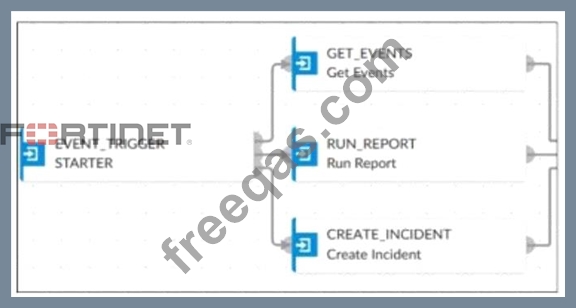
An analyst wants to create an incident and generate a report whenever FortiAnalyzer generates a malicious attachment event based on FortiSandbox analysis. The endpoint hosts are protected by FortiClient EMS integrated with FortiSandbox. All devices are logging to FortiAnalyzer.
Which connector must the analyst use in this playbook?

Correct Answer: A
* Understanding the Requirements:
* The objective is to create an incident and generate a report based on malicious attachment events detected by FortiAnalyzer from FortiSandbox analysis.
* The endpoint hosts are protected by FortiClient EMS, which is integrated with FortiSandbox. All logs are sent to FortiAnalyzer.
* Key Components:
* FortiAnalyzer: Centralized logging and analysis for Fortinet devices.
* FortiSandbox: Advanced threat protection system that analyzes suspicious files and URLs.
* FortiClient EMS: Endpoint management system that integrates with FortiSandbox for endpoint protection.
* Playbook Analysis:
* The playbook in the exhibit consists of three main actions:GET_EVENTS,RUN_REPORT, andCREATE_INCIDENT.
* EVENT_TRIGGER: Starts the playbook when an event occurs.
* GET_EVENTS: Fetches relevant events.
* RUN_REPORT: Generates a report based on the events.
* CREATE_INCIDENT: Creates an incident in the incident management system.
* Selecting the Correct Connector:
* The correct connector should allow fetching events related to malicious attachments analyzed by FortiSandbox and facilitate integration with FortiAnalyzer.
* Connector Options:
* FortiSandbox Connector:
* Directly integrates with FortiSandbox to fetch analysis results and events related to malicious attachments.
* Best suited for getting detailed sandbox analysis results.
* Selected as it is directly related to the requirement of handling FortiSandbox analysis events.
* FortiClient EMS Connector:
* Used for managing endpoint security and integrating with endpoint logs.
* Not directly related to fetching sandbox analysis events.
* Not selected as it is not directly related to the sandbox analysis events.
* FortiMail Connector:
* Used for email security and handling email-related logs and events.
* Not applicable for sandbox analysis events.
* Not selected as it does not relate to the sandbox analysis.
* Local Connector:
* Handles local events within FortiAnalyzer itself.
* Might not be specific enough for fetching detailed sandbox analysis results.
* Not selected as it may not provide the required integration with FortiSandbox.
* Implementation Steps:
* Step 1: Ensure FortiSandbox is configured to send analysis results to FortiAnalyzer.
* Step 2: Use the FortiSandbox connector in the playbook to fetch events related to malicious attachments.
* Step 3: Configure theGET_EVENTSaction to use the FortiSandbox connector.
* Step 4: Set up theRUN_REPORTandCREATE_INCIDENTactions based on the fetched events.
References:
* Fortinet Documentation on FortiSandbox Integration FortiSandbox Integration Guide
* Fortinet Documentation on FortiAnalyzer Event Handling FortiAnalyzer Administration Guide By using the FortiSandbox connector, the analyst can ensure that the playbook accurately fetches events based on FortiSandbox analysis and generates the required incident and report.
insert code

Question 17

Refer to the exhibit,

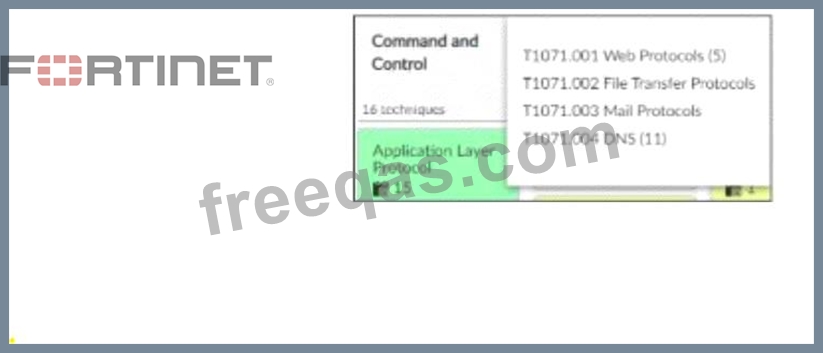
which shows the partial output of the MITRE ATT&CK Enterprise matrix on FortiAnalyzer.
Which two statements are true? (Choose two.)

Correct Answer: B,C
* Understanding the MITRE ATT&CK Matrix:
* The MITRE ATT&CK framework is a knowledge base of adversary tactics and techniques based on real-world observations.
* Each tactic in the matrix represents the "why" of an attack technique, while each technique represents "how" an adversary achieves a tactic.
* Analyzing the Provided Exhibit:
* The exhibit shows part of the MITRE ATT&CK Enterprise matrix as displayed on FortiAnalyzer.
* The focus is on technique T1071 (Application Layer Protocol), which has subtechniques labeled T1071.001, T1071.002, T1071.003, and T1071.004.
* Each subtechnique specifies a different type of application layer protocol used for Command and
* Control (C2):
* T1071.001 Web Protocols
* T1071.002 File Transfer Protocols
* T1071.003 Mail Protocols
* T1071.004 DNS
* Identifying Key Points:
* Subtechniques under T1071:There are four subtechniques listed under the primary technique T1071, confirming that statement B is true.
* Event Handlers for T1071:FortiAnalyzer includes event handlers for monitoring various tactics and techniques. The presence of event handlers for tactic T1071 suggests active monitoring and alerting for these specific subtechniques, confirming that statement C is true.
* Misconceptions Clarified:
* Statement A (four techniques under tactic T1071) is incorrect because T1071 is a single technique with four subtechniques.
* Statement D (15 events associated with the tactic) is misleading. The number 15 refers to the techniques under the Application Layer Protocol, not directly related to the number of events.
Conclusion:
* The accurate interpretation of the exhibit confirms that there are four subtechniques under technique T1071 and that there are event handlers covering tactic T1071.
References:
* MITRE ATT&CK Framework documentation.
* FortiAnalyzer Event Handling and MITRE ATT&CK Integration guides.
insert code

Question 18

A customer wants FortiAnalyzer to run an automation stitch that executes a CLI command on FortiGate to block a predefined list of URLs, if a botnet command-and-control (C&C) server IP is detected.
Which FortiAnalyzer feature must you use to start this automation process?

Correct Answer: C
Understanding Automation Processes in FortiAnalyzer:
FortiAnalyzer can automate responses to detected security events, such as running commands on FortiGate devices.
Analyzing the Customer Requirement:
The customer wants to run a CLI command on FortiGate to block predefined URLs when a botnet C&C server IP is detected.
This requires an automated response triggered by a specific event.
Evaluating the Options:
Option A: Playbooks orchestrate complex workflows but are not typically used for direct event-triggered automation processes.
Option B: Data selectors filter logs based on criteria but do not initiate automation processes.
Option C: Event handlers can be configured to detect specific events (such as detecting a botnet C&C server IP) and trigger automation stitches to execute predefined actions.
Option D: Connectors facilitate communication between FortiAnalyzer and other systems but are not the primary mechanism for initiating automation based on log events. Conclusion:
To start the automation process when a botnet C&C server IP is detected, you must use an Event handler in FortiAnalyzer.
Reference: Fortinet Documentation on Event Handlers and Automation Stitches in FortiAnalyzer.
Best Practices for Configuring Automated Responses in FortiAnalyzer.
insert code

Question 19

Refer to the Exhibit:

An analyst wants to create an incident and generate a report whenever FortiAnalyzer generates a malicious attachment event based on FortiSandbox analysis. The endpoint hosts are protected by FortiClient EMS integrated with FortiSandbox. All devices are logging to FortiAnalyzer.
Which connector must the analyst use in this playbook?

Correct Answer: A
Understanding the Requirements:
The objective is to create an incident and generate a report based on malicious attachment events detected by FortiAnalyzer from FortiSandbox analysis.
The endpoint hosts are protected by FortiClient EMS, which is integrated with FortiSandbox. All logs are sent to FortiAnalyzer.
Key Components:
FortiAnalyzer: Centralized logging and analysis for Fortinet devices.
FortiSandbox: Advanced threat protection system that analyzes suspicious files and URLs.
FortiClient EMS: Endpoint management system that integrates with FortiSandbox for endpoint protection.
Playbook Analysis:
The playbook in the exhibit consists of three main actions: GET_EVENTS, RUN_REPORT, and CREATE_INCIDENT.
EVENT_TRIGGER: Starts the playbook when an event occurs.
GET_EVENTS: Fetches relevant events.
RUN_REPORT: Generates a report based on the events.
CREATE_INCIDENT: Creates an incident in the incident management system.
Selecting the Correct Connector:
The correct connector should allow fetching events related to malicious attachments analyzed by FortiSandbox and facilitate integration with FortiAnalyzer. Connector Options:
FortiSandbox Connector:
Directly integrates with FortiSandbox to fetch analysis results and events related to malicious attachments.
Best suited for getting detailed sandbox analysis results.
Selected as it is directly related to the requirement of handling FortiSandbox analysis events.
FortiClient EMS Connector:
Used for managing endpoint security and integrating with endpoint logs.
Not directly related to fetching sandbox analysis events.
Not selected as it is not directly related to the sandbox analysis events.
FortiMail Connector:
Used for email security and handling email-related logs and events.
Not applicable for sandbox analysis events.
Not selected as it does not relate to the sandbox analysis.
Local Connector:
Handles local events within FortiAnalyzer itself.
Might not be specific enough for fetching detailed sandbox analysis results. Not selected as it may not provide the required integration with FortiSandbox. Implementation Steps:
Step 1: Ensure FortiSandbox is configured to send analysis results to FortiAnalyzer.
Step 2: Use the FortiSandbox connector in the playbook to fetch events related to malicious attachments.
Step 3: Configure the GET_EVENTS action to use the FortiSandbox connector.
Step 4: Set up the RUN_REPORT and CREATE_INCIDENT actions based on the fetched events.
Reference: Fortinet Documentation on FortiSandbox Integration FortiSandbox Integration Guide Fortinet Documentation on FortiAnalyzer Event Handling FortiAnalyzer Administration Guide By using the FortiSandbox connector, the analyst can ensure that the playbook accurately fetches events based on FortiSandbox analysis and generates the required incident and report.
insert code

Question 20

Refer to the exhibits.

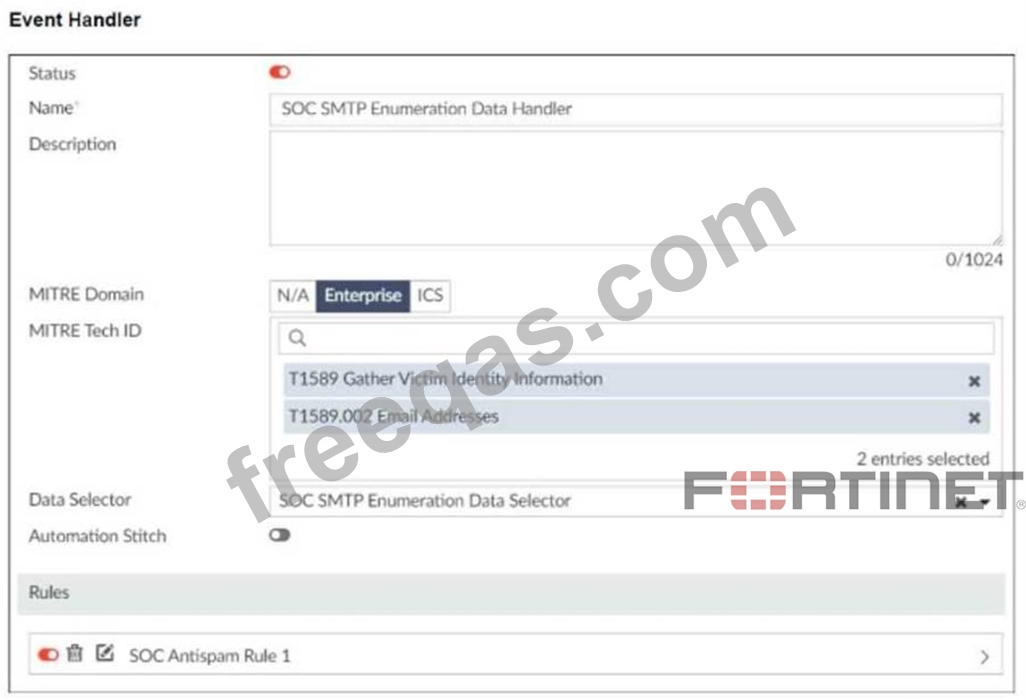
You configured a custom event handler and an associated rule to generate events whenever FortiMail detects spam emails. However, you notice that the event handler is generating events for both spam emails and clean emails.
Which change must you make in the rule so that it detects only spam emails?

Correct Answer: A
Understanding the Custom Event Handler Configuration:
The event handler is set up to generate events based on specific log data.
The goal is to generate events specifically for spam emails detected by FortiMail.
Analyzing the Issue:
The event handler is currently generating events for both spam emails and clean emails.
This indicates that the rule's filtering criteria are not correctly distinguishing between spam and non- spam emails.
Evaluating the Options:
Option A: Selecting the "Anti-Spam Log (spam)" in the Log Type field will ensure that only logs related to spam emails are considered. This is the most straightforward and accurate way to filter for spam emails.
Option B: Typing type==spam in the Log filter by Text field might help filter the logs, but it is not as direct and reliable as selecting the correct log type.
Option C: Disabling the rule to use the filter in the data selector to create the event does not address the issue of filtering for spam logs specifically.
Option D: Selecting "Within a group, the log field Spam Name (snane) has 2 or more unique values" is not directly relevant to filtering spam logs and could lead to incorrect filtering criteria. Conclusion:
The correct change to make in the rule is to select "Anti-Spam Log (spam)" in the Log Type field. This ensures that the event handler only generates events for spam emails.
Reference: Fortinet Documentation on Event Handlers and Log Types.
Best Practices for Configuring FortiMail Anti-Spam Settings.
insert code
  • «
  • 1
  • 2
  • 3
  • 4
  • 5
  • 6
  • 7
  • 8
  • 9
  • 10
  • …
  • »
  • »»
[×]

Download PDF File

Enter your email address to download Fortinet.FCSS_SOC_AN-7.4.v2025-09-04.q46 Dumps

Email:

FreeQAs

Our website provides the Largest and the most Latest vendors Certification Exam materials around the world.

Using dumps we provide to Pass the Exam, we has the Valid Dumps with passing guranteed just which you need.

  • DMCA
  • About
  • Contact Us
  • Privacy Policy
  • Terms & Conditions
©2026 FreeQAs

www.freeqas.com materials do not contain actual questions and answers from Cisco's certification exams.