FreeQAs
 Request Exam  Contact
  • Home
  • View All Exams
  • New QA's
  • Upload
PRACTICE EXAMS:
  • Oracle
  • Fortinet
  • Juniper
  • Microsoft
  • Cisco
  • Citrix
  • CompTIA
  • VMware
  • SAP
  • EMC
  • PMI
  • HP
  • Salesforce
  • Other
  • Oracle
    Oracle
  • Fortinet
    Fortinet
  • Juniper
    Juniper
  • Microsoft
    Microsoft
  • Cisco
    Cisco
  • Citrix
    Citrix
  • CompTIA
    CompTIA
  • VMware
    VMware
  • SAP
    SAP
  • EMC
    EMC
  • PMI
    PMI
  • HP
    HP
  • Salesforce
    Salesforce
  1. Home
  2. Fortinet Certification
  3. NSE5_FMG-6.4 Exam
  4. Fortinet.NSE5_FMG-6.4.v2023-01-27.q20 Dumps
  • «
  • 1
  • 2
  • 3
  • 4
  • 5
  • »
Download Now

Question 1

Which two statements regarding device management on FortiManager are true? (Choose two.)

Correct Answer: A,B
insert code

Question 2

Which two settings must be configured for SD-WAN Central Management? (Choose two.)

Correct Answer: B,D
insert code

Question 3

An administrator has enabled Service Access on FortiManager.
What is the purpose of Service Access on the FortiManager interface?

Correct Answer: C
insert code

Question 4

Refer to the exhibit.

Which two statements about the output are true? (Choose two.)

Correct Answer: A,C
database
Explanation:
STATUS: dev-db: modified; conf: in sync; cond: pending; dm: retrieved; conn: up - dev-db: modified - This is the device setting status which indicates that configuration changes were made on FortiManager. - conf: in sync - This is the sync status which shows that the latest revision history is in sync with Fortigate's configuration. - cond: pending - This is the configuration status which says that configuration changes need to be installed.
Most probably a retrieve was done in the past (dm: retrieved) updating the revision history DB (conf: in sync) and FortiManager device level DB, now there is a new modification on FortiManager device level DB (dev-db: modified) which wasn't installed to FortiGate (cond: pending), hence; revision history DB is not aware of that modification and doesn't match device DB.
Conclusion: - Revision DB does match FortiGate. - No changes were installed to FortiGate yet. - Device DB doesn't match Revision DB. - No changes were done on FortiGate (auto-update) but configuration was retrieved instead After an Auto-Update or Retrieve: device database = latest revision = FGT Then after a manual change on FMG end (but no install yet): latest revision = FGT (still) but now device database has been modified (is different).
After reverting to a previous revision in revision history: device database = reverted revision != FGT
insert code

Question 5

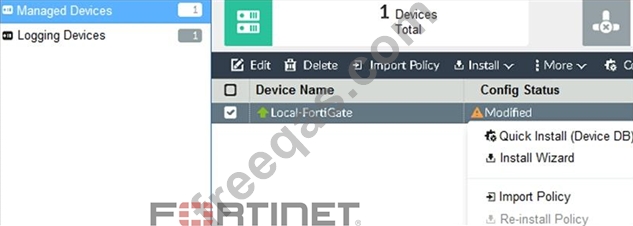
Refer to the exhibit.

You are using the Quick Install option to install configuration changes on the managed FortiGate.
Which two statements correctly describe the result? (Choose two.)

Correct Answer: B,C
FortiManager_6.4_Study_Guide-Online - page 164
The Install Config option allows you to perform a quick installation of device-level settings without launching the Install Wizard. When you use this option, you cannot preview the changes prior to committing. Administrator should be certain of the changes before using this install option, because the install can't be cancelled after the process is initiated.
insert code
  • «
  • 1
  • 2
  • 3
  • 4
  • 5
  • »
[×]

Download PDF File

Enter your email address to download Fortinet.NSE5_FMG-6.4.v2023-01-27.q20 Dumps

Email:

FreeQAs

Our website provides the Largest and the most Latest vendors Certification Exam materials around the world.

Using dumps we provide to Pass the Exam, we has the Valid Dumps with passing guranteed just which you need.

  • DMCA
  • About
  • Contact Us
  • Privacy Policy
  • Terms & Conditions
©2025 FreeQAs

www.freeqas.com materials do not contain actual questions and answers from Cisco's certification exams.