FreeQAs
 Request Exam  Contact
  • Home
  • View All Exams
  • New QA's
  • Upload
PRACTICE EXAMS:
  • Oracle
  • Fortinet
  • IBM
  • Juniper
  • Microsoft
  • Cisco
  • Citrix
  • CompTIA
  • VMware
  • ISC
  • SAP
  • EMC
  • PMI
  • HP
  • Salesforce
  • Other
  • Oracle
    Oracle
  • Fortinet
    Fortinet
  • IBM
    IBM
  • Juniper
    Juniper
  • Microsoft
    Microsoft
  • Cisco
    Cisco
  • Citrix
    Citrix
  • CompTIA
    CompTIA
  • VMware
    VMware
  • ISC
    ISC
  • SAP
    SAP
  • EMC
    EMC
  • PMI
    PMI
  • HP
    HP
  • Salesforce
    Salesforce
  1. Home
  2. Fortinet Certification
  3. NSE5_FSM-6.3 Exam
  4. Fortinet.NSE5_FSM-6.3.v2024-10-28.q33 Dumps
  • «
  • 1
  • 2
  • 3
  • 4
  • 5
  • 6
  • 7
  • 8
  • »
Download Now

Question 11

Which process converts raw log data to structured data?

Correct Answer: C
Raw Log Data: When devices send logs to FortiSIEM, the data arrives in a raw, unstructured format.
Data Parsing Process: The process that converts this raw log data into a structured format is known as data parsing.
* Data Parsing: This involves extracting relevant fields from the raw log entries and organizing them into
* a structured format, making the data usable for analysis, reporting, and correlation.
Significance of Structured Data: Structured data is essential for effective event correlation, alerting, and generating meaningful reports.
References: FortiSIEM 6.3 User Guide, Data Parsing section, which details how raw log data is transformed into structured data through parsing.
insert code

Question 12

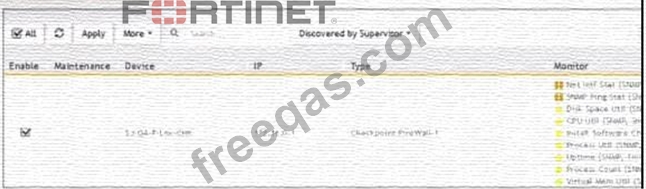
What do the yellow stars listed in the Monitor column indicate?

Correct Answer: C
insert code

Question 13

Which discovery scan type is prone to miss a device, if the device is quiet and the entry foe that device is not present in the ARP table of adjacent devices?

Correct Answer: B
Discovery Scan Types: FortiSIEM uses various scan types to discover devices on a network.
Layer 2 (L2) Scan: An L2 scan discovers devices based on ARP tables and MAC address information from adjacent devices.
* Limitation: If a device is quiet (not actively communicating) and its entry is not present in the ARP table of adjacent devices, the L2 scan may miss it.
Other Scan Types:
* CMDB Scan: Based on the existing Configuration Management Database (CMDB) entries.
* Range Scan: Scans a specified IP range for devices.
* Smart Scan: Uses a combination of methods to discover devices.
References: FortiSIEM 6.3 User Guide, Device Discovery section, which explains the different types of discovery scans and their characteristics.
insert code

Question 14

Refer to the exhibit.

What does the pauso icon indicate?

Correct Answer: D
Data Collection Status: FortiSIEM displays various icons to indicate the status of data collection for different devices.
Pause Icon: The pause icon specifically indicates that data collection is paused, but this can happen due to several reasons.
Common Cause for Pausing: One common cause for pausing data collection is an issue such as a change of password, which prevents the system from authenticating and collecting data.
Exhibit Analysis: In the provided exhibit, the presence of the pause icon next to the device suggests that data collection has encountered an issue that has caused it to pause.
References: FortiSIEM 6.3 User Guide, Device Management and Data Collection Status Icons section, which explains the different icons and their meanings.
insert code

Question 15

In me FortiSIEM CLI. which command must you use to determine whether or not syslog is being received from a network device?

Correct Answer: A
Syslog Reception Verification: To verify whether syslog messages are being received from a network device, a network packet capture tool can be used.
tcpdump Command:tcpdumpis a powerful command-line packet analyzer tool available in Unix-like operating systems. It allows administrators to capture and analyze network traffic.
* Usage: By usingtcpdumpwith the appropriate filters (e.g., port 514 for syslog), administrators can monitor the incoming syslog messages in real-time to verify if they are being received.
* Example Command:tcpdump -i <interface> port 514captures the syslog messages on the specified network interface.
References: FortiSIEM 6.3 User Guide, CLI Commands section, which details the usage oftcpdumpfor network traffic analysis and verification of syslog reception.
insert code
  • «
  • 1
  • 2
  • 3
  • 4
  • 5
  • 6
  • 7
  • 8
  • »
[×]

Download PDF File

Enter your email address to download Fortinet.NSE5_FSM-6.3.v2024-10-28.q33 Dumps

Email:

FreeQAs

Our website provides the Largest and the most Latest vendors Certification Exam materials around the world.

Using dumps we provide to Pass the Exam, we has the Valid Dumps with passing guranteed just which you need.

  • DMCA
  • About
  • Contact Us
  • Privacy Policy
  • Terms & Conditions
©2026 FreeQAs

www.freeqas.com materials do not contain actual questions and answers from Cisco's certification exams.