FreeQAs
 Request Exam  Contact
  • Home
  • View All Exams
  • New QA's
  • Upload
PRACTICE EXAMS:
  • Oracle
  • Fortinet
  • Juniper
  • Microsoft
  • Cisco
  • Citrix
  • CompTIA
  • VMware
  • SAP
  • EMC
  • PMI
  • HP
  • Salesforce
  • Other
  • Oracle
    Oracle
  • Fortinet
    Fortinet
  • Juniper
    Juniper
  • Microsoft
    Microsoft
  • Cisco
    Cisco
  • Citrix
    Citrix
  • CompTIA
    CompTIA
  • VMware
    VMware
  • SAP
    SAP
  • EMC
    EMC
  • PMI
    PMI
  • HP
    HP
  • Salesforce
    Salesforce
  1. Home
  2. HP Certification
  3. HPE0-S59 Exam
  4. HP.HPE0-S59.v2026-01-13.q98 Dumps
  • «
  • 1
  • 2
  • 3
  • 4
  • 5
  • 6
  • 7
  • 8
  • 9
  • 10
  • …
  • »
  • »»
Download Now

Question 1

Your customer reports mat an external FC boot volume for Windows server is visible four times in the Disk Management 1 online and 3 offline.
What should you do to resolve this issue?

Correct Answer: D
insert code

Question 2

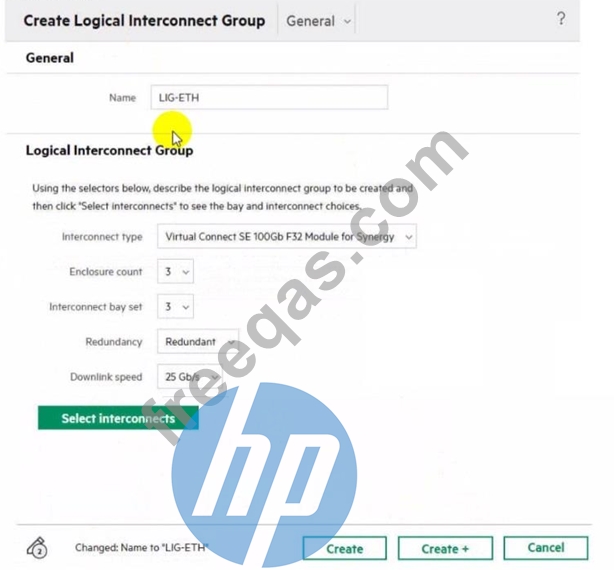
Refer to the exhibit.

Which statement about this logical interconnect group is true?

Correct Answer: D
In HPE Synergy configurations, when using interconnect bay set 3, it implies that the compute nodes should be half-height. This is because bay set 3 is typically utilized in configurationswhere half-height compute nodes are used to ensure proper alignment and connectivity within the Synergy frame.
insert code

Question 3

You configured a vVoI datastore using HPE Storage integration Pack for VMware vCenter.
Which storage object should you check using SSMC to verify whether vVol datastore is configured property?

Correct Answer: B
insert code

Question 4

You need to setup HPE Synergy frames after hardware components are discovered within HPE OneView.
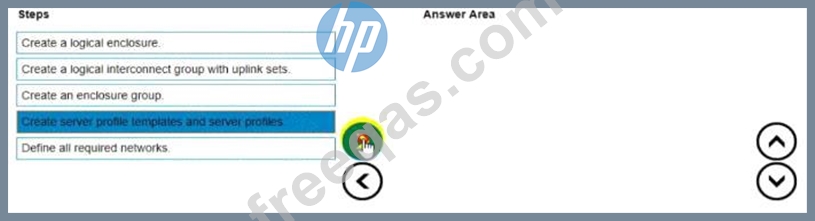
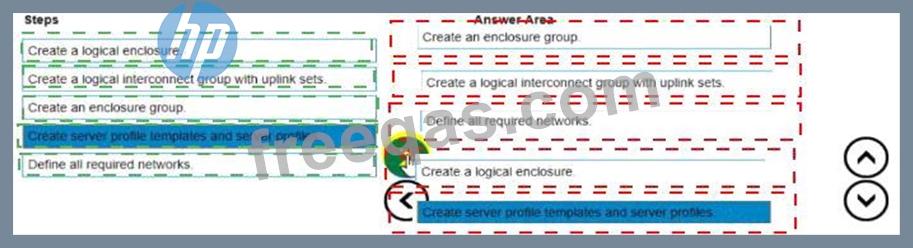
Put the steps to achieve this goal into the coned order in the answer area on the right.
Correct Answer:

Explanation:
To set up HPE Synergy frames after the hardware components are discovered within HPE OneView, the following steps should be followed in the correct order:
* Create an enclosure group.
* Create a logical interconnect group with uplink sets.
* Define all required networks.
* Create a logical enclosure.
* Create server profile templates and server profiles.
* Create an enclosure group: This step involves defining the enclosure group, which includes the configurations for the enclosure such as firmware baselines and logical interconnect groups.
* Create a logical interconnect group with uplink sets: Next, set up the logical interconnect group, which includes the uplink sets that define the connectivity from the enclosures to the data center networks.
* Define all required networks: After setting up the logical interconnect group, define all the necessary networks that will be used within the HPE Synergy environment.
* Create a logical enclosure: Create a logical enclosure by combining the physical enclosures with the defined enclosure group, effectively binding the hardware configuration with the logical settings.
* Create server profile templates and server profiles: Finally, create server profile templates and individual server profiles to apply the required configuration settings to the compute modules.
insert code

Question 5

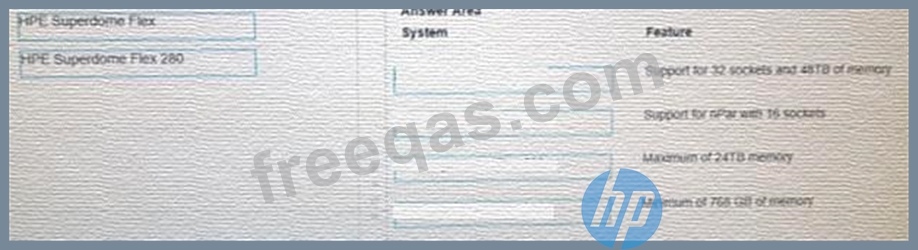
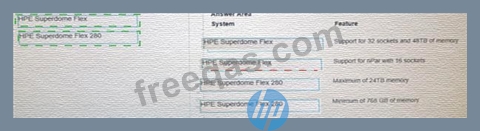
Match HPE Superdome Flex system with its specific feature.
Correct Answer:

Explanation:
Here are the correct matches for each HPE Superdome Flex system with its respective feature:
* HPE Superdome Flex
* Support for 32 sockets and 48TB of memory
* Support for nPar with 16 sockets
* HPE Superdome Flex 280
* Maximum of 24TB memory
* Minimum of 768 GB of memory
* HPE Superdome Flex:
* Support for 32 sockets and 48TB of memory:The HPE Superdome Flex system is designed for extremely large-scale workloads and can support configurations with up to 32 CPU sockets and
48TB of memory.
* Support for nPar with 16 sockets:This system supports nPartitions (nPars) with configurations that can include up to 16 CPU sockets, providing flexible partitioning and resource allocation.
* HPE Superdome Flex 280:
* Maximum of 24TB memory:The HPE Superdome Flex 280 supports a maximum memory capacity of 24TB, suitable for large but not as massive workloads compared to the full Superdome Flex.
* Minimum of 768 GB of memory:The minimum memory configuration for the HPE Superdome Flex 280 is 768 GB, ensuring a base level of performance and capacity for smaller deployments.
insert code
  • «
  • 1
  • 2
  • 3
  • 4
  • 5
  • 6
  • 7
  • 8
  • 9
  • 10
  • …
  • »
  • »»
[×]

Download PDF File

Enter your email address to download HP.HPE0-S59.v2026-01-13.q98 Dumps

Email:

FreeQAs

Our website provides the Largest and the most Latest vendors Certification Exam materials around the world.

Using dumps we provide to Pass the Exam, we has the Valid Dumps with passing guranteed just which you need.

  • DMCA
  • About
  • Contact Us
  • Privacy Policy
  • Terms & Conditions
©2026 FreeQAs

www.freeqas.com materials do not contain actual questions and answers from Cisco's certification exams.