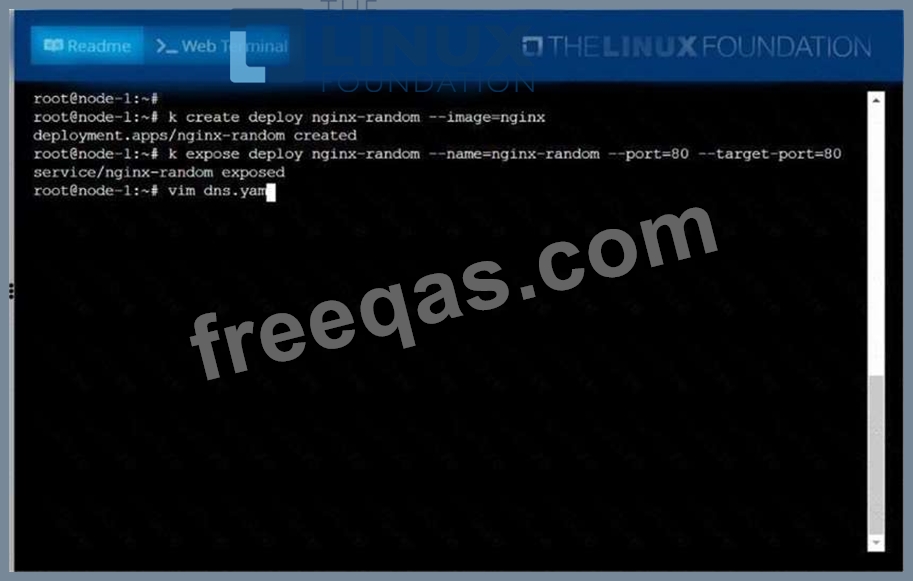
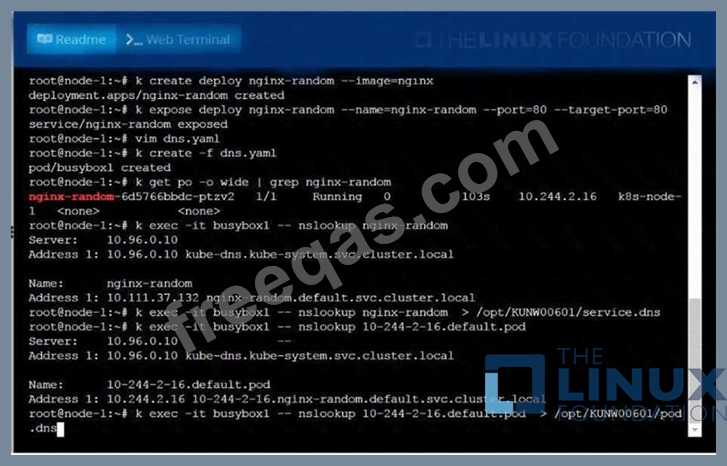
Create a deployment as follows:
* Name:nginx-random
* Exposed via a servicenginx-random
* Ensure that the service & podare accessible via theirrespective DNS records
* The container(s) within anypod(s) running as a part of thisdeployment should use thenginxImage Next, use the utilitynslookupto lookup the DNS records of the service &pod and write the output to
/opt/KUNW00601/service.dnsand/opt/KUNW00601/pod.dnsrespectively.

Given a partially-functioningKubernetes cluster, identifysymptoms of failure on the cluster.
Determine the node, the failingservice, and take actions to bring upthe failed service and restore thehealth of the cluster. Ensure that anychanges are made permanently.
You cansshto the relevant Inodes (bk8s-master-0orbk8s-node-0) using:
[student@node-1] $ ssh<nodename>
You can assume elevatedprivileges on any node in thecluster with the followingcommand:
[student@nodename] $ | sudo -i


Scale the deployment webserver to

Score:7%
Context
An existing Pod needs to be integrated into the Kubernetes built-in logging architecture (e. g. kubectl logs). Adding a streaming sidecar container is a good and common way to accomplish this requirement.
Task
Add a sidecar container named sidecar, using the busybox Image, to the existing Pod big-corp-app. The new sidecar container has to run the following command:
/bin/sh -c tail -n+1 -f /va r/log/big-corp-app.log
Use a Volume, mounted at /var/log, to make the log file big-corp-app.log available to the sidecar container.
Change the Image version back to 1.17.1 for the pod you just updated and observe the changes
Enter your email address to download LinuxFoundation.CKA.v2023-10-04.q74 Dumps

