FreeQAs
 Request Exam  Contact
  • Home
  • View All Exams
  • New QA's
  • Upload
PRACTICE EXAMS:
  • Oracle
  • Fortinet
  • IBM
  • Juniper
  • Microsoft
  • Cisco
  • Citrix
  • CompTIA
  • VMware
  • ISC
  • SAP
  • EMC
  • PMI
  • HP
  • Salesforce
  • Other
  • Oracle
    Oracle
  • Fortinet
    Fortinet
  • IBM
    IBM
  • Juniper
    Juniper
  • Microsoft
    Microsoft
  • Cisco
    Cisco
  • Citrix
    Citrix
  • CompTIA
    CompTIA
  • VMware
    VMware
  • ISC
    ISC
  • SAP
    SAP
  • EMC
    EMC
  • PMI
    PMI
  • HP
    HP
  • Salesforce
    Salesforce
  1. Home
  2. Linux Foundation Certification
  3. CKS Exam
  4. LinuxFoundation.CKS.v2022-03-11.q25 Dumps
  • «
  • 1
  • 2
  • 3
  • 4
  • 5
  • 6
Download Now

Question 21

SIMULATION
Before Making any changes build the Dockerfile with tag base:v1
Now Analyze and edit the given Dockerfile(based on ubuntu 16:04)
Fixing two instructions present in the file, Check from Security Aspect and Reduce Size point of view.
Dockerfile:
FROM ubuntu:latest
RUN apt-get update -y
RUN apt install nginx -y
COPY entrypoint.sh /
RUN useradd ubuntu
ENTRYPOINT ["/entrypoint.sh"]
USER ubuntu
entrypoint.sh
#!/bin/bash
echo "Hello from CKS"
After fixing the Dockerfile, build the docker-image with the tag base:v2 To Verify: Check the size of the image before and after the build.

Correct Answer: A
insert code

Question 22

SIMULATION
Enable audit logs in the cluster, To Do so, enable the log backend, and ensure that
1. logs are stored at /var/log/kubernetes/kubernetes-logs.txt.
2. Log files are retained for 5 days.
3. at maximum, a number of 10 old audit logs files are retained.
Edit and extend the basic policy to log:
1. Cronjobs changes at RequestResponse
2. Log the request body of deployments changes in the namespace kube-system.
3. Log all other resources in core and extensions at the Request level.
4. Don't log watch requests by the "system:kube-proxy" on endpoints or

Correct Answer: A
insert code

Question 23

SIMULATION
Enable audit logs in the cluster, To Do so, enable the log backend, and ensure that
1. logs are stored at /var/log/kubernetes-logs.txt.
2. Log files are retained for 12 days.
3. at maximum, a number of 8 old audit logs files are retained.
4. set the maximum size before getting rotated to 200MB
Edit and extend the basic policy to log:
1. namespaces changes at RequestResponse
2. Log the request body of secrets changes in the namespace kube-system.
3. Log all other resources in core and extensions at the Request level.
4. Log "pods/portforward", "services/proxy" at Metadata level.
5. Omit the Stage RequestReceived
All other requests at the Metadata level

Correct Answer:
Kubernetes auditing provides a security-relevant chronological set of records about a cluster. Kube-apiserver performs auditing. Each request on each stage of its execution generates an event, which is then pre-processed according to a certain policy and written to a backend. The policy determines what's recorded and the backends persist the records.
You might want to configure the audit log as part of compliance with the CIS (Center for Internet Security) Kubernetes Benchmark controls.
The audit log can be enabled by default using the following configuration in cluster.yml:
services:
kube-api:
audit_log:
enabled: true
When the audit log is enabled, you should be able to see the default values at /etc/kubernetes/audit-policy.yaml The log backend writes audit events to a file in JSONlines format. You can configure the log audit backend using the following kube-apiserver flags:
--audit-log-path specifies the log file path that log backend uses to write audit events. Not specifying this flag disables log backend. - means standard out
--audit-log-maxage defined the maximum number of days to retain old audit log files
--audit-log-maxbackup defines the maximum number of audit log files to retain
--audit-log-maxsize defines the maximum size in megabytes of the audit log file before it gets rotated If your cluster's control plane runs the kube-apiserver as a Pod, remember to mount the hostPath to the location of the policy file and log file, so that audit records are persisted. For example:
--audit-policy-file=/etc/kubernetes/audit-policy.yaml \
--audit-log-path=/var/log/audit.log
insert code

Question 24

Using the runtime detection tool Falco, Analyse the container behavior for at least 30 seconds, using filters that detect newly spawning and executing processes

Correct Answer: A
[timestamp],[uid],[user-name],[processName]
insert code

Question 25

You must complete this task on the following cluster/nodes:
Cluster: trace
Master node: master
Worker node: worker1
You can switch the cluster/configuration context using the following command:
[desk@cli] $ kubectl config use-context trace
Given: You may use Sysdig or Falco documentation.
Task:
Use detection tools to detect anomalies like processes spawning and executing something weird frequently in the single container belonging to Pod tomcat.
Two tools are available to use:
1. falco
2. sysdig
Tools are pre-installed on the worker1 node only.
Analyse the container's behaviour for at least 40 seconds, using filters that detect newly spawning and executing processes.
Store an incident file at /home/cert_masters/report, in the following format:
[timestamp],[uid],[processName]
Note: Make sure to store incident file on the cluster's worker node, don't move it to master node.
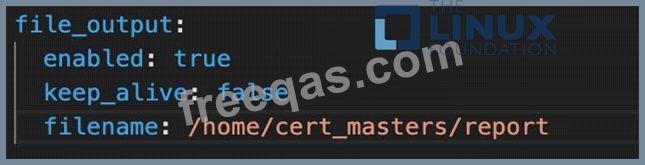
Correct Answer:
$vim /etc/falco/falco_rules.local.yaml
- rule: Container Drift Detected (open+create)
desc: New executable created in a container due to open+create
condition: >
evt.type in (open,openat,creat) and
evt.is_open_exec=true and
container and
not runc_writing_exec_fifo and
not runc_writing_var_lib_docker and
not user_known_container_drift_activities and
evt.rawres>=0
output: >
%evt.time,%user.uid,%proc.name # Add this/Refer falco documentation
priority: ERROR
$kill -1 <PID of falco>
Explanation
[desk@cli] $ ssh node01
[node01@cli] $ vim /etc/falco/falco_rules.yaml
search for Container Drift Detected & paste in falco_rules.local.yaml
[node01@cli] $ vim /etc/falco/falco_rules.local.yaml
- rule: Container Drift Detected (open+create)
desc: New executable created in a container due to open+create
condition: >
evt.type in (open,openat,creat) and
evt.is_open_exec=true and
container and
not runc_writing_exec_fifo and
not runc_writing_var_lib_docker and
not user_known_container_drift_activities and
evt.rawres>=0
output: >
%evt.time,%user.uid,%proc.name # Add this/Refer falco documentation
priority: ERROR
[node01@cli] $ vim /etc/falco/falco.yaml
insert code
  • «
  • 1
  • 2
  • 3
  • 4
  • 5
  • 6
[×]

Download PDF File

Enter your email address to download LinuxFoundation.CKS.v2022-03-11.q25 Dumps

Email:

FreeQAs

Our website provides the Largest and the most Latest vendors Certification Exam materials around the world.

Using dumps we provide to Pass the Exam, we has the Valid Dumps with passing guranteed just which you need.

  • DMCA
  • About
  • Contact Us
  • Privacy Policy
  • Terms & Conditions
©2026 FreeQAs

www.freeqas.com materials do not contain actual questions and answers from Cisco's certification exams.
