What happens to a file residing outside the home directory when the file owner's account is deleted? (Choose two.)
Correct Answer: C,E
When a user account is deleted, the files owned by that user are not automatically deleted from the file system, unless they are in the user's home directory. The files residing outside the home directory will remain unchanged, but they will have an invalid owner. The owner of a file is identified by a numeric user ID (UID), which is mapped to a user name by the /etc/passwd file. When a user is deleted, the corresponding entry in the /etc/passwd file is removed, but the UID of the file is not changed. Therefore, when listing the file's details, the UID of the former owner is shown instead of the user name. For example, if the user alice with UID 1001 is deleted, and she owns a file named report.txt in the /tmp directory, the output of ls -l /tmp/report.txt will look something like this: -rw-r-r-- 1 1001 users 1024 Nov 20 14:11 /tmp/report.txt The user root is not set as the new owner of the file, nor is the file moved to /lost+found or removed from the file system. The /lost+found directory is used to store files that are recovered from a corrupted file system after running the fsck command, not from deleted user accounts. The file system check does not affect the ownership or permissions of the files, unless there is a serious inconsistency that needs to be fixed. Reference: Linux Essentials - Linux Professional Institute (LPI), section 5.2.1 5.2 Lesson 1 - Linux Professional Institute Certification Programs, slide 6.
Question 42
Most commands on Linux can display information on their usage. How can this information typically be displayed?
Correct Answer: D
Most commands on Linux can display information on their usage by running the command with the option -h or --help. This option shows a brief summary of the command syntax, options, arguments, and examples. For example, running ls -h or ls --help will display the usage information for the ls command, which lists files and directories. The -h or --help option is a standard convention for most Linux commands, and it is useful for learning how to use a command or checking its available options. However, some commands may not support this option, or may use a different option to display usage information. In that case, you can use the man command to access the manual page for the command, which provides more detailed information on the command usage, description, options, arguments, examples, and references. For example, running man ls will display the manual page for the ls command. The man command is one of the applications covered in the Linux Essentials certification program from the Linux Professional Institute (LPI). Reference: Linux Essentials - Linux Professional Institute (LPI) Linux Commands Cheat Sheet: Beginner to Advanced - GeeksforGeeks
Question 43
Which of the followingtaroptions handle compression? (Choose two correct answers.)
Correct Answer: B,D
Explanation The tar command is used to create or extract compressed archive files that contain multiple files or directories. The tar command has the following syntax: tar [options] [archive-file] [file or directory...]. The options argument specifies how the tar command should operate and what kind of compression should be used. The archive-file argument is the name of the archive file to be created or extracted. The file or directory argument is the name of one or more files or directories to be included in or extracted from the archive file. The following are some of the common options for the tar command: * -c: create a new archive file. * -x: extract files from an existing archive file. * -t: list the contents of an archive file. * -v: show the progress of the operation. * -f: specify the name of the archive file. * -z: use gzip compression or decompression. * -j: use bzip2 compression or decompression. * -J: use xz compression or decompression. The options -z and -j are used to handle compression with the tar command. The option -z uses the gzip program to compress or decompress the archive file, which usually has the extension .tar.gz or .tgz. The option -j uses the bzip2 program to compress or decompress the archive file, which usually has the extension .tar.bz2 or .tbz. Both gzip and bzip2 are popular compression programs that reduce the size of files by removing redundant or unnecessary information. For example, to create a compressed archive file called backup.tar.gz that contains the files and directories in the current directory, the following command can be used: tar -czvf backup.tar.gz . To extract the files and directories from the archive file backup.tar.gz to the current directory, the following command can be used: tar -xzvf backup.tar.gz To create a compressed archive file called backup.tar.bz2 that contains the files and directories in the current directory, the following command can be used: tar -cjvf backup.tar.bz2 . To extract the files and directories from the archive file backup.tar.bz2 to the current directory, the following command can be used: tar -xjvf backup.tar.bz2 The other options in the question are not related to compression. The option -bz is invalid, as there is no such option for the tar command. The option -g is used to create or update an incremental archive file, which only contains the files that have changed since the last backup. The option -z2 is also invalid, as there is no such option for the tar command. References: * Linux Essentials Version 1.6 Objectives: 3.1. Archiving Files on the Command Line1 * Linux Essentials Version 1.6 Exam Study Resources: Linux Essentials Manual - Chapter 9. The Power of the Command Line - 9.1. Archiving Files on the Command Line - 9.1.1. The tar Command2 * Linux Essentials Version 1.6 Exam Study Resources: Linux Essentials Manual - Appendix A. Answers to the Exercises - Chapter 9. The Power of the Command Line - 9.1. Archiving Files on the Command Line - Exercise 9.1.12
Question 44
Which of the following commands puts the lines of the file data.csv into alphabetical order?
Correct Answer: B
Explanation The sort command is used to sort the lines of a file or a stream of input according to a specified criterion, such as alphabetical order, numerical order, reverse order, etc. By default, the sort command sorts the lines in ascending alphabetical order, using the firstcharacter of each line as the key. For example, the command sort data.csv will sort the lines of the file data.csv in alphabetical order and display the output on the screen. If you want to save the sorted output to a new file, you can use the redirection operator (>) to specify the output file name. For example, the command sort data.csv > sorted_data.csv will sort the lines of the file data.csv in alphabetical order and save the output to a new file named sorted_data.csv. The other commands are either invalid or do not perform the sorting operation. The a...z command does not exist, the abc command is a text editor, the wc command counts the number of words, lines, and bytes in a file, and the grep command searches for a pattern in a file or a stream of input. Therefore, the correct answer is B. References: * Linux Essentials - Linux Professional Institute (LPI), section 2.3.2 * LPI Linux Essentials Study Guide: Exam 010 v1.6, 3rd Edition, chapter 4, page 95.
Question 45
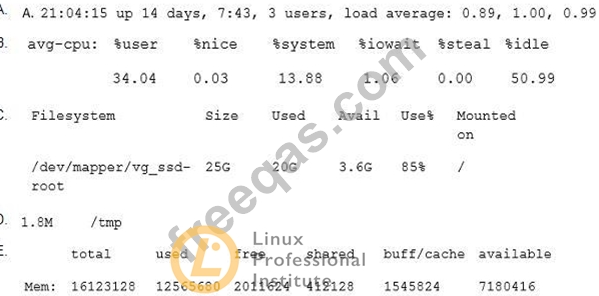
Which of the following outputs comes from the commandfree?