FreeQAs
 Request Exam  Contact
  • Home
  • View All Exams
  • New QA's
  • Upload
PRACTICE EXAMS:
  • Oracle
  • Fortinet
  • Juniper
  • Microsoft
  • Cisco
  • Citrix
  • CompTIA
  • VMware
  • SAP
  • EMC
  • PMI
  • HP
  • Salesforce
  • Other
  • Oracle
    Oracle
  • Fortinet
    Fortinet
  • Juniper
    Juniper
  • Microsoft
    Microsoft
  • Cisco
    Cisco
  • Citrix
    Citrix
  • CompTIA
    CompTIA
  • VMware
    VMware
  • SAP
    SAP
  • EMC
    EMC
  • PMI
    PMI
  • HP
    HP
  • Salesforce
    Salesforce
  1. Home
  2. Microsoft Certification
  3. AI-102 Exam
  4. Microsoft.AI-102.v2022-06-10.q113 Dumps
  • «
  • 1
  • 2
  • 3
  • 4
  • 5
  • 6
  • 7
  • 8
  • 9
  • 10
  • …
  • »
  • »»
Download Now

Question 21

You are developing an internet-based training solution for remote learners.
Your company identifies that during the training, some learners leave their desk for long periods or become distracted.
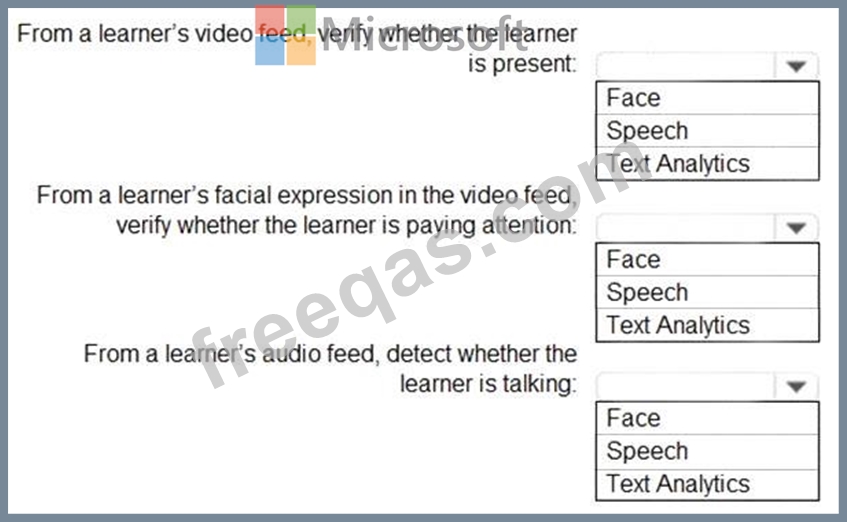
You need to use a video and audio feed from each learner's computer to detect whether the learner is present and paying attention. The solution must minimize development effort and identify each learner.
Which Azure Cognitive Services service should you use for each requirement? To answer, select the appropriate options in the answer area.
NOTE: Each correct selection is worth one point.
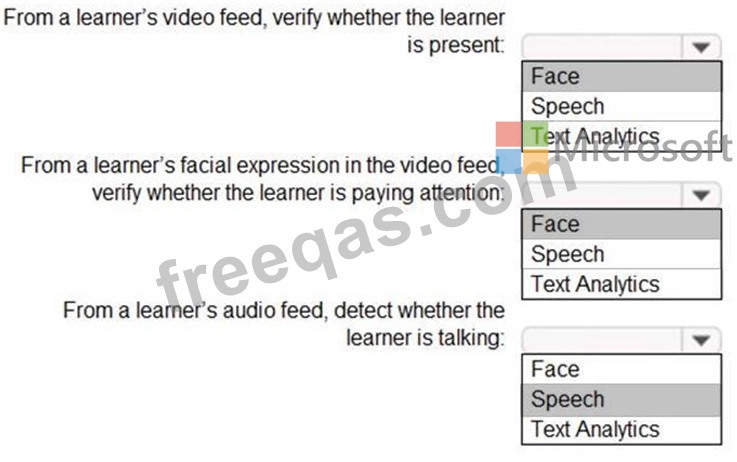
Correct Answer:
Graphical user interface, text, application, email Description automatically generated

Reference:
https://docs.microsoft.com/en-us/azure/cognitive-services/what-are-cognitive-services
insert code

Question 22

You plan to build a chatbot to support task tracking.
You create a Language Understanding service named lu1.
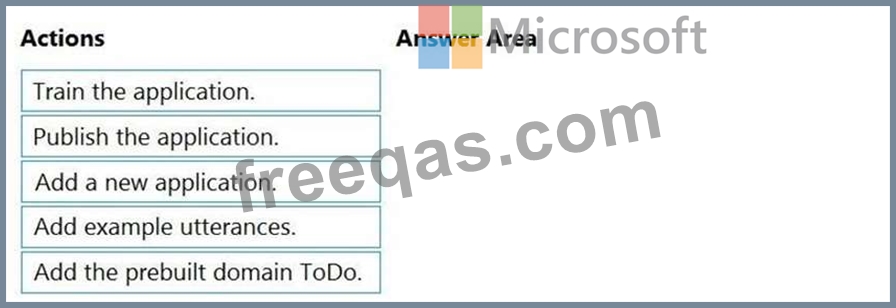
You need to build a Language Understanding model to integrate into the chatbot. The solution must minimize development time to build the model.
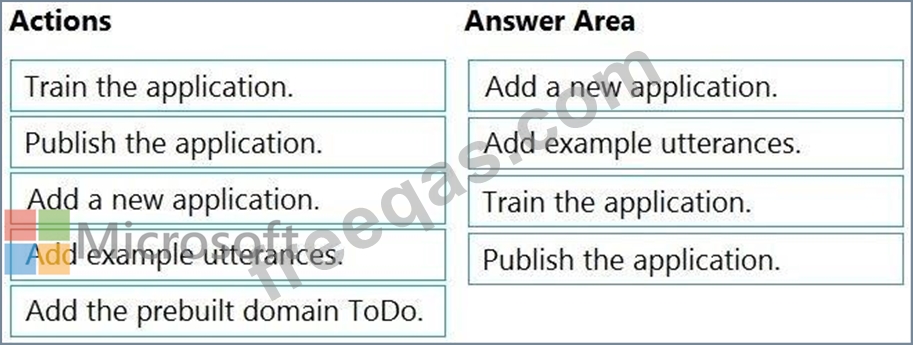
Which four actions should you perform in sequence? To answer, move the appropriate actions from the list of actions to the answer area and arrange them in the correct order. (Choose four.)
Correct Answer:

Step 1: Add a new application
Create a new app
* Sign in to the LUIS portal with the URL of https://www.luis.ai.
* Select Create new app.
* Etc.
Step 2: Add example utterances.
In order to classify an utterance, the intent needs examples of user utterances that should be classified with this intent.
Step 3: Train the application
Step 4: Publish the application
In order to receive a LUIS prediction in a chat bot or other client application, you need to publish the app to the prediction endpoint.
Reference:
https://docs.microsoft.com/en-us/azure/cognitive-services/luis/tutorial-intents-only
insert code

Question 23

You are using a Language Understanding service to handle natural language input from the users of a web-based customer agent.
The users report that the agent frequently responds with the following generic response: "Sorry, I don't understand that." You need to improve the ability of the agent to respond to requests.
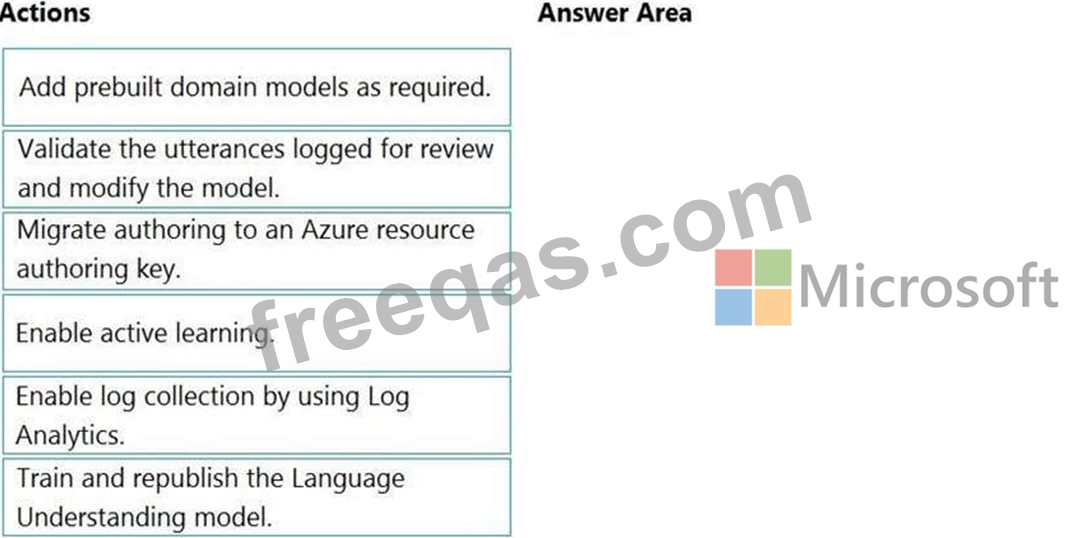
Which three actions should you perform in sequence? To answer, move the appropriate actions from the list of actions to the answer area and arrange them in the correct order. (Choose three.)
Correct Answer:

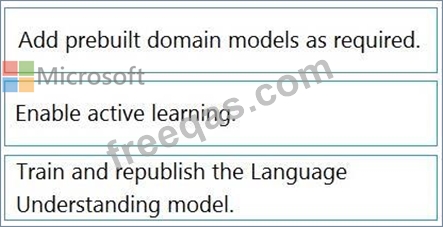
Step 1: Add prebuilt domain models as required.
Prebuilt models provide domains, intents, utterances, and entities. You can start your app with a prebuilt model or add a relevant model to your app later.
Note: Language Understanding (LUIS) provides prebuilt domains, which are pre-trained models of intents and entities that work together for domains or common categories of client applications.
The prebuilt domains are trained and ready to add to your LUIS app. The intents and entities of a prebuilt domain are fully customizable once you've added them to your app.
Step 2: Enable active learning
To enable active learning, you must log user queries. This is accomplished by calling the endpoint query with the log=true querystring parameter and value.
Step 3: Train and republish the Language Understanding model
The process of reviewing endpoint utterances for correct predictions is called Active learning. Active learning captures endpoint queries and selects user's endpoint utterances that it is unsure of. You review these utterances to select the intent and mark entities for these real-world utterances. Accept these changes into your example utterances then train and publish. LUIS then identifies utterances more accurately.
Reference:
https://docs.microsoft.com/en-us/azure/cognitive-services/luis/luis-how-to-review-endpoint-utterances#log-user-
https://docs.microsoft.com/en-us/azure/cognitive-services/luis/luis-concept-prebuilt-model
insert code

Question 24

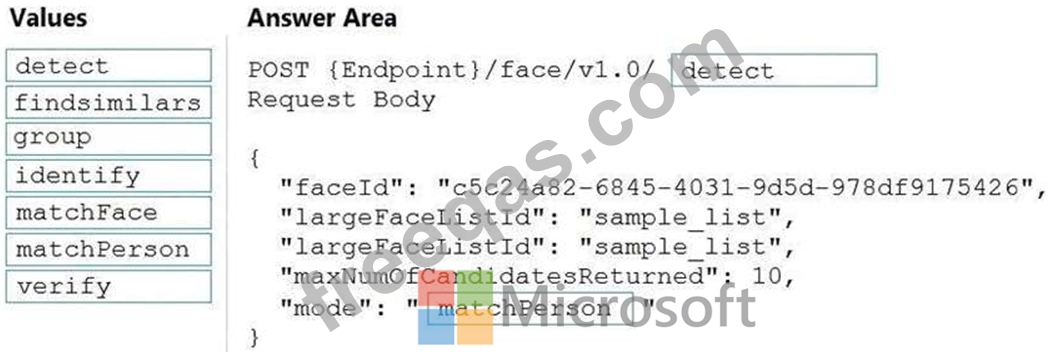
You are developing a photo application that will find photos of a person based on a sample image by using the Face API.
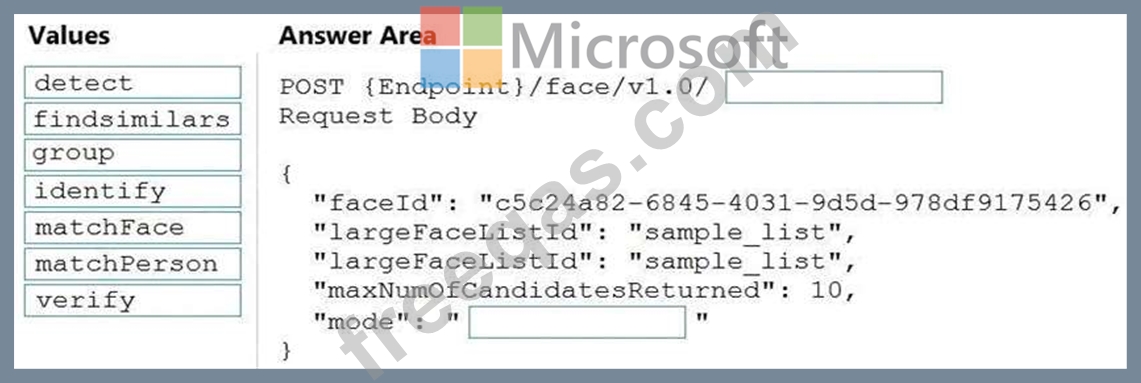
You need to create a POST request to find the photos.
How should you complete the request? To answer, drag the appropriate values to the correct targets. Each value may be used once, more than once, or not at all. You may need to drag the split bar between panes or scroll to view content.
NOTE: Each correct selection is worth one point.
Correct Answer:

Explanation

Box 1: detect
Face - Detect With Url: Detect human faces in an image, return face rectangles, and optionally with faceIds, landmarks, and attributes.
POST {Endpoint}/face/v1.0/detect
Box 2: matchPerson
Find similar has two working modes, "matchPerson" and "matchFace". "matchPerson" is the default mode that it tries to find faces of the same person as possible by using internal same-person thresholds. It is useful to find a known person's other photos. Note that an empty list will be returned if no faces pass the internal thresholds.
"matchFace" mode ignores same-person thresholds and returns ranked similar faces anyway, even the similarity is low. It can be used in the cases like searching celebrity-looking faces.
Reference:
https://docs.microsoft.com/en-us/rest/api/faceapi/face/detectwithurl
https://docs.microsoft.com/en-us/rest/api/faceapi/face/findsimilar
insert code

Question 25

You are building a chatbot by using the Microsoft Bot Framework SDK.
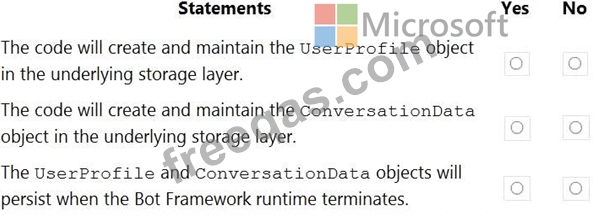
You use an object named UserProfile to store user profile information and an object named ConversationData to store information related to a conversation.
You create the following state accessors to store both objects in state.
var userStateAccessors = _userState.CreateProperty<UserProfile>(nameof(UserProfile)); var conversationStateAccessors =
_conversationState.CreateProperty<ConversationData>(nameof(ConversationData)); The state storage mechanism is set to Memory Storage.
For each of the following statements, select Yes if the statement is true. Otherwise, select No.
NOTE: Each correct selection is worth one point.
Correct Answer:

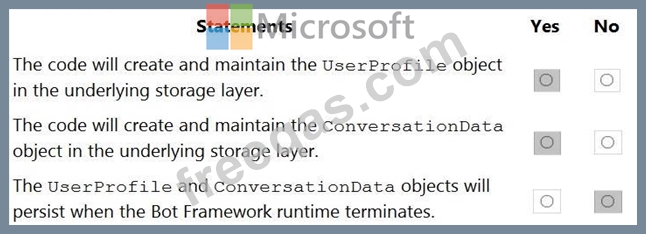
Box 1: Yes
You create property accessors using the CreateProperty method that provides a handle to the BotState object.
Each state property accessor allows you to get or set the value of the associated state property.
Box 2: Yes
Box 3: No
Before you exit the turn handler, you use the state management objects' SaveChangesAsync() method to write all state changes back to storage.
Reference:
https://docs.microsoft.com/en-us/azure/bot-service/bot-builder-howto-v4-state
insert code
  • «
  • 1
  • 2
  • 3
  • 4
  • 5
  • 6
  • 7
  • 8
  • 9
  • 10
  • …
  • »
  • »»
[×]

Download PDF File

Enter your email address to download Microsoft.AI-102.v2022-06-10.q113 Dumps

Email:

FreeQAs

Our website provides the Largest and the most Latest vendors Certification Exam materials around the world.

Using dumps we provide to Pass the Exam, we has the Valid Dumps with passing guranteed just which you need.

  • DMCA
  • About
  • Contact Us
  • Privacy Policy
  • Terms & Conditions
©2026 FreeQAs

www.freeqas.com materials do not contain actual questions and answers from Cisco's certification exams.
