FreeQAs
 Request Exam  Contact
  • Home
  • View All Exams
  • New QA's
  • Upload
PRACTICE EXAMS:
  • Oracle
  • Fortinet
  • Juniper
  • Microsoft
  • Cisco
  • Citrix
  • CompTIA
  • VMware
  • ISC
  • SAP
  • EMC
  • PMI
  • HP
  • Salesforce
  • Other
  • Oracle
    Oracle
  • Fortinet
    Fortinet
  • Juniper
    Juniper
  • Microsoft
    Microsoft
  • Cisco
    Cisco
  • Citrix
    Citrix
  • CompTIA
    CompTIA
  • VMware
    VMware
  • ISC
    ISC
  • SAP
    SAP
  • EMC
    EMC
  • PMI
    PMI
  • HP
    HP
  • Salesforce
    Salesforce
  1. Home
  2. Microsoft Certification
  3. AZ-120 Exam
  4. Microsoft.AZ-120.v2022-12-08.q124 Dumps
  • ««
  • «
  • …
  • 16
  • 17
  • 18
  • 19
  • 20
  • 21
  • 22
  • 23
  • 24
  • 25
  • …
  • »
  • »»
Download Now

Question 96

for each of the following statements, select Yes if the statement is true. Otherwise. select No.
NOTE: Each correct selection is worth one point.

Correct Answer:
insert code

Question 97

You need direct connectivity from an on-premises network to SAP HANA (Large Instances). The solution must meet the following requirements:
Minimize administrative effort.
Provide the highest level of resiliency.
What should you use?

Correct Answer: A
https://docs.microsoft.com/en-us/azure/virtual-machines/workloads/sap/hana-network-architecture Express Route Global Reach Microsoft introduced a new functionality called ExpressRoute Global Reach. Global Reach can be used for HANA Large Instances in two scenarios: Enable direct access from on-premises to your HANA Large Instance units deployed in different regions Enable direct communication between your HANA Large Instance units deployed in different regions Direct Access from on-premises In the Azure regions where Global Reach is offered, you can request enabling the Global Reach functionality for your ExpressRoute circuit that connects your on-premises network to the Azure virtual network that connects to your HANA Large Instance units as well.
insert code

Question 98

Your on-premises network contains SAP and non-SAP applications.
You have JAVA-based SAP systems that use SPNEGO for single-sign on (SSO) authentication.
Your external portal uses multi-factor authentication (MFA) to authenticate users.
You plan to extend the on-premises authentication features to Azure and to migrate the SAP applications to Azure.
For each of the following statements, select Yes if the statement is true. Otherwise, select No.
NOTE: Each correct selection is worth one point.

Correct Answer:

Explanation:
Box 1: No
Need AD FS for MF
Note: Azure Active Directory (Azure AD) Pass-through Authentication allows your users to sign in to both on-premises and cloud-based applications using the same passwords. This feature is an alternative to Azure AD Password Hash Synchronization (see Box 2).
Box 2: Yes
Password hash synchronization is one of the sign-in methods used to accomplish hybrid identity. Azure AD Connect synchronizes a hash, of the hash, of a users password from an on-premises Active Directory instance to a cloud-based Azure AD instance.
Password hash synchronization is an extension to the directory synchronization feature implemented by Azure AD Connect sync. You can use this feature to sign in to Azure AD services like Office 365. You sign in to the service by using the same password you use to sign in to your on-premises Active Directory instance.
Box 3: Yes
If your organization is federated with Azure AD, you can use Azure Multi-Factor Authentication to secure AD FS resources, both on-premises and in the cloud. Azure MFA enables you to eliminate passwords and provide a more secure way to authenticate.
References:
https://docs.microsoft.com/en-us/azure/active-directory/hybrid/whatis-phs
https://docs.microsoft.com/en-us/windows-server/identity/ad-fs/operations/configure-ad-fs-and-azure-mfa
insert code

Question 99

You have an Azure alert rule and action group as shown in the following exhibit.

Use the drop-down menus to select the answer choice that completes each statement based on the information presented in the graphic.
NOTE: Each correct selection is worth one point.

Correct Answer:

Reference:
https://docs.microsoft.com/en-us/azure/azure-monitor/alerts/alerts-metric-overview
insert code

Question 100

You plan to deploy multiple SAP HANA virtual machines to Azure by using an Azure Resource Manager template.
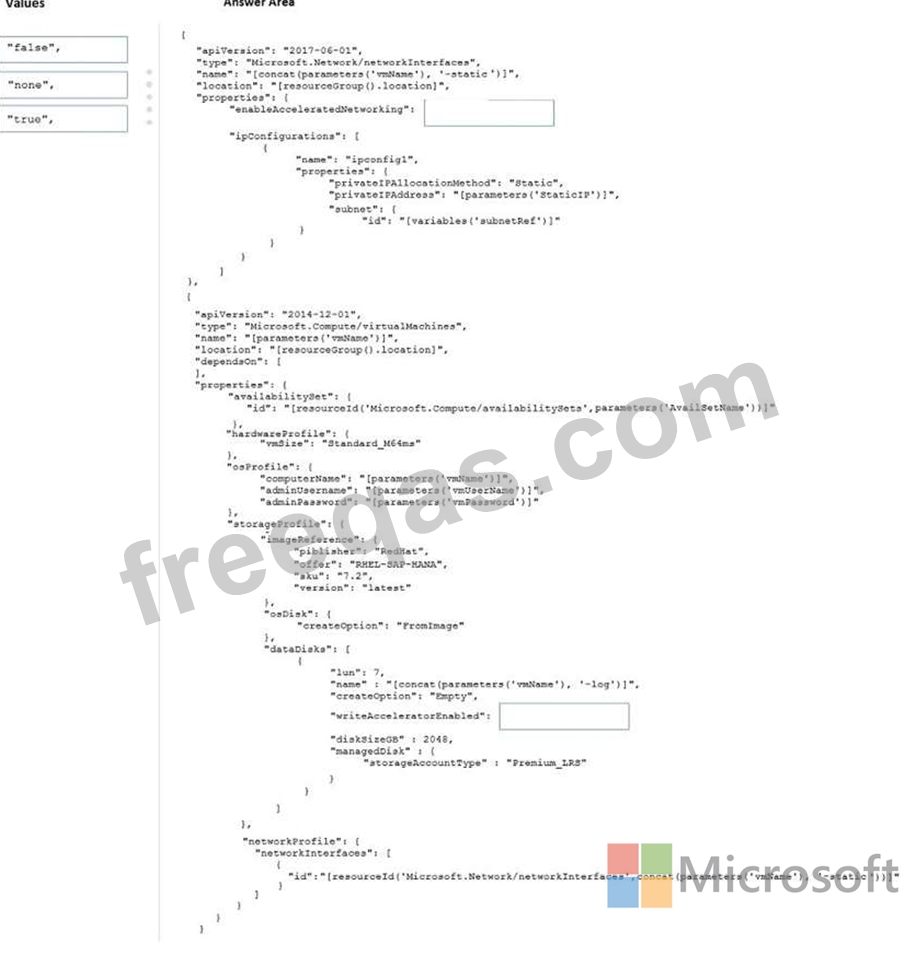
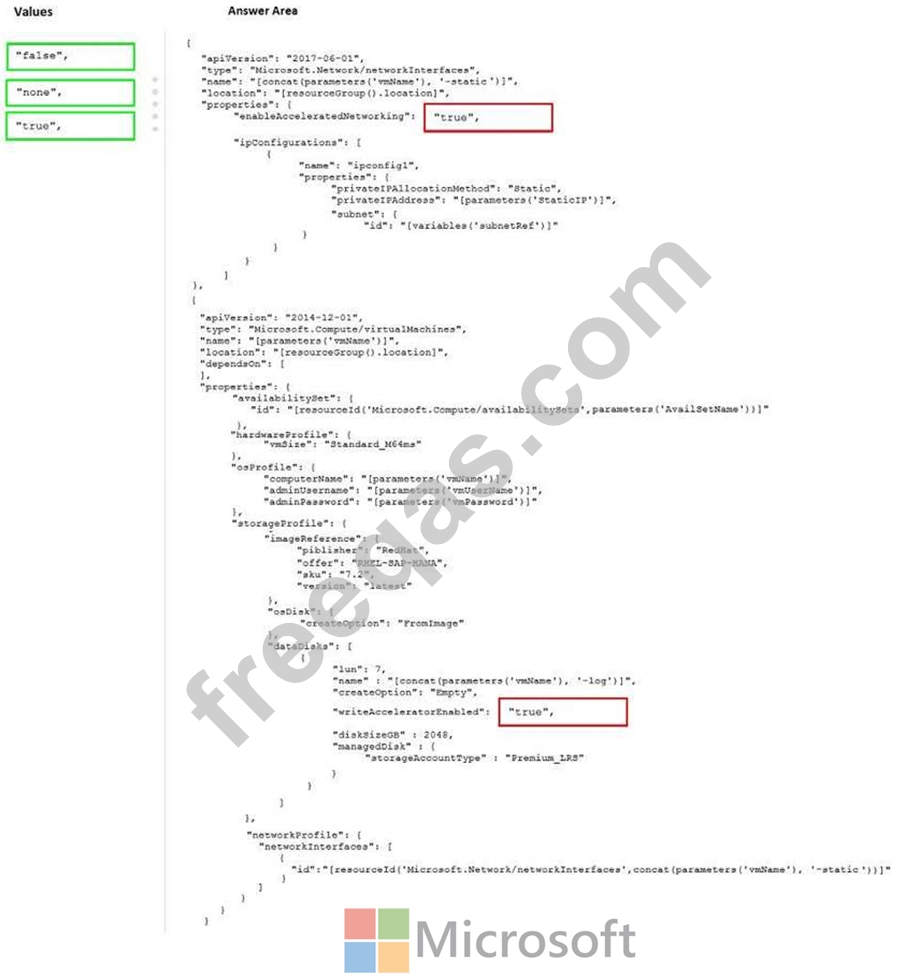
How should you configure Accelerated Networking and Write Accelerator in the template? To answer, drag the appropriate values to the correct targets. Each value may be used once, more than once, or not at all. You may need to drag the split bar between panes or scroll to view content.
NOTE: Each correct selection is worth one point.
Correct Answer:

Explanation:
Box 1: true
enableAcceleratedNetworking: If the network interface is accelerated networking enabled.
To further reduce network latency between Azure VMs, we [Micorosoft] recommend that you choose Azure Accelerated Networking. Use it when you deploy Azure VMs for an SAP workload, especially for the SAP application layer and the SAP DBMS layer.
Box 2: true
Write Accelerator should be used for the volumes that contain the transaction log or redo logs of a DBMS. It is not recommended to use Write Accelerator for the data volumes of a DBMS as the feature has been optimized to be used against log disks.
References:
https://docs.microsoft.com/en-us/azure/virtual-machines/workloads/sap/dbms_guide_general
insert code
  • ««
  • «
  • …
  • 16
  • 17
  • 18
  • 19
  • 20
  • 21
  • 22
  • 23
  • 24
  • 25
  • …
  • »
  • »»
[×]

Download PDF File

Enter your email address to download Microsoft.AZ-120.v2022-12-08.q124 Dumps

Email:

FreeQAs

Our website provides the Largest and the most Latest vendors Certification Exam materials around the world.

Using dumps we provide to Pass the Exam, we has the Valid Dumps with passing guranteed just which you need.

  • DMCA
  • About
  • Contact Us
  • Privacy Policy
  • Terms & Conditions
©2026 FreeQAs

www.freeqas.com materials do not contain actual questions and answers from Cisco's certification exams.
