You have the devices shown in the following table.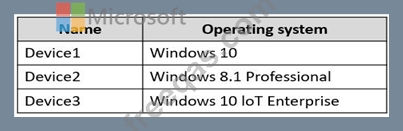
You plan to deploy Azure Virtual Desktop for client access to remote virtualized apps.
Which devices support the Remote Desktop client?
You have an Azure subscription that contains 500 users. The users are assigned Microsoft Office 365 E1 licenses.
You deploy an Azure Virtual Desktop solution that contains Windows 10 multi-session hosts and streams a custom remote app named App1.
You need to ensure that the users are licensed to stream App1. The solution must minimize costs.
Which license should you use?
You have an Azure subscription named Subscription that contains an Azure Virtual Desktop host pool named HostPool1.
HostPool1 is managed by using Microsoft Intune. Subscription1 contains 50 users that connect to HostPool1 by using computers that run Windows 10.
You need to prevent the users from copying files between an Azure Virtual Desktop session and the computers. The solution must minimize administrative effort.
What should you do?
You network contains an on-premises Active Directory domain. The domain contains a universal security group named WVDusers.
You have a hybrid Azure Active Directory (Azure AD) tenant. WVDusers syncs to Azure AD.
You have a Windows Virtual Desktop host pool that contains four Windows 10 Enterprise multi-session hosts.
You need to ensure that only the members of WVDusers can establish Windows Virtual Desktop sessions to the host pool.
What should you do?
You have a Azure Virtual Desktop deployment.
In Azure Advisor, you discover the following recommendation related to Azure Virtual Desktop:
* Impact Medium
* Description: No validation environment enabled
* Potential Benefit Ensure business continuity through AVD service deployments
* Impacted Resource:' Host Pool
What can you validate by implementing the recommendations?

