FreeQAs
 Request Exam  Contact
  • Home
  • View All Exams
  • New QA's
  • Upload
PRACTICE EXAMS:
  • Oracle
  • Fortinet
  • Juniper
  • Microsoft
  • Cisco
  • Citrix
  • CompTIA
  • VMware
  • ISC
  • SAP
  • EMC
  • PMI
  • HP
  • Salesforce
  • Other
  • Oracle
    Oracle
  • Fortinet
    Fortinet
  • Juniper
    Juniper
  • Microsoft
    Microsoft
  • Cisco
    Cisco
  • Citrix
    Citrix
  • CompTIA
    CompTIA
  • VMware
    VMware
  • ISC
    ISC
  • SAP
    SAP
  • EMC
    EMC
  • PMI
    PMI
  • HP
    HP
  • Salesforce
    Salesforce
  1. Home
  2. Microsoft Certification
  3. AZ-204 Exam
  4. Microsoft.AZ-204.v2024-05-19.q385 Dumps
  • ««
  • «
  • …
  • 37
  • 38
  • 39
  • 40
  • 41
  • 42
  • 43
  • 44
  • 45
  • 46
  • …
  • »
  • »»
Download Now

Question 201

You are developing an Azure-hosted application that must use an on-premises hardware security module (HSM) key.
The key must be transferred to your existing Azure Key Vault by using the Bring Your Own Key (BYOK) process.
You need to securely transfer the key to Azure Key Vault.
Which four actions should you perform in sequence? To answer, move the appropriate actions from the list of actions to the answer area and arrange them in the correct order.

Correct Answer:

Explanation
Text Description automatically generated

To perform a key transfer, a user performs following steps:
Generate KEK.
Retrieve the public key of the KEK.
Using HSM vendor provided BYOK tool - Import the KEK into the target HSM and exports the Target Key protected by the KEK.
Import the protected Target Key to Azure Key Vault.
Step 1: Generate a Key Exchange Key (KEK).
Step 2: Retrieve the Key Exchange Key (KEK) public key.
Step 3: Generate a key transfer blob file by using the HSM vendor-provided tool.
Generate key transfer blob using HSM vendor provided BYOK tool
Step 4: Run the az keyvault key import command
Upload key transfer blob to import HSM-key.
Customer will transfer the Key Transfer Blob (".byok" file) to an online workstation and then run a az keyvault key import command to import this blob as a new HSM-backed key into Key Vault.
To import an RSA key use this command:
az keyvault key import
Reference:
https://docs.microsoft.com/en-us/azure/key-vault/keys/byok-specification
insert code

Question 202

You are developing an ASP.NET Core website that can be used to manage photographs which are stored in Azure Blob Storage containers.
Users of the website authenticate by using their Azure Active Directory (Azure AD) credentials.
You implement role-based access control (RBAC) role permission on the containers that store photographs. You assign users to RBAC role.
You need to configure the website's Azure AD Application so that user's permissions can be used with the Azure Blob containers.
How should you configure the application? To answer, drag the appropriate setting to the correct location. Each setting may be used once, more than once, or not at all. You may need to drag the split bar between panes or scroll to view content.
NOTE: Each correct selection is worth one point.

Correct Answer:

Reference:
https://docs.microsoft.com/en-us/samples/azure-samples/active-directory-dotnet-webapp-webapi-openidconnect-aspnetcore/calling-a-web-api-in-an-aspnet-core-web-application-using-azure-ad/
insert code

Question 203

You need to add YAML markup at line CS17 to ensure that the ContentUploadService can access Azure Storage access keys.
How should you complete the YAML markup? To answer, drag the appropriate YAML segments to the correct locations. Each YAML segment may be used once, more than once, or not at all. You may need to drag the split bar between panes or scroll to view content.
NOTE: Each correct selection is worth one point.

Correct Answer:

Explanation

Box 1: volumeMounts
Example:
volumeMounts:
- mountPath: /mnt/secrets
name: secretvolume1
volumes:
- name: secretvolume1
secret:
mysecret1: TXkgZmlyc3Qgc2VjcmV0IEZPTwo=
Box 2: volumes
Box 3: secret
Reference:
https://docs.microsoft.com/en-us/azure/container-instances/container-instances-volume-secret
insert code

Question 204

You need to configure security and compliance for the corporate website files.
Which Azure Blob storage settings should you use? To answer, select the appropriate options in the answer area.
NOTE: Each correct selection is worth one point.

Correct Answer:

Explanation

Box 1: role-based access control (RBAC)
Azure Storage supports authentication and authorization with Azure AD for the Blob and Queue services via Azure role-based access control (Azure RBAC).
Scenario: File access must restrict access by IP, protocol, and Azure AD rights.
Box 2: storage account type
Scenario: The website uses files stored in Azure Storage
Auditing of the file updates and transfers must be enabled to comply with General Data Protection Regulation (GDPR).
Creating a diagnostic setting:
1. Sign in to the Azure portal.
2. Navigate to your storage account.
3. In the Monitoring section, click Diagnostic settings (preview).

4. Choose file as the type of storage that you want to enable logs for.
5. Click Add diagnostic setting.
Reference:
https://docs.microsoft.com/en-us/azure/storage/common/storage-introduction
https://docs.microsoft.com/en-us/azure/storage/files/storage-files-monitoring
insert code

Question 205

You plan to create a Docker image that runs an ASP.NET Core application named ContosoApp. You have a setup script named setupScript.ps1 and a series of application files including ContosoApp.dll.
You need to create a Dockerfile document that meets the following requirements:
* Call setupScripts.ps1 when the container is built.
* Run ContosoApp.dll when the container starts.
The Dockerfile document must be created in the same folder where ContosoApp.dll and setupScript.ps1 are stored.
Which five commands should you use to develop the solution? To answer, move the appropriate commands from the list of commands to the answer area and arrange them in the correct order.
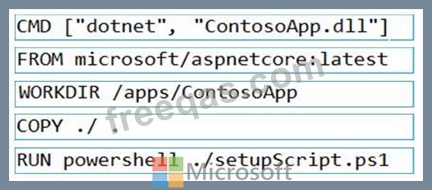
Correct Answer:

Box 1: CMD [..]
Cmd starts a new instance of the command interpreter, Cmd.exe.
Syntax: CMD <string>
Specifies the command you want to carry out.
Box 2: FROM microsoft/aspnetcore-build:latest
Box 3: WORKDIR /apps/ContosoApp
Bxo 4: COPY ./ .
Box 5: RUN powershell ./setupScript.ps1
insert code
  • ««
  • «
  • …
  • 37
  • 38
  • 39
  • 40
  • 41
  • 42
  • 43
  • 44
  • 45
  • 46
  • …
  • »
  • »»
[×]

Download PDF File

Enter your email address to download Microsoft.AZ-204.v2024-05-19.q385 Dumps

Email:

FreeQAs

Our website provides the Largest and the most Latest vendors Certification Exam materials around the world.

Using dumps we provide to Pass the Exam, we has the Valid Dumps with passing guranteed just which you need.

  • DMCA
  • About
  • Contact Us
  • Privacy Policy
  • Terms & Conditions
©2026 FreeQAs

www.freeqas.com materials do not contain actual questions and answers from Cisco's certification exams.
