FreeQAs
 Request Exam  Contact
  • Home
  • View All Exams
  • New QA's
  • Upload
PRACTICE EXAMS:
  • Oracle
  • Fortinet
  • Juniper
  • Microsoft
  • Cisco
  • Citrix
  • CompTIA
  • VMware
  • ISC
  • SAP
  • EMC
  • PMI
  • HP
  • Salesforce
  • Other
  • Oracle
    Oracle
  • Fortinet
    Fortinet
  • Juniper
    Juniper
  • Microsoft
    Microsoft
  • Cisco
    Cisco
  • Citrix
    Citrix
  • CompTIA
    CompTIA
  • VMware
    VMware
  • ISC
    ISC
  • SAP
    SAP
  • EMC
    EMC
  • PMI
    PMI
  • HP
    HP
  • Salesforce
    Salesforce
  1. Home
  2. Microsoft Certification
  3. AZ-220 Exam
  4. Microsoft.AZ-220.v2022-08-05.q131 Dumps
  • «
  • 1
  • 2
  • 3
  • 4
  • 5
  • 6
  • 7
  • 8
  • 9
  • 10
  • …
  • »
  • »»
Download Now

Question 11

You create an Azure IoT hub by running the following command.
az iot hub create --resource-group MyResourceGroup --name MyIotHub --sku B1 -- location westus --partition-count 4 What does MylotHub support?

Correct Answer: A
The Device Provisioning Service is included in the Basic Tiers (such as B1).
Incorrect Answers:
B, C, D: The Standard tier is needed for cloud-to-device messaging, Azure IoT Edge, and device twins.
Reference:
https://docs.microsoft.com/en-us/azure/iot-hub/iot-hub-scaling
Topic 2, Contoso
Existing Environment
Current State of Development
Contoso produces a set of Bluetooth sensors that read the temperature and humidity. The sensors connect to IoT gateway devices that relay the data.
All the IoT gateway devices connect to an Azure IoT hub named iothub1.
Existing Environment. Device Twin
You plan to implement device twins by using the following JSON sample.

Existing Environment. Azure Stream Analytics
Each room will have between three to five sensors that will generate readings that are sent to a single IoT gateway device. The IoT gateway device will forward all the readings to iothub1 at intervals of between 10 and 60 seconds.
You plan to use a gateway pattern so that each IoT gateway device will have its own IoT Hub device identity.
You draft the following query, which is missing the GROUP BY clause.
SELECT
AVG(temperature),
System.TimeStamp() AS AsaTime
FROM
Iothub
You plan to use a 30-second period to calculate the average temperature reading of the sensors.
You plan to minimize latency between the condition reported by the sensors and the corresponding alert issued by the Stream Analytics job.
Existing Environment. Device Messages
The IoT gateway devices will send messages that contain the following JSON data whenever the temperature exceeds a specified threshold.

The level property will be used to route the messages to an Azure Service Bus queue endpoint named criticalep.
Existing Environment. Issues
You discover connectivity issues between the IoT gateway devices and iothub1, which cause IoT devices to lose connectivity and messages.
Requirements. Planning Changes
Contoso plans to make the following changes:
Use Stream Analytics to process and view data.
Use Azure Time Series Insights to visualize data.
Implement a system to sync device statuses and required settings.
Add extra information to messages by using message enrichment.
Create a notification system to send an alert if a condition exceeds a specified threshold.
Implement a system to identify what causes the intermittent connection issues and lost messages.
Requirements. Technical Requirements
Contoso must meet the following requirements:
Use the built-in functions of IoT Hub whenever possible.
Minimize hardware and software costs whenever possible.
Minimize administrative effort to provision devices at scale.
Implement a system to trace message flow to and from iothub1.
Minimize the amount of custom coding required to implement the planned changes.
Prevent read operations from being negatively affected when you implement additional services.
insert code

Question 12

You have an Azure IoT hub.
You plan to attach three types of IoT devices as shown in the following table.
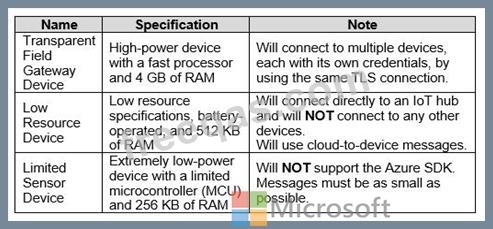
You need to select the appropriate communication protocol for each device.
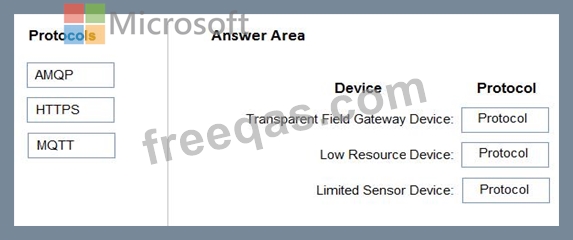
What should you select? To answer, drag the appropriate protocols to the correct devices. Each protocol may be used once, more than once, or not at all. You may need to drag the split bar between panes or scroll to view content.
NOTE: Each correct selection is worth one point.
Correct Answer:

Explanation:
Box 1: AMQP
Use AMQP on field and cloud gateways to take advantage of connection multiplexing across devices.
Box 2: MQTT
MQTT is used on all devices that do not require to connect multiple devices (each with its own per-device credentials) over the same TLS connection.
Box 3: HTTPS
Use HTTPS for devices that cannot support other protocols.
Reference:
https://docs.microsoft.com/en-us/azure/iot-hub/iot-hub-devguide-protocols
insert code

Question 13

You have an Azure IoT hub.
You plan to implement IoT Hub events by using Azure Event Grid.
You need to send an email when the following events occur:
* Device Created
* Device Deleted
* Device Connected
* Device Disconnected
Which two actions should you perform? Each correct answer presents part of the solution.
NOTE: Each correct selection is worth one point.

Correct Answer: B,C
Explanation
For non-telemetry events like DeviceConnected, DeviceDisconnected, DeviceCreated and DeviceDeleted, the Event Grid filtering can be used when creating the subscription.
Azure Event Grid enables you to react to events in IoT Hub by triggering actions in your downstream business applications.
A trigger, such as a Request trigger, is a specific event that starts your logic app.
Reference:
https://docs.microsoft.com/en-us/azure/event-grid/publish-iot-hub-events-to-logic-apps
insert code

Question 14

You have an Azure subscription that contains an Azure IoT hub and two IoT devices named Device1 and Device2.
You plan to deploy an Azure IoT Edge gateway device named Gateway1.
You need to ensure that all device-to-cloud messages and twin change notifications from Device1 and Device2 to the IoT hub are routed by using Gateway1.
What tasks should you perform to configure the devices? To answer, select the appropriate options in the answer area.
NOTE: Each correct selection is worth one point.

Correct Answer:

Explanation
Graphical user interface, text, application, email Description automatically generated

Box 1: Device1 and Device2
Connection strings for downstream devices need the following components:
* The gateway device that the device connects through. Provide the hostname value from the IoT Edge gateway device's config file: GatewayHostName={gateway hostname} Box 2: Gateway1 To deploy the IoT Edge hub module and configure it with routes to handle incoming messages from downstream devices, follow these steps:
* In the Azure portal, navigate to your IoT hub.
* Go to IoT Edge and select your IoT Edge device that you want to use as a gateway.
* Select Set Modules.
* On the Modules page, you can add any modules you want to deploy to the gateway device.
* Select Next: Routes.
* On the Routes page, make sure that there is a route to handle messages coming from downstream devices. For example:A route that sends all messages, whether from a module or from a downstream device, to IoT Hub:
Name: allMessagesToHub Value: FROM /messages/* INTO $upstream
Box 3: FROM /messages/* INTO $upstream
Reference:
https://docs.microsoft.com/en-us/azure/iot-edge/how-to-authenticate-downstream-device
insert code

Question 15

You have an Azure IoT solution that includes an Azure IoT hub, 100 Azure IoT Edge devices, and 500 leaf devices.
You need to perform a key rotation across the devices.
Which three types of entities should you update? Each Answer presents part of the solution.
NOTE: Each correct selection is worth one point.


Correct Answer: A,D,F
Explanation
To get authorization to connect to IoT Hub, devices and services must send security tokens signed with either a shared access or symmetric key. These keys are stored with a device identity in the identity registry.
An IoT Hub identity registry can be accessed like a dictionary, by using the deviceId or moduleId as the key.
Reference:
https://docs.microsoft.com/bs-latn-ba/azure/iot-dps/how-to-control-access
https://docs.microsoft.com/en-us/azure/iot-hub/iot-hub-devguide-identity-registry
insert code
  • «
  • 1
  • 2
  • 3
  • 4
  • 5
  • 6
  • 7
  • 8
  • 9
  • 10
  • …
  • »
  • »»
[×]

Download PDF File

Enter your email address to download Microsoft.AZ-220.v2022-08-05.q131 Dumps

Email:

FreeQAs

Our website provides the Largest and the most Latest vendors Certification Exam materials around the world.

Using dumps we provide to Pass the Exam, we has the Valid Dumps with passing guranteed just which you need.

  • DMCA
  • About
  • Contact Us
  • Privacy Policy
  • Terms & Conditions
©2026 FreeQAs

www.freeqas.com materials do not contain actual questions and answers from Cisco's certification exams.