FreeQAs
 Request Exam  Contact
  • Home
  • View All Exams
  • New QA's
  • Upload
PRACTICE EXAMS:
  • Oracle
  • Fortinet
  • Juniper
  • Microsoft
  • Cisco
  • Citrix
  • CompTIA
  • VMware
  • ISC
  • SAP
  • EMC
  • PMI
  • HP
  • Salesforce
  • Other
  • Oracle
    Oracle
  • Fortinet
    Fortinet
  • Juniper
    Juniper
  • Microsoft
    Microsoft
  • Cisco
    Cisco
  • Citrix
    Citrix
  • CompTIA
    CompTIA
  • VMware
    VMware
  • ISC
    ISC
  • SAP
    SAP
  • EMC
    EMC
  • PMI
    PMI
  • HP
    HP
  • Salesforce
    Salesforce
  1. Home
  2. Microsoft Certification
  3. AZ-400 Exam
  4. Microsoft.AZ-400.v2023-11-06.q439 Dumps
  • «
  • 1
  • 2
  • 3
  • 4
  • 5
  • 6
  • 7
  • 8
  • 9
  • 10
  • …
  • »
  • »»
Download Now

Question 11

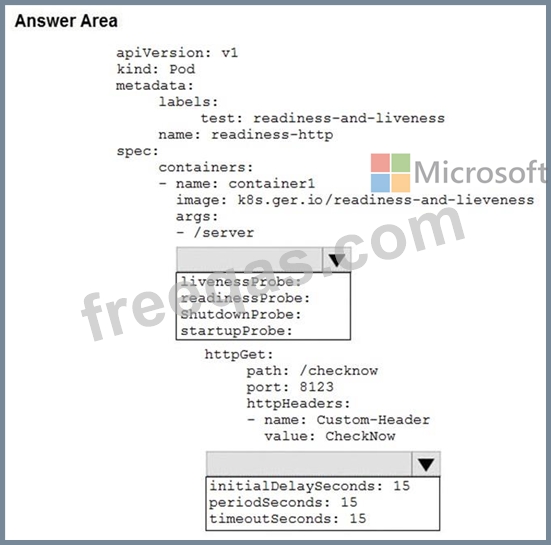
You have an Azure Kubernetes Service (AKS) pod.
You need to configure a probe to perform the following actions:
Confirm that the pod is responding to service requests.
Check the status of the pod four times a minute.
Initiate a shutdown if the pod is unresponsive.
How should you complete the YAML configuration file? To answer, select the appropriate options in the answer area.
NOTE: Each correct selection is worth one point.
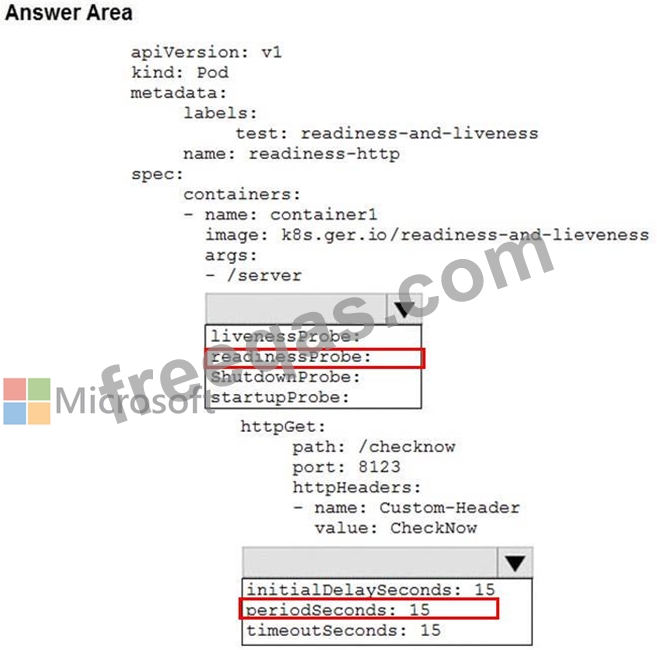
Correct Answer:

Reference:
https://docs.microsoft.com/en-us/azure/container-instances/container-instances-readiness-probe
insert code

Question 12

You have an Azure DevOps organization named Contoso.
You have 10 Azure virtual machines that run Windows Server 2019. The virtual machines host an application that you build and deploy by using Azure Pipelines. Each virtual machine has the Web Server (IIS) role installed and configured.
You need to ensure that the web server configurations pin the virtual machines is maintained automatically. The solution must provide centralized management of the configuration settings and minimize management overhead.
Which four actions should you perform in sequence? To answer, move the appropriate actions from the list of actions to the answer area and arrange them in the correct order.

Correct Answer:

1 - Create an Azure Automation account.
2 - Install the custom Desired State Configuration (DSC) extension on the virtual machines
3 - Onboard the virtual machines to the Azure Automation account.
4 - Complete the Desired State Configuration (DSC) configuration.
Reference:
https://docs.microsoft.com/en-us/azure/automation/automation-dsc-onboarding
insert code

Question 13

Your development team is building a new web solution by using the Microsoft Visual Studio integrated development environment (IDE).
You need to make a custom package available to all the developers. The package must be managed centrally, and the latest version must be available for consumption in Visual Studio automatically.
Which three actions should you perform? Each correct answer presents part of the solution.
NOTE: Each correct selection is worth one point.

Correct Answer: A,B,E
Explanation
B: By using your custom NuGet package feed within your Azure DevOps (previously VSTS) instance, you'll be able to distribute your packages within your organization with ease.
Start by creating a new feed.
A: We can publish, pack and push the built project to our NuGet feed.
E: Consume your private NuGet Feed
Go back to the Packages area in Azure DevOps, select your feed and hit "Connect to feed". You'll see some instructions for your feed, but it's fairly simple to set up.
Just copy your package source URL, go to Visual Studio, open the NuGet Package Manager, go to its settings and add a new source. Choose a fancy name, insert the source URL. Done.
Search for your package in the NuGet Package Manager and it should appear there, ready for installation.
Make sure to select the appropriate feed (or just all feeds) from the top right select box.
References:
https://medium.com/medialesson/get-started-with-private-nuget-feeds-in-azure-devops-8c7b5f022a68
insert code

Question 14

You need to recommend a solution for deploying charts by using Helm and Title to Azure Kubemets Service (AKS) in an RBAC-enabled cluster.
Which three commands should you recommend be run m sequence? To answer, move the appropriate commands from the list of commands to the answer area and arrange them in the correct order.

Correct Answer:

Explanation

Step 1: Kubectl create
You can add a service account to Tiller using the --service-account <NAME> flag while you're configuring Helm (step 2 below). As a prerequisite, you'll have to create a role binding which specifies a role and a service account name that have been set up in advance.
Example: Service account with cluster-admin role
$ kubectl create -f rbac-config.yaml
serviceaccount "tiller" created
clusterrolebinding "tiller" created
$ helm init --service-account tiller
Step 2: helm init
To deploy a basic Tiller into an AKS cluster, use the helm init command.
Step 3: helm install
To install charts with Helm, use the helm install command and specify the name of the chart to install.
References:
https://docs.microsoft.com/en-us/azure/aks/kubernetes-helm
https://docs.helm.sh/using_helm/#tiller-namespaces-and-rbac
insert code

Question 15

You plan to deploy a template named D:\Deploy.json to a resource group named Deploy-lod9940427.
You need to modify the template to meet the following requirements, and then to deploy the template:
* The address space must be reduced to support only 256 total IP addresses.
* The subnet address space must be reduced to support only 64 total IP addresses.
To complete this task, sign in to the Microsoft Azure portal.
Correct Answer:
See solution below.
Explanation
1. Sign in to the portal,
2. Choose template Deploy-lod9940427
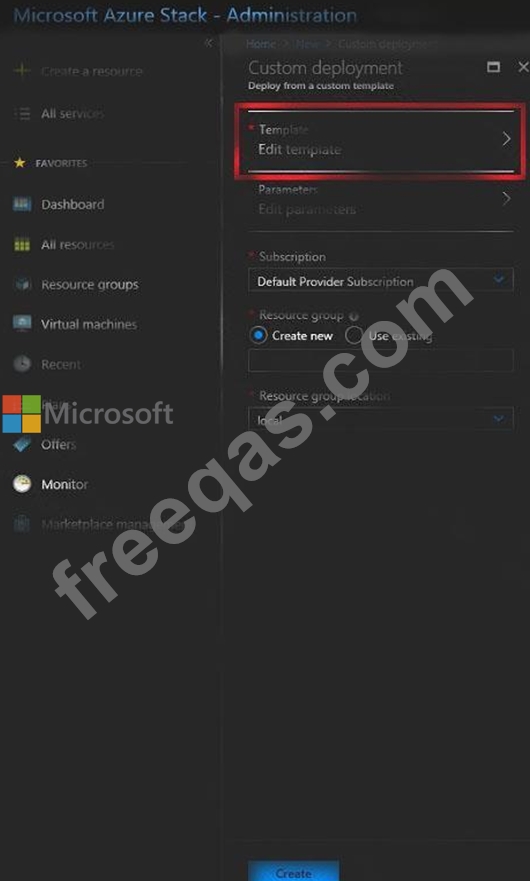
3. Select Edit template, and then paste your JSON template code into the code window.
4. Change the ASddressPrefixes to 10.0.0.0/24 in order to support only 256 total IP addresses.
addressSpace":{"addressPrefixes": ["10.0.0.0/24"]},
5. Change the firstSubnet addressprefix to 10.0.0.0/26 to support only 64 total IP addresses.
"subnets":[
{
"name":"firstSubnet",
"properties":{
"addressPrefix":"10.0.0.0/24"
}
6. Select Save.

7. Select Edit parameters, provide values for the parameters that are shown, and then select OK.
8 Select Subscription. Choose the subscription you want to use, and then select OK.
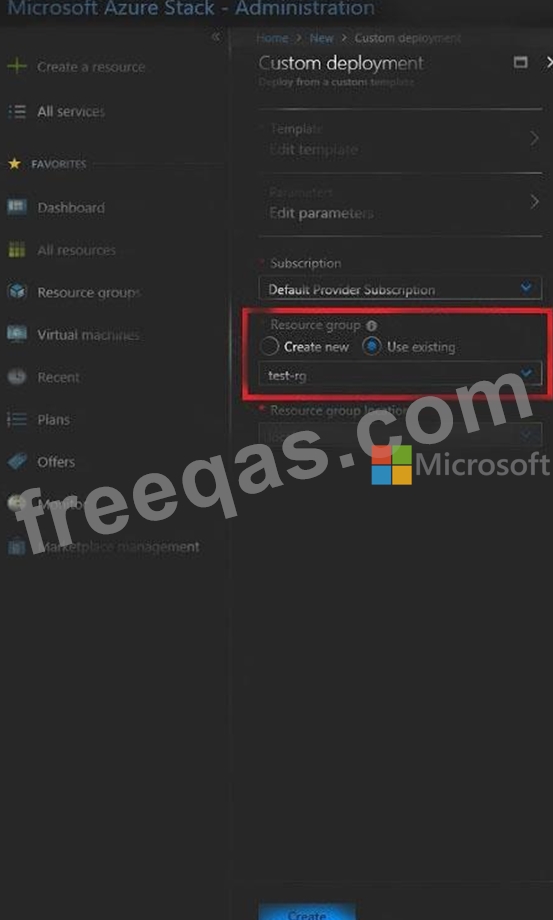
9. Select Resource group. Choose an existing resource group or create a new one, and then select OK.

10. Select Create. A new tile on the dashboard tracks the progress of your template deployment.
References:
https://docs.microsoft.com/en-us/azure-stack/user/azure-stack-deploy-template-portal?view=azs-1908
https://docs.microsoft.com/en-us/azure/architecture/building-blocks/extending-templates/update-resource
insert code
  • «
  • 1
  • 2
  • 3
  • 4
  • 5
  • 6
  • 7
  • 8
  • 9
  • 10
  • …
  • »
  • »»
[×]

Download PDF File

Enter your email address to download Microsoft.AZ-400.v2023-11-06.q439 Dumps

Email:

FreeQAs

Our website provides the Largest and the most Latest vendors Certification Exam materials around the world.

Using dumps we provide to Pass the Exam, we has the Valid Dumps with passing guranteed just which you need.

  • DMCA
  • About
  • Contact Us
  • Privacy Policy
  • Terms & Conditions
©2026 FreeQAs

www.freeqas.com materials do not contain actual questions and answers from Cisco's certification exams.
