FreeQAs
 Request Exam  Contact
  • Home
  • View All Exams
  • New QA's
  • Upload
PRACTICE EXAMS:
  • Oracle
  • Fortinet
  • Juniper
  • Microsoft
  • Cisco
  • Citrix
  • CompTIA
  • VMware
  • ISC
  • SAP
  • EMC
  • PMI
  • HP
  • Salesforce
  • Other
  • Oracle
    Oracle
  • Fortinet
    Fortinet
  • Juniper
    Juniper
  • Microsoft
    Microsoft
  • Cisco
    Cisco
  • Citrix
    Citrix
  • CompTIA
    CompTIA
  • VMware
    VMware
  • ISC
    ISC
  • SAP
    SAP
  • EMC
    EMC
  • PMI
    PMI
  • HP
    HP
  • Salesforce
    Salesforce
  1. Home
  2. Microsoft Certification
  3. AZ-400 Exam
  4. Microsoft.AZ-400.v2024-06-28.q359 Dumps
  • «
  • 1
  • 2
  • 3
  • 4
  • 5
  • 6
  • 7
  • 8
  • 9
  • 10
  • …
  • »
  • »»
Download Now

Question 11

Your company is creating a suite of three mobile applications.
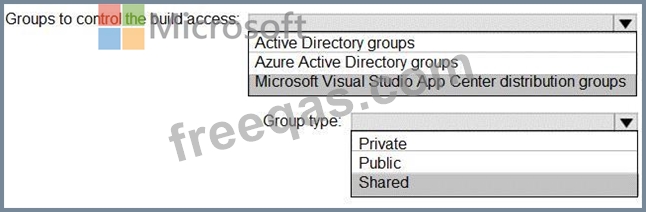
You need to control access to the application builds. The solution must be managed at the organization level What should you use? To answer, select the appropriate options m the answer area.
NOTE: Each correct selection is worth one point.

Correct Answer:

Explanation

Box 1: Microsoft Visual Studio App Center distribution Groups
Distribution Groups are used to control access to releases. A Distribution Group represents a set of users that can be managed jointly and can have common access to releases. Example of Distribution Groups can be teams of users, like the QA Team or External Beta Testers or can represent stages or rings of releases, such as Staging.
Box 2: Shared
Shared distribution groups are private or public distribution groups that are shared across multiple apps in a single organization. Shared distribution groups eliminate the need to replicate distribution groups across multiple apps.
Note: With the Deploy with App Center Task in Visual Studio Team Services, you can deploy your apps from Azure DevOps (formerly known as VSTS) to App Center. By deploying to App Center, you will be able to distribute your builds to your users.
References: https://docs.microsoft.com/en-us/appcenter/distribution/groups
insert code

Question 12

How should you confrere the release retention policy for the investment planning depletions suite? To answer, select the appropriate options in the answer area.
NOTE: Each correct selection is worth one point.

Correct Answer:

Topic 3, Woodgrove bank
To start the case study
To display the first question in this case study, click the Next button. Use the buttons in the left pane to explore the content of the case study before you answer the questions. Clicking these buttons displays information such as business requirements, existing environment, and problem statements. If the case study has an All Information tab, note that the information displayed is identical to the information displayed on the subsequent tabs. When you are ready to answer a question, click the Question button to return to the question.
Overview
General Overview
Woodgrove Bank is a financial services company that has a main office in the United Kingdom.
Technical Requirements and Planned Changes
Planned Changes
Woodgrove Bank plans to implement the following project management changes:
Implement Azure DevOps for project tracking.
Centralize source code control in private GitHub repositories.
Implement Azure Pipelines for build pipelines and release pipelines.
Woodgrove Bank plans to implement the following changes to the identity environment:
Deploy an Azure AD tenant named woodgrovebank.com.
Sync the Active Directory domain to Azure AD.
Configure App1 to use a service principal.
Integrate GitHub with Azure AD.
Woodgrove Bank plans to implement the following changes to the core apps:
Migrate App1 to ASP.NET Core.
Integrate Azure Pipelines and the third-party build tool used to develop App2.
Woodgrove Bank plans to implement the following changes to the DevOps environment:
Deploy App1 to Azure App Service.
Implement source control for the DB1 schema.
Migrate all the source code from TFS1 to GitHub.
Deploy App2 to an Azure virtual machine named VM1.
Merge the POC branch into the GitHub default branch.
Implement an Azure DevOps dashboard for stakeholders to monitor development progress.
Technical Requirements
Woodgrove Bank identifies the following technical requirements:
The initial databases for new environments must contain both schema and reference data.
An Azure Monitor alert for VM1 must be configured to meet the following requirements:
Be triggered when average CPU usage exceeds 80 percent for 15 minutes.
Calculate CPU usage averages once every minute.
The commit history of the POC branch must replace the history of the default branch.
The Azure DevOps dashboard must display the metrics shown in the following table.

Access to Azure DevOps must be restricted to specific IP addresses.
Page load times for App1 must be captured and monitored.
Administrative effort must be minimized.
insert code

Question 13

You have a project in Azure DevOps named Contoso App that contains pipelines in Azure Pipelines for GitHub repositories. You need to ensure that developers receive Microsoft Teams notifications when there are failures in a pipeline of Contoso App. What should you run in Teams? To answer, select the appropriate options in the answer are a. NOTE: Each correct selection is worth one point.

Correct Answer:
insert code

Question 14

You use Azure DevOps to manage the build and deployment of an app named App1.
You have a release pipeline that deploys a virtual machine named VM1.
You plan to monitor the release pipeline by using Azure Monitor
You need to create an alert to monitor the performance of VM1. The alert must be triggered when the average CPU usage exceeds 70 percent for five minutes. The alert must calculate the average once every minute.
How should you configure the alert rule? To answer, select the appropriate options in the answer area.

Correct Answer:

Reference:
https://docs.microsoft.com/en-us/azure/azure-monitor/platform/alerts-metric-overview
insert code

Question 15

You need to recommend a solution for deploying charts by using Helm and Title to Azure Kubemets Service (AKS) in an RBAC-enabled cluster.
Which three commands should you recommend be run m sequence? To answer, move the appropriate commands from the list of commands to the answer area and arrange them in the correct order.

Correct Answer:

Explanation

Step 1: Kubectl create
You can add a service account to Tiller using the --service-account <NAME> flag while you're configuring Helm (step 2 below). As a prerequisite, you'll have to create a role binding which specifies a role and a service account name that have been set up in advance.
Example: Service account with cluster-admin role
$ kubectl create -f rbac-config.yaml
serviceaccount "tiller" created
clusterrolebinding "tiller" created
$ helm init --service-account tiller
Step 2: helm init
To deploy a basic Tiller into an AKS cluster, use the helm init command.
Step 3: helm install
To install charts with Helm, use the helm install command and specify the name of the chart to install.
References:
https://docs.microsoft.com/en-us/azure/aks/kubernetes-helm
https://docs.helm.sh/using_helm/#tiller-namespaces-and-rbac
insert code
  • «
  • 1
  • 2
  • 3
  • 4
  • 5
  • 6
  • 7
  • 8
  • 9
  • 10
  • …
  • »
  • »»
[×]

Download PDF File

Enter your email address to download Microsoft.AZ-400.v2024-06-28.q359 Dumps

Email:

FreeQAs

Our website provides the Largest and the most Latest vendors Certification Exam materials around the world.

Using dumps we provide to Pass the Exam, we has the Valid Dumps with passing guranteed just which you need.

  • DMCA
  • About
  • Contact Us
  • Privacy Policy
  • Terms & Conditions
©2026 FreeQAs

www.freeqas.com materials do not contain actual questions and answers from Cisco's certification exams.
