FreeQAs
 Request Exam  Contact
  • Home
  • View All Exams
  • New QA's
  • Upload
PRACTICE EXAMS:
  • Oracle
  • Fortinet
  • Juniper
  • Microsoft
  • Cisco
  • Citrix
  • CompTIA
  • VMware
  • ISC
  • SAP
  • EMC
  • PMI
  • HP
  • Salesforce
  • Other
  • Oracle
    Oracle
  • Fortinet
    Fortinet
  • Juniper
    Juniper
  • Microsoft
    Microsoft
  • Cisco
    Cisco
  • Citrix
    Citrix
  • CompTIA
    CompTIA
  • VMware
    VMware
  • ISC
    ISC
  • SAP
    SAP
  • EMC
    EMC
  • PMI
    PMI
  • HP
    HP
  • Salesforce
    Salesforce
  1. Home
  2. Microsoft Certification
  3. AZ-400 Exam
  4. Microsoft.AZ-400.v2025-02-10.q279 Dumps
  • ««
  • «
  • …
  • 29
  • 30
  • 31
  • 32
  • 33
  • 34
  • 35
  • 36
  • 37
  • 38
  • …
  • »
  • »»
Download Now

Question 161

You use GitHub Enterprise Server as a source code repository.
You create an Azure DevOps organization named Contoso.
In the Contoso organization, you create a project named Project 1.
You need to link GitHub commits, pull requests, and issues to the work items of Project 1. The solution must use OAuth-based authentication Which three actions should you perform in sequence? To answer, move the appropriate actions from the list of actions to the answer area and arrange them in the correct order.

Correct Answer:

1 - From Developer settings in GitHub Enterprise Server, register a new OAuth app.
2 - Organization settings in Azure DevOps, add an OAuth configuration
3 - From Project Settings in Azure DevOps, add a GitHub connection.
Reference:
https://docs.microsoft.com/en-us/azure/devops/boards/github/connect-to-github
insert code

Question 162

Your company uses Team Foundation Server 2013 (TFS 2013).
You plan to migrate to Azure DevOps.
You need to recommend a migration strategy that meets the following requirements:
* Preserves the dates of Team Foundation Version Control changesets
* Preserves the changes dates of work items revisions
* Minimizes migration effort
* Migrates all TFS artifacts
What should you recommend? To answer, select the appropriate options in the answer area.
NOTE: Each correct selection is worth one point.

Correct Answer:

Explanation

Box 1: Upgrade TFS to the most recent RTM release.
One of the major prerequisites for migrating your Team Foundation Server database is to get your database schema version as close as possible to what is currently deployed in Azure Devops Services.
Box 2: Use the TFS Database Import Service
In Phase 3 of your migration project, you will work on upgrading your Team Foundation Server to one of the supported versions for the Database Import Service in Azure Devops Services.
References: Team Foundation Server to Azure Devops Services Migration Guide
insert code

Question 163

You plan to deploy a runbook that will create Azure AD user accounts.
You need to ensure that runbooks can run the Azure PowerShell cmdlets for Azure Active Directory.
To complete this task, sign in to the Microsoft Azure portal.

Correct Answer:
Azure Automation now ships with the Azure PowerShell module of version 0.8.6, which introduced the ability to non-interactively authenticate to Azure using OrgId (Azure Active Directory user) credential-based authentication. Using the steps below, you can set up Azure Automation to talk to Azure using this authentication type.
Step 1: Find the Azure Active Directory associated with the Azure subscription to manage:
1. Log in to the Azure portal as the service administrator for the Azure subscription you want to manage using Azure Automation. You can find this user by logging in to the Azure portal as any user with access to this Azure subscription, then clicking Settings, then Administrators.

2. Note the name of the directory associated with the Azure subscription you want to manage. You can find this directory by clicking Settings, then Subscriptions.

Step 2: Create an Azure Active Directory user in the directory associated with the Azure subscription to manage:
You can skip this step if you already have an Azure Active Directory user in this directory. and plan to use this OrgId to manage Azure.
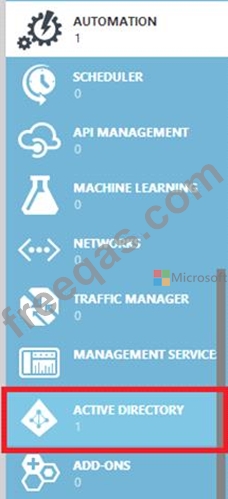
1. In the Azure portal click on Active Directory service.

2. Click the directory name that is associated with this Azure subscription.
3. Click on the Users tab and then click the Add User button.
4. For type of user, select "New user in your organization." Enter a username for the user to create.
5. Fill out the user's profile. For role, pick "User." Don't enable multi-factor authentication. Multi-factor accounts cannot be used with Azure Automation.
6. Click Create.
7. Jot down the full username (including part after @ symbol) and temporary password.
Step 3: Allow this Azure Active Directory user to manage this Azure subscription.
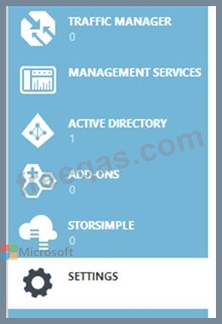
1. Click on Settings (bottom Azure tab under StorSimple)

2. Click Administrators
3. Click the Add button. Type the full user name (including part after @ symbol) of the Azure Active Directory user you want to set up to manage Azure. For subscriptions, choose the Azure subscriptions you want this user to be able to manage. Click the check mark.
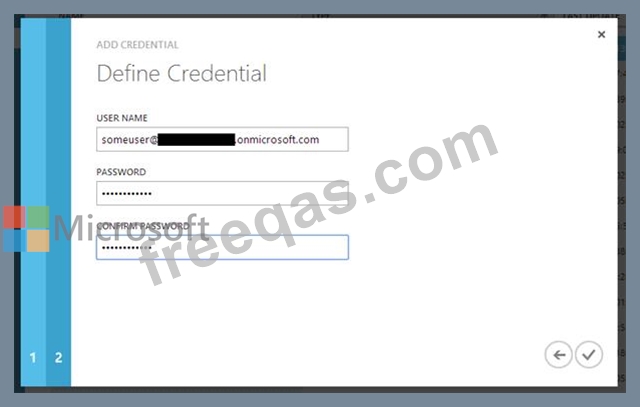
Step 4: Configure Azure Automation to use this Azure Active Directory user to manage this Azure subscription Create an Azure Automation credential asset containing the username and password of the Azure Active Directory user that you have just created. You can create a credential asset in Azure Automation by clicking into an Automation Account and then clicking the Assets tab, then the Add Setting button.

Note: Once you have set up the Azure Active Directory credential in Azure and Azure Automation, you can now manage Azure from Azure Automation runbooks using this credential.
References:
https://azure.microsoft.com/sv-se/blog/azure-automation-authenticating-to-azure-using-azure-active-directory/
insert code

Question 164

You company uses Azure DevOps to deploy infrastructures to Azure.
Pipelines are developed by using YAML.
You execute a pipeline and receive the results in the web portal for Azure Pipelines as shown in the following exhibit.

Use the drop-down menus to select the answer choice that completes each statement based on the information presented in the graphic.
NOTE: Each correct selection is worth one point.

Correct Answer:

Explanation

Reference:
https://dev.to/rajikaimal/azure-devops-ci-cd-yaml-pipeline-4glj
insert code

Question 165

Your company uses Team Foundation Server 2013 (TFS 2013).
You plan to migrate to Azure DevOps.
You need to recommend a migration strategy that meets the following requirements:
* Preserves the dates of Team Foundation Version Control changesets
* Preserves the changes dates of work items revisions
* Minimizes migration effort
* Migrates all TFS artifacts
What should you recommend? To answer, select the appropriate options in the answer area.
NOTE: Each correct selection is worth one point.

Correct Answer:

Explanation

Box 1: Upgrade TFS to the most recent RTM release.
One of the major prerequisites for migrating your Team Foundation Server database is to get your database schema version as close as possible to what is currently deployed in Azure Devops Services.
Box 2: Use the TFS Database Import Service
In Phase 3 of your migration project, you will work on upgrading your Team Foundation Server to one of the supported versions for the Database Import Service in Azure Devops Services.
References: Team Foundation Server to Azure Devops Services Migration Guide
insert code
  • ««
  • «
  • …
  • 29
  • 30
  • 31
  • 32
  • 33
  • 34
  • 35
  • 36
  • 37
  • 38
  • …
  • »
  • »»
[×]

Download PDF File

Enter your email address to download Microsoft.AZ-400.v2025-02-10.q279 Dumps

Email:

FreeQAs

Our website provides the Largest and the most Latest vendors Certification Exam materials around the world.

Using dumps we provide to Pass the Exam, we has the Valid Dumps with passing guranteed just which you need.

  • DMCA
  • About
  • Contact Us
  • Privacy Policy
  • Terms & Conditions
©2026 FreeQAs

www.freeqas.com materials do not contain actual questions and answers from Cisco's certification exams.