You have an Azure subscription named Sub1.
You have an Azure Active Directory (Azure AD) group named Group1 that contains all the members of your IT team.
You need to ensure that the members of Group1 can stop, start, and restart the Azure virtual machines in Sub1. The solution must use the principle of least privilege.
Which three actions should you perform in sequence? To answer, move the appropriate actions from the list of actions to the answer area and arrange them in the correct order.

You have an Azure Active Directory (Azure AD) tenant named contoso.com that contains the users shown in the following table.
You create and enforce an Azure AD Identity Protection user risk policy that has the following settings:
* Assignment: Include Group1, Exclude Group2
* Conditions: Sign-in risk of Medium and above
* Access: Allow access, Require password change
For each of the following statements, select Yes if the statement is true. Otherwise, select No.
NOTE: Each correct selection is worth one point.


You network contains an on-premises Active Directory domain that syncs to an Azure Active Directory (Azure AD) tenant. The tenant contains the users shown in the following table.
The tenant contains the groups shown in the following table.
You configure a multi-factor authentication (MFA) registration policy that and the following settings:
Assignments:
Include: Group1
Exclude Group2
Controls: Require Azure MFA registration
Enforce Policy: On
For each of the following statements, select Yes if the statement is true. Otherwise, select No.

You have an Azure subscription.
You need to create and deploy an Azure policy that meets the following requirements:
When a new virtual machine is deployed, automatically install a custom security extension.
Trigger an autogenerated remediation task for non-compliant virtual machines to install the extension.
What should you include in the policy? To answer, select the appropriate options in the answer area.
NOTE: Each correct selection is worth one point.

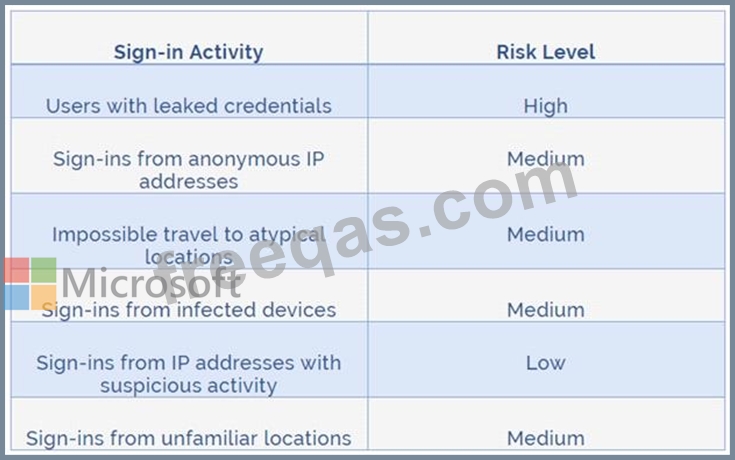
You are implementing conditional access policies.
You must evaluate the existing Azure Active Directory (Azure AD) risk events and risk levels to configure and implement the policies.
You need to identify the risk level of the following risk events:
Users with leaked credentials
Impossible travel to atypical locations
Sign ins from IP addresses with suspicious activity
Which level should you identify for each risk event? To answer, drag the appropriate levels to the correct risk events. Each level may be used once, more than once, or not at all. You may need to drag the split bar between panes or scroll to view content.
NOTE: Each correct selection is worth one point.