You need to ensure that users can access VM0. The solution must meet the platform protection requirements.
What should you do?


You have an Azure subscription that contains a storage account named storage1 and several virtual machines. The storage account and virtual machines are in the same Azure region. The network configurations of the virtual machines are shown in the following table.
The virtual network subnets have service endpoints defined as shown in the following table.
You configure the following Firewall and virtual networks settings for storage1:
Allow access from: Selected networks
Virtual networks: VNET3\Subnet3
Firewall - Address range: 52.233.129.0/24
For each of the following statements, select Yes if the statement is true. Otherwise, select No.
NOTE: Each correct selection is worth one point.

You have an Azure subscription named Sub1.
You create a virtual network that contains one subnet. On the subnet, you provision the virtual machines shown in the following table.
Currently, you have not provisioned any network security groups (NSGs).
You need to implement network security to meet the following requirements:
Allow traffic to VM4 from VM3 only.
Allow traffic from the Internet to VM1 and VM2 only.
Minimize the number of NSGs and network security rules.
How many NSGs and network security rules should you create? To answer, select the appropriate options in the answer area.
NOTE: Each correct selection is worth one point.

Use the following login credentials as needed:
To enter your username, place your cursor in the Sign in box and click on the username below.
To enter your password, place your cursor in the Enter password box and click on the password below.
Azure Username: [email protected]
Azure Password: Ag1Bh9!#Bd
The following information is for technical support purposes only:
Lab Instance: 10598168


You need to ensure that a user named user21059868 can manage the properties of the virtual machines in the RG1lod10598168 resource group. The solution must use the principle of least privilege.
To complete this task, sign in to the Azure portal.

You create resources in an Azure subscription as shown in the following table.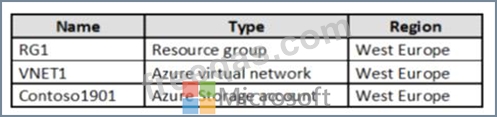
VNET1 contains two subnets named Subnet1 and Subnet2. Subnet1 has a network ID of 10.0.0.0/24. Subnet2 has a network ID of 10.1.1.0/24.
Contoso1901 is configured as shown in the exhibit. (Click the Exhibit tab.)
For each of the following statements, select Yes if the statement is true. Otherwise, select No.
NOTE: Each correct selection is worth one point.


