You have an Azure subscription that contains two virtual networks named Vnet1 and Vnet2.
You register a public DNS zone named fabrikam.com. The zone is configured as shown in the Public DNS Zone exhibit.
You have a private DNS zone named fabrikam.com. The zone is configured as shown in the Private DNS Zone exhibit.
You have a virtual network link configured as shown in the Virtual Network Link exhibit.
For each of the following statements, select Yes if the statement is true. Otherwise, select No.
NOTE: Each correct selection is worth one point.

You have an Azure virtual network named Vnet1 that contains two subnets named Subnet1 and Subnet2. Both subnets contain virtual machines. You create a NAT gateway named NATgateway1 as shown in the following exhibit.
Use the drop-down menus to select the answer choice that completes each statement based on the information presented in the graphic. NOTE: Each correct selection is worth one point.

You have an Azure subscription. The subscription contains multiple Azure SQL Database resources and a virtual network named VNet1 that has five subnets. All the subnets are associated with a network security group (NSG) named NSG1. NSG1 blocks all outbound traffic, unless specifically allowed by a rule.
Each subnet contains 50 virtual machines. Multiple virtual machines host instances of SQL Server on Virtual Machines and will be configured to replicate with the Azure SQL Database resources.
You need to configure a new outbound rule in NSG1 to allow the SQL Server on Virtual Machines instances to connect to the Azure SQL Database resources. The solution must meet the following requirements:
* Minimize modifications to NSG1 when additional instances of SQL Server on Virtual Machines are deployed.
* Ensure that only SQL Server on Virtual Machines instances can connect to the Azure SQL Database resources.
How should you configure each setting for the new outbound rule? To answer, select the appropriate options in the answer area.
NOTE: Each correct selection is worth one point.


You have two Azure subscriptions named Subscription1 and Subscription2.
There are no connections between the virtual networks in two subscriptions.
You configure a private link service as shown in the privatelinkservice1 exhibit. (Click the privatelinkservice1 tab.)
You create a load balancer name in Subscription1 and configure the backend pool shown in the lb1 exhibit. (Click tie 1b1 tab.)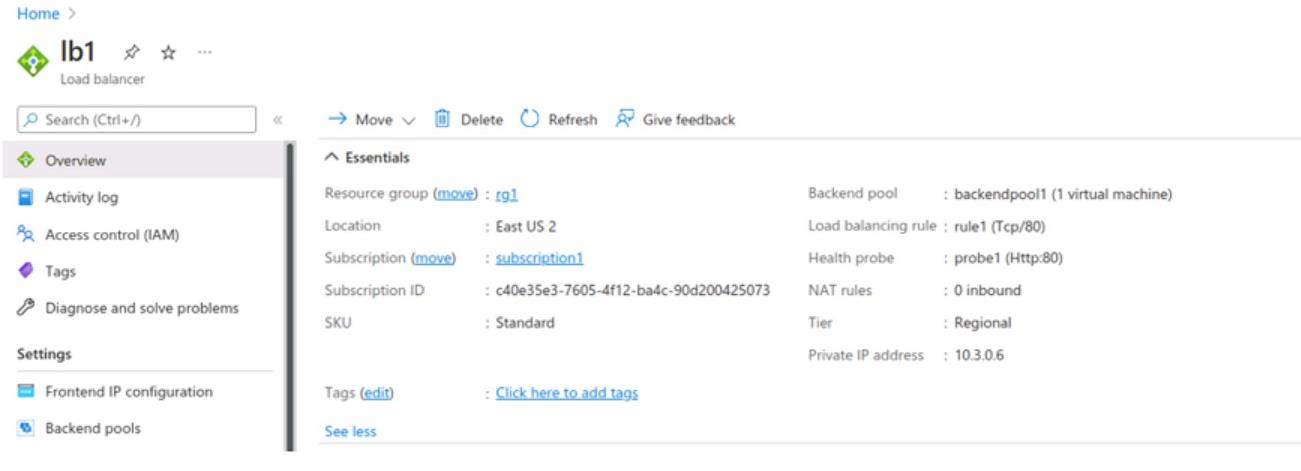
You create a private endpoint in Subscription2 as shown in the privateendpoint4 exhibit. (Click the privateendpoint4)
For each of the following statements, select YES if the statement is true. Otherwise. select No.

You have an Azure load balancer that has the following configurations:
* Name:LB1
* Location: East US 2
* SKU: Standard
* Private IP address: 10.3.0.7
* Load balancing rule: rule! (Tcp/80)
* Health probe: probe1 (Http:80)
* NAT rules; 0 inbound
The backend pool of LB1 has the following configurations:
* Name: backend I
* Virtual network: Vnet1
* Backend pool configuration: NIC
* IP version: IPv4
* Virtual machines: VM1.VM2. VM3:
You have an Azure virtual machine named VM4 that has the following network configurations:
* Network interface: vm49Sl
* Virtual network/subnet: Vnet3/Subnet3
* NIC private IP address: 10.4.0.4
* Accelerated networking: Enabled
For each of the following statements, select Yes if the statement is true. Otherwise, select No.
NOTE: Each correct selection is worth one point.


