Your network contains an Active Directory Domain Services (AD DS) domain. The domain contains the servers shown in the following table.
Server3 contains a share named Share1.
On Server1, DHCP has the following configurations:
Conflict detection attempts: 3
An IPv4 scope named Scope1 that has the following settings:
1. Address Pool: 172.16.10.100 - 172.16.10.130
2. Address Leases:
- 172.16.10.100 computer1.contoso.com
- 172.16.10.101 computer2.contoso.com
Reservations: 172.16.10.101 computer2.contoso.com
Policies: Policy1
You perform the following actions:
On Server1, you run
Export-DhcpServer -File \\Server3\Share1\File1.xml.
On Server2, you run
Import-DhcpServer -File \\Server3\Share1\File1.xml
-BackupPath \\Server3\Share1.
For each of the following statements, select Yes if the statement is true. Otherwise, select No.
NOTE: Each correct selection is worth one point.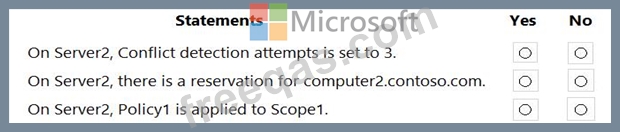

You have a failover cluster named Cluster1 that contains three Windows Server nodes named Node 1, Node2.
and Node3.
You need to deploy a Storage Spaces Direct virtual disk to Cluster1.
You add the following disks to each node:
* Three 512-6B NVMe disks
* Three 3-TB diskS
* Three 1-TB SSD disks
On Cluster1. you enable Storage Spaces Direct and add the new disks.
What is the total amount of disk space available for the Storage Spaces Direct virtual disk, and which operations are cached for the SSD and HDD disks? To answer, select the appropriate options in the answer area.

Your network contains a single-domain Active Directory Domain Services (AD DS) forest named contoso.
com. The functional level of the forest is Windows Server 2012 R2. All domain controllers run Windows Server 2012 R2.
Sysvol replicates by using the File Replication Service (FRS).
You plan to replace the existing domain controllers with new domain controllers that will run Windows Server 2022.
You need to ensure that you can add the first domain controller that runs Windows Server 2022.
Solution; You raise the domain and forest functional levels.
Does this meet the goal?
You are planning the data share migration to support the on-premises migration plan.
What should you use to perform the migration?

You deploy Azure Migrate to an on-premises network.
You have an on-premises physical server named Server1 that runs Windows Server and has the following configuration.
* Operating system disk 600 GB
* Data disic 3 TB
* NIC Teaming: Enabled
* Mobility service: installed
* Windows Firewall: Enabled
* Microsoft Defender Antivirus: Enabled
You need to ensure that you can use Azure Migrate to migrate Server1.
Solution: You disable NIC Teaming on Server1.
Does this meet the goal?

