You are creating a survey using a Dynamics 365 for Marketing Surveys. You need to include multiple question types.
Which survey question types presents the best choice for each scenario/example presented? To answer, drag the appropriate survey question to the scenario/example. Each survey question type may be used once, more than once or not at all. You may need to drag the split bar between panes or scroll to view the content.
NOTE: Each correct selection is worth one point.


DRAG DROP
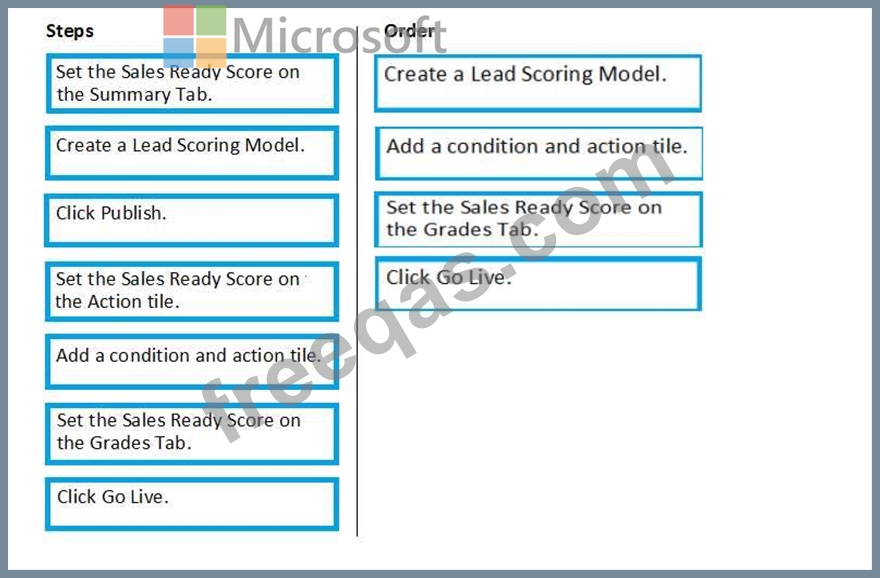
You want to create a method that will alert sales people when a lead is ready to be sold to.
This method should automatically move the lead to the Sales-Acceptance stage of the lead life-cycle.
Which four steps must you take, in order to complete your task? (Choose four.) To answer, move the appropriate actions from the list of actions to the answer area and arrange them in the correct order.
Select and Place:
You are creating a customer survey and you want to get good responses.
You need to analyze the responses to provide actions to best suit your organization.
Which three responses are considered best practice? (Choose three.) Each correct answer presents a complete solution.
NOTE: Each correct selection is worth one point.
Note: This question is part of a series of questions that present the same scenario. Which question in the series contains a unique solution that might meet the stated goals. Some question sets might have more than one correct solution, while others might not have a correct solution.
After you answer a question in this section, you will NOT be able to return to it. As a result, these questions will not appear in the review screen.
You have created a lead scoring model for a marketing effort. The lead scoring model has 3 grades: Cold, Warm and Hot.
After a week you notice that no one has received any scores from your model.
Solution: You click the Go Live button.
Does this resolve your issue?
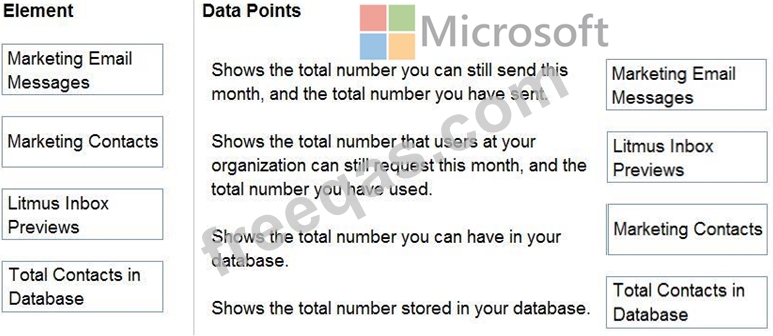
As the Dynamics 365 Marketing functional consultant, it is your responsibility to make sure your company stays within the quota limits defined by your subscription. The current subscription includes a quota of 10,000 contacts and 100,000 Marketing email messages.
Your manager wants you to create a monthly report showing usage.
When you navigate to Quota Limits, which items will you be viewing to create the required report? To answer, drag the appropriate element to the correct data point. Each element may be used once, more than once, or not at all. You may need to drag the split bar between panes or scroll to view content.