FreeQAs
 Request Exam  Contact
  • Home
  • View All Exams
  • New QA's
  • Upload
PRACTICE EXAMS:
  • Oracle
  • Fortinet
  • Juniper
  • Microsoft
  • Cisco
  • Citrix
  • CompTIA
  • VMware
  • ISC
  • SAP
  • EMC
  • PMI
  • HP
  • Salesforce
  • Other
  • Oracle
    Oracle
  • Fortinet
    Fortinet
  • Juniper
    Juniper
  • Microsoft
    Microsoft
  • Cisco
    Cisco
  • Citrix
    Citrix
  • CompTIA
    CompTIA
  • VMware
    VMware
  • ISC
    ISC
  • SAP
    SAP
  • EMC
    EMC
  • PMI
    PMI
  • HP
    HP
  • Salesforce
    Salesforce
  1. Home
  2. Microsoft Certification
  3. MB-280 Exam
  4. Microsoft.MB-280.v2025-10-22.q93 Dumps
  • «
  • 1
  • 2
  • 3
  • 4
  • 5
  • 6
  • 7
  • 8
  • 9
  • 10
  • …
  • »
  • »»
Download Now

Question 1

The remote sales workforce of your organization has been using the integrated Teams chat to collaborate internally. To save time, you indicate to the sales leader that suggested contacts can be displayed when a seller starts a new connected chat.
The sales leader asked you to configure the ability to use suggested contacts.
Which three users can you use as a rule for suggesting contacts? Each correct answer presents a complete solution. Choose three.
NOTE: Each correct selection is worth one point.

Correct Answer: A,C,D
Manager on System User Record:
Suggested contacts in Teams can include users directly linked to the individual starting the chat. The manager assigned on the user's system record can be a suggested contact, as this is a common relationship that suggests frequent communication.
Record Owner of the Initiating Record:
The owner of the record being discussed or acted upon is also likely to be a suggested contact. This is because the owner has primary responsibility for the record and would commonly need to be consulted or informed about actions related to it.
Created By of the Initiating Record:
If the user is the Created By for a record, they are associated with its initial setup or creation. As a result, they may be suggested when actions on that record are taken since they are familiar with its origins.
Reference:
These selections align with the rules typically used for suggesting contacts in integrated Teams chats, ensuring relevant parties are automatically suggested based on record associations and user relationships.
insert code

Question 2

A company plans to use server-side synchronization to synchronize emails, tasks, and appointments between Microsoft Exchange and Dynamics 365 Sales.
The salespeople want to know when their emails will be synced.
You need to describe the server-side synchronization frequency for the salespeople.
How should you describe the frequency?

Correct Answer: C
* Server-side synchronization typically syncs at equal intervals, which can be configured in Dynamics 365. These intervals determine how often data is synchronized between Microsoft Exchange and Dynamics 365 Sales, affecting emails, tasks, and appointments.
* The synchronization frequency can be adjusted by the administrator but operates at consistent, regular intervals by default.
insert code

Question 3

You need to ensure the active stage of the business process flow is visible in a view on the Pet table that you share with the founder.
Which two actions should you perform to meet the founder's requirements? Each correct answer presents a complete solution. (Choose two.) NOTE: Each correct selection is worth one point.

Correct Answer: A,C
To display the active stage of the business process flow (BPF) in the Pet table view, the active stage must be stored in a column within the Pet table. Since the Onboard new pet BPF is linked to the Pet table, a cloud flow can be used to fetch the active stage from the BPF and write it into a newly created column on the Pet table.
Once the data is available in the Pet table, the next step is to modify an existing view. Since the Active Pets view is already being used in the system, modifying this view by adding the newly created column ensures that the relevant data is visible. Saving the edited view as a new one and sharing it with the founder completes the requirement.
insert code

Question 4

You are a Dynamics 365 Sales administrator. You create a forecast by using the forecast category layout shown in the exhibit:
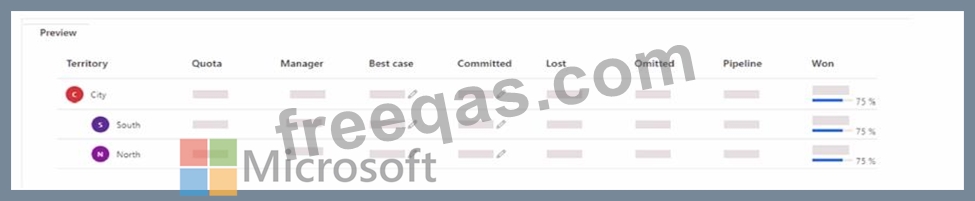
Use the drop-down menus to select the answer choice that answers each question based on the information presented in the graphic.
NOTE: Each correct selection is worth one point.
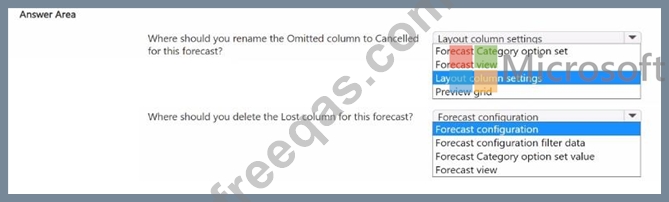
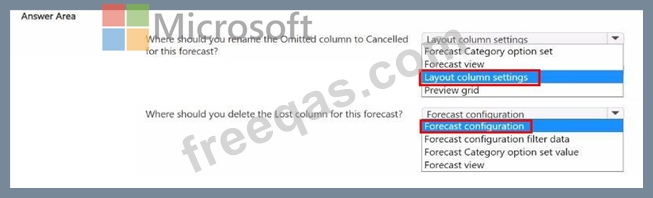
Correct Answer:

Reference:
Deleting the Lost Column from the Forecast:
To remove a column entirely, such as the Lost column, you should adjust the Forecast configuration. This configuration setting allows you to add or remove columns from the forecast grid.
Modifying Forecast configuration affects the structural aspects of the forecast, such as which columns are included, based on what is necessary for reporting and analysis.
By utilizing the Layout column settings for renaming columns and the Forecast configuration for adding or removing columns, you can tailor the forecast layout to meet specific business requirements, ensuring the forecast view is both relevant and easy for users to interpret.
insert code

Question 5

You are designing the user experience for sales users at your organization for a variety of tasks.
One of the user experience requirements is for sales users to be able to see information from custom attributes created for originating leads for opportunities WITHOUT having to navigate to the Lead record.
You are already signed in to the correct editing application and you now need to configure the user experience in Dynamics 365 Sales to enable this.
Which five actions should you perform in sequence before saving and publishing your changes? To answer, move the five appropriate actions from the list of actions to the answer are a. Arrange the five actions in the correct order.
NOTE: More than one order of answer choices is correct. You will receive credit for any of the correct orders you select

Correct Answer:

Reference:
In the Forms Area, Create a Quick View Form with the Required Columns:
Within the Lead table, go to the Forms section and create a Quick View form. The Quick View form will be designed to include the necessary custom attributes from the Lead table.
This step is crucial as the Quick View form will later be embedded in the Opportunity form to provide context about the originating lead.
Select Tables > Opportunity:
After configuring the Quick View form in the Lead table, navigate to the Opportunity table where you will embed this Quick View form.
In the Forms Area, Select the Main Form You Wish to Update:
Within the Opportunity table, go to the Forms area, and select the Main Form that sales users will use. This is where you will add the Quick View form created from the Lead table.
Add the Quick View Form as a Component:
Finally, add the previously created Quick View form as a component on the Opportunity Main Form. This will enable the embedded display of lead information, allowing users to view lead data directly within the Opportunity form.
Once added, save and publish the form to make the changes effective.
By following these steps, sales users can access lead information within the Opportunity form itself, streamlining their workflow by removing the need to navigate to the Lead record.
insert code
  • «
  • 1
  • 2
  • 3
  • 4
  • 5
  • 6
  • 7
  • 8
  • 9
  • 10
  • …
  • »
  • »»
[×]

Download PDF File

Enter your email address to download Microsoft.MB-280.v2025-10-22.q93 Dumps

Email:

FreeQAs

Our website provides the Largest and the most Latest vendors Certification Exam materials around the world.

Using dumps we provide to Pass the Exam, we has the Valid Dumps with passing guranteed just which you need.

  • DMCA
  • About
  • Contact Us
  • Privacy Policy
  • Terms & Conditions
©2026 FreeQAs

www.freeqas.com materials do not contain actual questions and answers from Cisco's certification exams.
