FreeQAs
 Request Exam  Contact
  • Home
  • View All Exams
  • New QA's
  • Upload
PRACTICE EXAMS:
  • Oracle
  • Fortinet
  • Juniper
  • Microsoft
  • Cisco
  • Citrix
  • CompTIA
  • VMware
  • ISC
  • SAP
  • EMC
  • PMI
  • HP
  • Salesforce
  • Other
  • Oracle
    Oracle
  • Fortinet
    Fortinet
  • Juniper
    Juniper
  • Microsoft
    Microsoft
  • Cisco
    Cisco
  • Citrix
    Citrix
  • CompTIA
    CompTIA
  • VMware
    VMware
  • ISC
    ISC
  • SAP
    SAP
  • EMC
    EMC
  • PMI
    PMI
  • HP
    HP
  • Salesforce
    Salesforce
  1. Home
  2. Microsoft Certification
  3. MB-310 Exam
  4. Microsoft.MB-310.v2023-10-19.q188 Dumps
  • ««
  • «
  • …
  • 18
  • 19
  • 20
  • 21
  • 22
  • 23
  • 24
  • 25
  • 26
  • 27
  • …
  • »
  • »»
Download Now

Question 106

You are configuring automatic bank reconciliation functionality for a company that has multiple bank accounts, The company wants to import their bank statements.
You need to import electronic bank statements to reconcile the bank accounts.
Which three actions can you perform? Each correct answer presents a complete solution.
NOTE: Each correct selection is worth one point.

Correct Answer: A,B,D
insert code

Question 107

An organization plans to set up intercompany accounting between legal entities within the organization.
Automatic transactions between legal entities must meet the following requirements:
* Provides systemwide integration and streamlining to save time
* Minimizes errors and create an audit trail with full visibility into business activities and transaction histories within the legal entities You need to set up intercompany accounting and create pairs of legal entities that can transact with each other, clearly defining the originating company and the destination company.
Which three actions should you perform? Each correct answer presents part of the solution.
NOTE: Each correct selection is worth one point.

Correct Answer: A,C,D
Reference:
https://docs.microsoft.com/en-us/dynamics365/finance/general-ledger/intercompany-accounting-setup
insert code

Question 108

You are a functional consultant for Contoso Entertainment System USA (USMF).
USMF plans to implement a new manufacturing department that will be based in Australia.
You need to create a draft account structure for the new department. The account structure must use the same account structure as a department named Manufacturing India and be named Manufacturing Australia.
To complete this task, sign in to the Dynamics 365 portal.

Correct Answer:
You need to create an account structure with the same structure as the department named Manufacturing India by using the following instructions.
Go to Navigation pane > Modules > General ledger > Chart of accounts > Structures > Configure account structures.
On the Action pane, click New to open the drop dialog.
In the Account structure field, type a name to describe the purpose of the account structure.
In the Description field, type a description to specify the purpose of the account structure.
Click Create.
In the Segments and allowed values, click Add segment.
In the dimensions list, select the dimension to add to the account structure.
At the end of the list, click Add segment.
Repeat step 6 to 9 as needed.
In the Allowed value details section, select the segment to edit the allowed values. For example, click the Main Account field.
In the Operator field, select an option, such as is between and includes.
In the Value field, type a value. For example, 600000.
In the through field, type a value. For example, 699999.
In the Allowed value details section, click Apply.
Repeat step 10 to 15 as needed.
In the Allowed value details section, click Add new criteria.
In the Operator field, select an option, such as is between and includes.
In the Value field, type a value. For example, 033.
In the through field, type a value. For example, 034.
Click Apply.
In the grid, select the segment to edit the allowed values. For example, Cost Center.
In the CostCenter field, type a value. For example, 007..021.
In the Segments and allowed values, click Add.
In the MainAccount field, type a value. For example, 600000..699999
In the grid, select the segment to edit the allowed values. For example, Department.
In the Department field, type a value. For example, 032.
In the CostCenter field, type a value. For example, 086.
On the Action pane, click Validate.
Reference:
https://docs.microsoft.com/en-us/dynamics365/finance/general-ledger/tasks/create-account-structures
insert code

Question 109

A retail company has outlets in multiple locations. Taxes vary depending on the location.
You need to configure the various components of the tax framework.
In which order should you perform the actions? To answer, move all actions from the list of actions to the answer area and arrange them in the correct order.
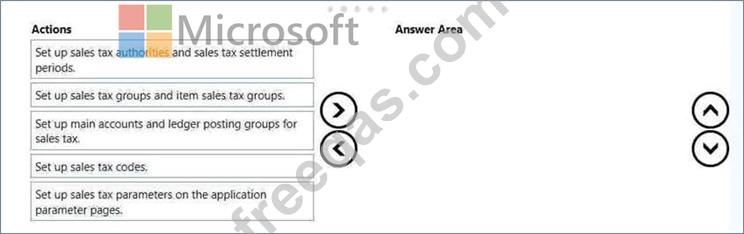
Correct Answer:

1 - Set up main accounts and ledger posting groups for sales tax
2 - Set up sales tax authorities and sales tax sattlement periods
3 - Set up sales tax codes
4 - Set up sales tax groups and item sales tax groups
5 - Set up sales tax parameters on the application parameter pages
insert code

Question 110

A company implements baste budgeting functionality in Dynamics 365 Finance in multiple departments that belong to the same legal entity. Managers must be able to identify and track budgets by department You need to configure the system. What should you configure?


Correct Answer: A
insert code
  • ««
  • «
  • …
  • 18
  • 19
  • 20
  • 21
  • 22
  • 23
  • 24
  • 25
  • 26
  • 27
  • …
  • »
  • »»
[×]

Download PDF File

Enter your email address to download Microsoft.MB-310.v2023-10-19.q188 Dumps

Email:

FreeQAs

Our website provides the Largest and the most Latest vendors Certification Exam materials around the world.

Using dumps we provide to Pass the Exam, we has the Valid Dumps with passing guranteed just which you need.

  • DMCA
  • About
  • Contact Us
  • Privacy Policy
  • Terms & Conditions
©2026 FreeQAs

www.freeqas.com materials do not contain actual questions and answers from Cisco's certification exams.