You are configuring automated business processes for an organization.
The business analyst has identified the following requirements:
Invoices need to be approved before payment.
A person who submits an item to workflow cannot approve that item.
You need to recommend a configuration workflow.
What should you recommend?
You need to recommend a toolset to assist with User3 s feedback about the issues with journal entry and new user training. What should you recommend?
Note: This question is part of a series of questions that present the same scenario. Each question in the series contains a unique solution that might meet the stated goals. Some question sets might have more than one correct solution, while others might not have a correct solution.
After you answer a question in this section, you will NOT be able to return to it. As a result, these questions will not appear in the review screen.
A company with multiple legal entities implements Dynamics 365 Finance.
You need to recommend options to ensure that you can provide customized financial reporting across the legal entities.
Solution: Create separate cost centers to manage operations.
Does the solution meet the goal?
A company is implementing Dynamics 365 Finance.
A series of related data packages must be migrated.
You need to define the sequence of the data packages migration.
Which Lifecycle Services tool should you use?
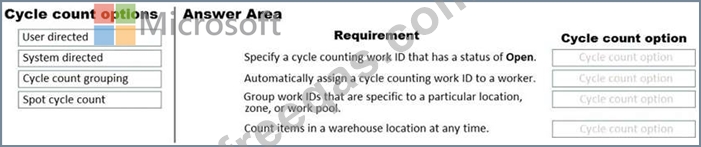
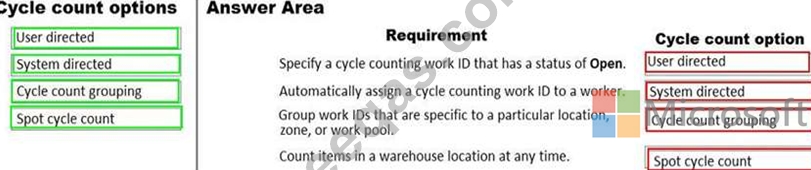
A company plans to implement Dynamics 365 Supply Chain Management. The company has the following requirements:
Use mobile devices for warehouse activities including cycle counting.
Set up automatic cycle counting work IDs and assign the IDs to workers.
Ensure that workers can group work IDs that are specific to a particular location, zone, or work pool.
Ensure that workers can specify a cycle counting work ID that has a status of Open.
Ensure that workers can count items in a warehouse location at any time.
You need to recommend cycle counting options that meet the company's requirements.
What should you recommend? To answer, drag the appropriate counting options to the correct requirements. Each counting option may be used once, more than once, or not at all. You may need to drag the split bar between panes or scroll to view content.
NOTE: Each correct selection is worth one point.