FreeQAs
 Request Exam  Contact
  • Home
  • View All Exams
  • New QA's
  • Upload
PRACTICE EXAMS:
  • Oracle
  • Fortinet
  • IBM
  • Juniper
  • Microsoft
  • Cisco
  • Citrix
  • CompTIA
  • VMware
  • ISC
  • SAP
  • EMC
  • PMI
  • HP
  • Salesforce
  • Other
  • Oracle
    Oracle
  • Fortinet
    Fortinet
  • IBM
    IBM
  • Juniper
    Juniper
  • Microsoft
    Microsoft
  • Cisco
    Cisco
  • Citrix
    Citrix
  • CompTIA
    CompTIA
  • VMware
    VMware
  • ISC
    ISC
  • SAP
    SAP
  • EMC
    EMC
  • PMI
    PMI
  • HP
    HP
  • Salesforce
    Salesforce
  1. Home
  2. Microsoft Certification
  3. MD-102 Exam
  4. Microsoft.MD-102.v2024-08-22.q207 Dumps
  • «
  • 1
  • 2
  • 3
  • 4
  • 5
  • 6
  • 7
  • 8
  • 9
  • 10
  • …
  • »
  • »»
Download Now

Question 6

You have two computers that run Windows 10. The computers are enrolled in Microsoft Intune as shown in the following table.

Windows 10 update rings are defined in Intune as shown in the following table.

You assign the update rings as shown in the following table.

What is the effect of the configurations on Computer1 and Computer2? To answer, select the appropriate options in the answer area.
NOTE: Each correct selection is worth one point.

Correct Answer:

Reference:
https://docs.microsoft.com/en-us/windows/deployment/update/waas-wufb-intune
https://allthingscloud.blog/configure-windows-update-business-using-microsoft-intune/
insert code

Question 7

You have a Microsoft 365 subscription that uses Microsoft Intune Suite. You use Microsoft Intune to manage devices. Azure AD joined Windows devices enroll automatically in Intune. You have the devices shown in the following table.
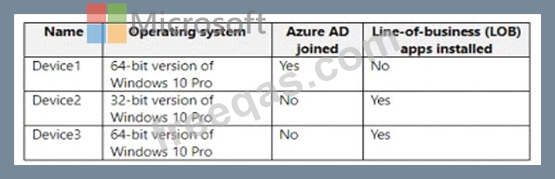
You are preparing to upgrade the devices to Windows 11. All the devices are compatible with Windows 11.
You need to evaluate Windows Autopilot and in-place upgrade as deployment methods to implement Windows 11 Pro on the devices, while retaining all user settings and applications.
Which devices can be upgraded by using each method? To answer, select the appropriate options in the answer area.
NOTE: Each correct selection is worth one point.

Correct Answer:

Explanation
insert code

Question 8

You have an Azure subscription.
You have an on-premises Windows 11 device named Device 1.
You plan to monitor Device1 by using Azure Monitor.
You create a data collection rule (DCR) named DCR1 in the subscription.
To what should you associate DCR1 ?

Correct Answer: B
To monitor Device1 by using Azure Monitor, you should associate DCR1 with Device1. A data collection rule (DCR) defines the data collection process in Azure Monitor, such as what data to collect, how to transform it, and where to send it. A DCR can be associated with multiple virtual machines and specify different data sources, such as Azure Monitor Agent, custom logs, or Azure Event Hubs1. To associate a DCR with a virtual machine, you need to install the Azure Monitor Agent on the machine and then select the DCR from the list of available rules2. You can also use Azure Policy to automatically install the agent and associate a DCR with any virtual machines or virtual machine scale sets as they are created in your subscription3.
The other options are not correct for this scenario because:
Azure Network Watcher is a service that provides network performance monitoring and diagnostics for Azure resources. It is not related to data collection rules or Azure Monitor4.
A Log Analytics workspace is a destination where you can send the data collected by a data collection rule. It is not an entity that you can associate a DCR with5.
A Monitored Object is not a valid term in the context of Azure Monitor or data collection rules.
References: Data collection rules in Azure Monitor, Configure data collection for Azure Monitor Agent, Use Azure Policy to install Azure Monitor Agent and associate with a DCR, What is Azure Network Watcher?, Log Analytics workspaces in Azure Monitor
insert code

Question 9

You have a Microsoft 365 E5 subscription.
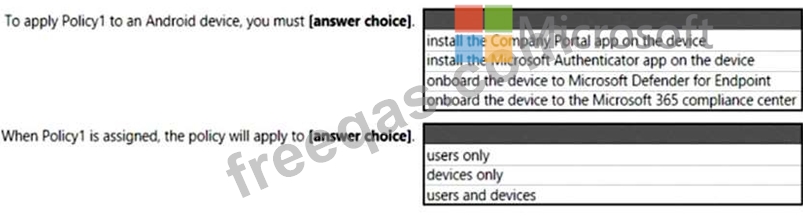
You create an app protection policy for Android devices named Policy1 as shown in the following exhibit.

Use the drop-down menus to select the answer choice that completes each statement based on the information presented in the graphic.
NOTE: Each correct selection is worth one point.
Correct Answer:

Explanation
Box 1: Install the Intune Company Portal app on the device
On Android, Android devices will prompt to install the Intune Company Portal app regardless of which Device type is chosen.
Bix 2: Devices only
For Android devices, unmanaged devices are devices where Intune MDM management has not been detected.
This includes devices managed by third-party MDM vendors.
Reference:
https://docs.microsoft.com/en-us/mem/intune/apps/app-protection-policies#app-protection-policies-for-iosipados
insert code

Question 10

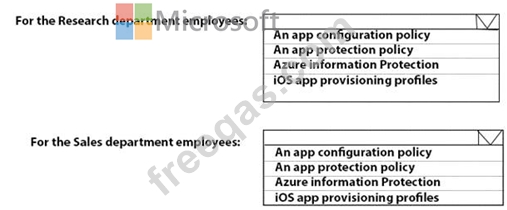
You need to recommend a solution to meet the device management requirements.
What should you include in the recommendation? To answer, select the appropriate options in the answer area.
NOTE: Each correct selection is worth one point.
Correct Answer:

Explanation

Reference:
https://github.com/MicrosoftDocs/IntuneDocs/blob/master/intune/app-protection-policy.md
https://docs.microsoft.com/en-us/azure/information-protection/configure-usage-rights#do-not-forward-option-for
insert code
  • «
  • 1
  • 2
  • 3
  • 4
  • 5
  • 6
  • 7
  • 8
  • 9
  • 10
  • …
  • »
  • »»
[×]

Download PDF File

Enter your email address to download Microsoft.MD-102.v2024-08-22.q207 Dumps

Email:

FreeQAs

Our website provides the Largest and the most Latest vendors Certification Exam materials around the world.

Using dumps we provide to Pass the Exam, we has the Valid Dumps with passing guranteed just which you need.

  • DMCA
  • About
  • Contact Us
  • Privacy Policy
  • Terms & Conditions
©2026 FreeQAs

www.freeqas.com materials do not contain actual questions and answers from Cisco's certification exams.
