You have an Azure Active Directory (Azure AD) tenant named contoso.com that contains the devices shown in the following table.
Contoso.com contains the Azure Active Directory groups shown in the following table.
You add a Windows Autopilot deployment profile. The profile is configured as shown in the following exhibit.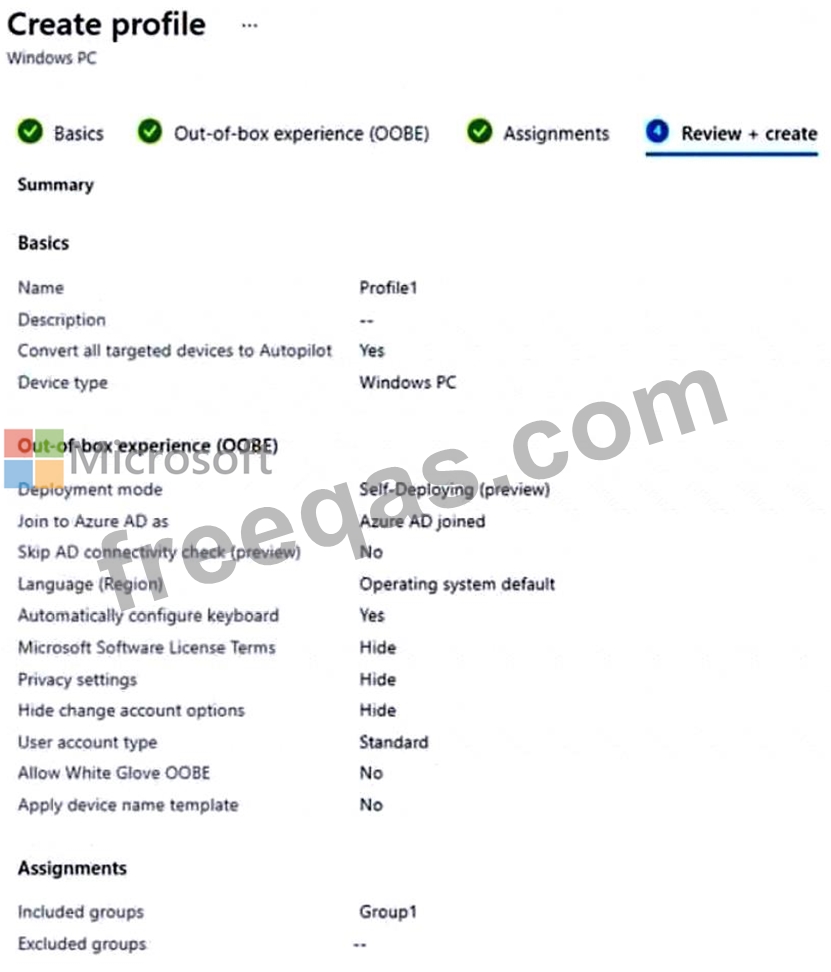
For each of the following statements, select Yes if the statement is true. Otherwise, select No.
NOTE:Each correct selection is worth one point.
Your company has a Microsoft Azure Active Directory (Azure AD) tenant named contoso.com. All users have computers that run Windows 10. The computers are joined to Azure AD and managed by using Microsoft Intune.
You need to ensure that you can centrally monitor the computers by using the Update Compliance solution.
What should you create in Intune?
You have a Microsoft 365 subscription that contains 500 computers that run Windows 11. The computers are Azure AD joined and are enrolled in Microsoft Intune.
You plan to manage Microsoft Defender Antivirus on the computers.
You need to prevent users from disabling Microsoft Defender Antivirus,
What should you do?
You have a Microsoft Deployment Toolkit (MDT) deployment shore.
You plan to deploy Windows 11 by using the Standard Client Task Sequence template.
You need to modify the task sequence to perform the following actions:
* Format disks to support Unified Extensible Firmware Interface (UEFl).
* Create a recovery partition.
Which phase of the Task sequence should you modify?
Note: This question is part of a series of questions that present the same scenario. Each question in the series contains a unique solution that might meet the stated goals. Some question sets might have more than one correct solution, while others might not have a correct solution.
After you answer a question in this section, you will NOT be able to return to it. As a result, these questions will not appear in the review screen.
Your company has several Windows 10 devices that are enrolled in Microsoft Intune.
You deploy a new computer named Computer1 that runs Windows 10 and is in a workgroup.
You need to enroll Computer1 in Intune.
Solution: You install the Company Portal app on Computer1 and use the Devices tab from the app.
Does this meet the goal?

