FreeQAs
 Request Exam  Contact
  • Home
  • View All Exams
  • New QA's
  • Upload
PRACTICE EXAMS:
  • Oracle
  • Fortinet
  • Juniper
  • Microsoft
  • Cisco
  • Citrix
  • CompTIA
  • VMware
  • ISC
  • SAP
  • EMC
  • PMI
  • HP
  • Salesforce
  • Other
  • Oracle
    Oracle
  • Fortinet
    Fortinet
  • Juniper
    Juniper
  • Microsoft
    Microsoft
  • Cisco
    Cisco
  • Citrix
    Citrix
  • CompTIA
    CompTIA
  • VMware
    VMware
  • ISC
    ISC
  • SAP
    SAP
  • EMC
    EMC
  • PMI
    PMI
  • HP
    HP
  • Salesforce
    Salesforce
  1. Home
  2. Microsoft Certification
  3. MS-100 Exam
  4. Microsoft.MS-100.v2023-11-24.q428 Dumps
  • ««
  • «
  • …
  • 25
  • 26
  • 27
  • 28
  • 29
  • 30
  • 31
  • 32
  • 33
  • 34
  • …
  • »
  • »»
Download Now

Question 141

From the Microsoft Azure Active Directory (Azure AD) Identity Protection dashboard, you view the risk events shown in the exhibit.

You need to reduce the likelihood that the sign-ins are identified as risky.
What should you do?

Correct Answer: B
A named location can be configured as a trusted location. Typically, trusted locations are network areas that are controlled by your IT department. In addition to Conditional Access, trusted named locations are also used by Azure Identity Protection and Azure AD security reports to reduce false positives for risky sign-ins.
Reference:
https://docs.microsoft.com/en-us/azure/active-directory/conditional-access/location-condition
insert code

Question 142

You have three devices enrolled in Microsoft Intune as shown in the following table.

The device compliance policies in Intune are configured as shown in the following table.

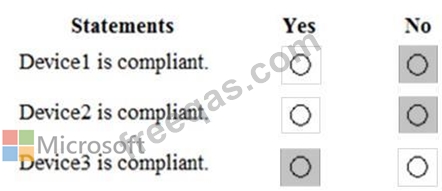
For each of the following statements, select Yes if the statement is true. Otherwise, select No.
NOTE: Each correct selection is worth one point.

Correct Answer:

Explanation

Device 1:
No because Device1 is in group3 which has Policy1 assigned which requires BitLocker.
Device 2:
No because Device2 is in group3 which has Policy1 assigned which requires BitLocker. Device2 is also in Group2 which has Policy2 assigned but the BitLocker requirement is not configured in Policy2.
Device3:
Yes because Device3 is in Group2 which has Policy2 assigned but the BitLocker requirement is not configured in Policy2.
Reference:
https://blogs.technet.microsoft.com/cbernier/2017/07/11/windows-10-intune-windows-bitlocker-management-ye
insert code

Question 143

You use Microsoft System Center Configuration manager (Current Branch) to manage devices.
Your company uses the following types of devices:
* Windows 10
* Windows 8.1
* Android
* iOS
Which devices can be managed by using co-management?

Correct Answer: C
Section: [none]
Explanation:
You can manage only Windows 10 devices by using co-management.
When you concurrently manage Windows 10 devices with both Configuration Manager and Microsoft Intune, this configuration is called co-management. When you manage devices with Configuration Manager and enroll to a third-party MDM service, this configuration is called coexistence.
Reference:
https://docs.microsoft.com/en-us/configmgr/comanage/overview
insert code

Question 144

Your company has a Microsoft Azure Active Directory (Azure AD) tenant named contoso.onmicrosoft.com that contains the users shown in the following table.

You need to identify which users can perform the following administrative tasks:
* Reset the password of User4.
* Modify the value for the manager attribute of User4.
Which users should you identify for each task? To answer, select the appropriate options in the answer area.
NOTE: Each correct selection is worth one point.

Correct Answer:

Explanation

Box 1:
A Password Administrator or a User Administrator can reset the password non-administrative users.
Box 2: A User Administrator can configure other attributes such as the Manager attribute of non-administrative users.
Reference:
https://docs.microsoft.com/en-us/azure/active-directory/users-groups-roles/directory-assign-admin-roles
insert code

Question 145

You have a Microsoft 365 subscription that uses a default named contoso.com.
Three files were created on February 1, 2019, as shown in the following table.

On March 1, 2019, you create two retention labels named Label1 and label2.
The settings for Label1 are configured as shown in the Label1 exhibit. (Click the Label1 tab.) Label 1

The settings for Label2 are configured as shown in the Label1 exhibit. (Click the Label2 tab.) Label 2

You apply the retention labels to Exchange email, SharePoint sites, and OneDrive accounts.
For each of the following statements, select Yes if the statement is true. Otherwise, select No.
NOTE: Each correct selection is worth one point.

Correct Answer:

Reference:
https://docs.microsoft.com/en-us/office365/securitycompliance/labels
https://docs.microsoft.com/en-us/office365/securitycompliance/disposition-reviews
insert code
  • ««
  • «
  • …
  • 25
  • 26
  • 27
  • 28
  • 29
  • 30
  • 31
  • 32
  • 33
  • 34
  • …
  • »
  • »»
[×]

Download PDF File

Enter your email address to download Microsoft.MS-100.v2023-11-24.q428 Dumps

Email:

FreeQAs

Our website provides the Largest and the most Latest vendors Certification Exam materials around the world.

Using dumps we provide to Pass the Exam, we has the Valid Dumps with passing guranteed just which you need.

  • DMCA
  • About
  • Contact Us
  • Privacy Policy
  • Terms & Conditions
©2026 FreeQAs

www.freeqas.com materials do not contain actual questions and answers from Cisco's certification exams.
