You need to Add the custom domain name* to Office 36S K> support the planned changes as quickly as possible.
What should you create to verify the domain names successfully?
You have a Microsoft 365 E5 subscription that contains an Azure Active Directory (Azure AD) tenant named contoso.com. The tenant contains a Microsoft SharePoint Online site named Site1 and the accounts shown in the following table.
You have an on-premises server named Server1 that contains a folder named Folder1. Folder1 contains the files shown in the following table.
The User1, User2, and Group1 accounts have the security identifiers (SIDs) shown in the following table.
You use the SharePoint Migration Tool to migrate Folder1 to Site1. You preserve the file share permissions and use the following user mapping file.
S-1-5-21-4534338-1127018997-2609994386-1304, [email protected], FALSE
S-1-5-21-4534338-1127018997-2609994386-1228, [email protected], FALSE
S-1-5-21-4534338-1127018997-2609994386-1106, GroupA, TRUE
For each of the following statements, select Yes if the statement is true. Otherwise, select No.
NOTE: Each correct selection is worth one point

Your network contains an on-premises Active Directory domain named contoso.com that syncs to Azure Active Directory (Azure AD).
You have users in contoso.com as shown in the following table.
The users have the passwords shown in the following table.
You implement password protection as shown in the following exhibit.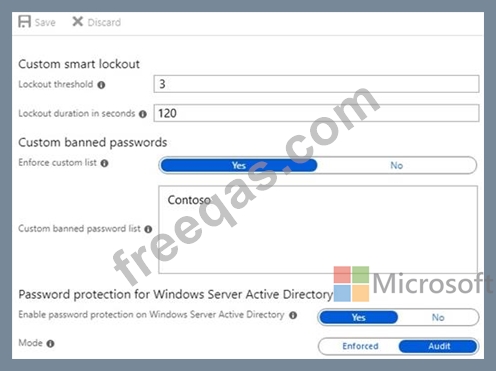
For each of the following statements, select Yes if the statement is true. Otherwise, select No.
NOTE: Each correct selection is worth one point.


Your company has an on premises Microsoft Exchange Server 2016 organization and a Microsoft 365 Enterprise subscription. You plan to migrate mailboxes and groups to Exchange Online.
You start a new migration batch.
Users report *low performance when they use the on premises Exchange Server organization.
You discover that the migration is causing the slow performance.
You need to reduce the impact of the mailbox migration on the end-users.
What should you do?
You have a Microsoft 365 E5 subscription and an Azure AD tenant named contoso.com.
All users have computers that run Windows 11, are joined to contoso.com, and are protected by using BitLocker Drive Encryption (BitLocker).
You plan to create a user named Admin1 that will perform following tasks:
* View BitLocker recovery keys.
* Configure the usage location for the users in contoso.com.
You need to assign roles to Admin1 to meet the requirements. The solution must use the principle of least privilege.
Which two roles should you assign? To answer, select the appropriate roles in the answer area. NOTE: Each correct selection is worth one point.


