Your company has a Microsoft 365 subscription that uses an Azure Active Directory (Azure AD) tenant named contoso.com. The tenant contains computers that run Windows 10 Enterprise and are managed by using Microsoft Intune. The computers are configured as shown in the following table.
You plan to implement Windows Defender Application Guard for contoso.com.
You need to identify on which two Windows 10 computers Windows Defender Application Guard can be installed.
Which two computers should you identify? Each correct answer presents part of the solution.
NOTE: Each correct selection is worth one point.
You have the Microsoft Azure Active Directory (Azure AD) users shown in the following table.
Your company uses Microsoft Intune.
Several devices are enrolled in Intune as shown in the following table.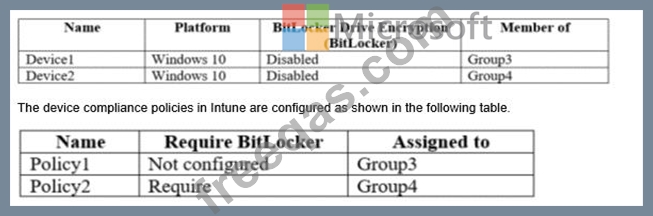
You create a conditional access policy that has the following settings:
The Assignments settings are configured as follows:
Users and groups: Group1
Cloud apps: Microsoft Office 365 Exchange Online
Conditions: Include All device state, exclude Device marked as compliant Access controls is set to Block access.
For each of the following statements, select Yes if the statement is true. Otherwise, select No.
NOTE: Each correct selection is worth one point.

You have a Microsoft 365 subscription that contains the users in the following table.
In Microsoft Endpoint Manager, you create two device type restrictions that have the settings shown in the following table.
In Microsoft Endpoint Manager, you create three device limit restrictions that have the settings shown in the following table.
For each of the following statements, select Yes if the statement is true. Otherwise, select No.
NOTE: Each correct selection is worth one point.


You need to meet the technical requirement for large-volume document retrieval. What should you create?
You have the Microsoft Azure Active Director (Azure AD) users shown in the following table.
You create a conditional access policy that has the following settings:
* The Assignments settings are configured as follows:
* Users and groups: Group1
* Cloud apps: Microsoft Office 365 Exchange Online
* Conditions: Include All device state, exclude Device marked as compliant
* Access controls is set to Block access.
For each of the following statements, select Yes if the statement is true. Otherwise, select No.
NOTE: Each correct selection is worth one point.


