FreeQAs
 Request Exam  Contact
  • Home
  • View All Exams
  • New QA's
  • Upload
PRACTICE EXAMS:
  • Oracle
  • Fortinet
  • IBM
  • Juniper
  • Microsoft
  • Cisco
  • Citrix
  • CompTIA
  • VMware
  • ISC
  • SAP
  • EMC
  • PMI
  • HP
  • Salesforce
  • Other
  • Oracle
    Oracle
  • Fortinet
    Fortinet
  • IBM
    IBM
  • Juniper
    Juniper
  • Microsoft
    Microsoft
  • Cisco
    Cisco
  • Citrix
    Citrix
  • CompTIA
    CompTIA
  • VMware
    VMware
  • ISC
    ISC
  • SAP
    SAP
  • EMC
    EMC
  • PMI
    PMI
  • HP
    HP
  • Salesforce
    Salesforce
  1. Home
  2. Microsoft Certification
  3. MS-102 Exam
  4. Microsoft.MS-102.v2024-05-22.q235 Dumps
  • «
  • 1
  • 2
  • 3
  • 4
  • 5
  • 6
  • 7
  • 8
  • 9
  • 10
  • …
  • »
  • »»
Download Now

Question 16

Note: This question is part of a series of questions that present the same scenario. Each question in the series contains a unique solution that might meet the stated goals. Some question sets might have more than one correct solution, while others might not have a correct solution.
After you answer a question in this section, you will NOT be able to return to it. As a result, these questions will not appear in the review screen.
Your network contains an Active Directory domain.
You deploy an Azure AD tenant.
Another administrator configures the domain to synchronize to Azure AD.
You discover that 10 user accounts in an organizational unit (OU) are NOT synchronized to Azure AD. All the other user accounts synchronized successfully.
You review Azure AD Connect Health and discover that all the user account synchronizations completed successfully.
You need to ensure that the 10 user accounts are synchronized to Azure AD.
Solution: From the Synchronization Rules Editor, you create a new outbound synchronization rule.
Does this meet the goal?

Correct Answer: B
The question states that "all the user account synchronizations completed successfully". Therefore, the synchronization rule is configured correctly. It is likely that the 10 user accounts are being excluded from the synchronization cycle by a filtering rule.
Reference:
https://docs.microsoft.com/en-us/azure/active-directory/hybrid/how-to-connect-sync-configure-filtering
insert code

Question 17

You have a Microsoft 365 subscription.
You need to review reports to identify the following:
* The storage usage of files stored in Microsoft Teams
* The number of active users per team
Which report should you review for each requirement? To answer, drag the appropriate reports to the correct requirements. Each report may be used once, more than once, or not at all. You may need to drag the split bar between panes or scroll to view content

Correct Answer:

Explanation
insert code

Question 18

You have a Microsoft 365 E5 subscription.
You plan to create the data loss prevention (DLP) policies shown in the following table.

You need to create DLP rules for each policy.
Which policies support the sender is condition and the file extension is condition? To answer select the appropriate options in the answer area.
NOTE: Each correct selection is worth one point.
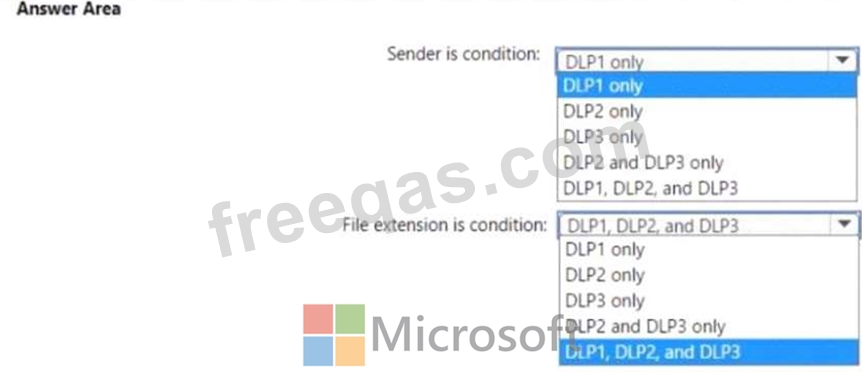
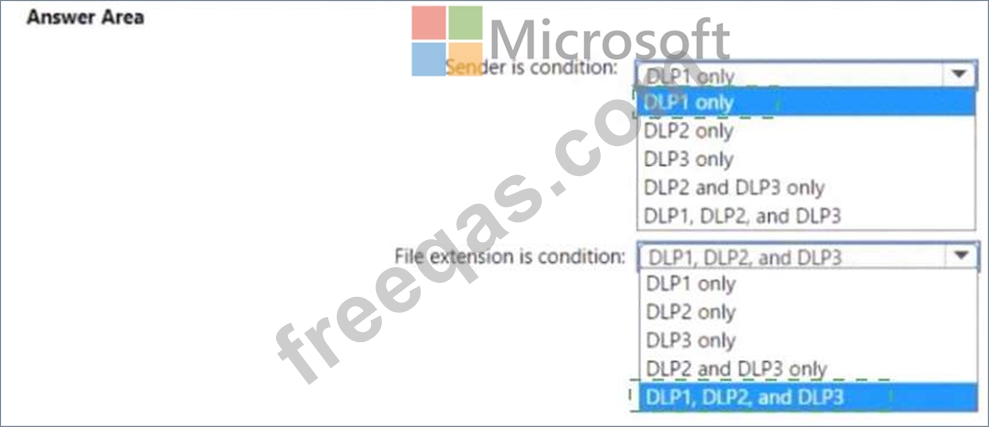

Correct Answer:

Explanation
insert code

Question 19

From the Security & Compliance admin center, you create a content export as shown in the exhibit. (Click the Exhibit tab.)

What will be excluded from the export?

Correct Answer: B
Explanation
Unrecognized file formats are excluded from the search.
Certain types of files, such as Bitmap or MP3 files, don't contain content that can be indexed. As a result, the search indexing servers in Exchange and SharePoint don't perform full-text indexing on these types of files.
These types of files are considered to be unsupported file types.
Reference:
https://docs.microsoft.com/en-us/microsoft-365/compliance/partially-indexed-items-in-content-search?view=o36
https://docs.microsoft.com/en-us/office365/securitycompliance/export-a-content-search-report
insert code

Question 20

You have a Microsoft 365 E5 tenant that contains a Microsoft SharePoint Online site named Site1. Site1 contains the files shown in the following table.
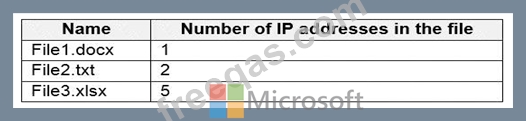
You create a sensitivity label named Sensitivity1 and an auto-label policy that has the following configurations:
Name: AutoLabel1
Label to auto-apply: Sensitivity1
Rules for SharePoint Online sites: Rule1-SPO
Choose locations where you want to apply the label: Site1
Rule1-SPO is configured as shown in the following exhibit.

For each of the following statements, select Yes if the statement is true. Otherwise, select No.
NOTE: Each correct selection is worth one point.
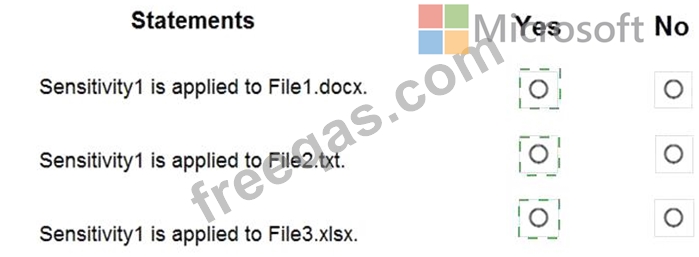
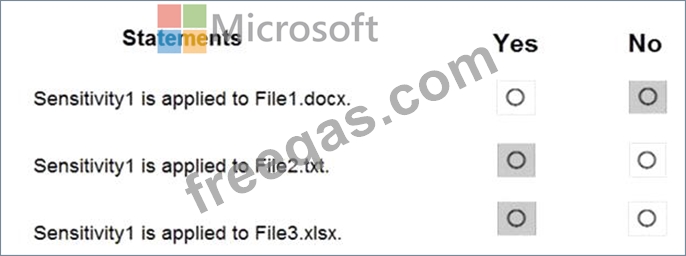
Correct Answer:

Explanation

Reference:
https://docs.microsoft.com/en-us/microsoft-365/compliance/apply-sensitivity-label-automatically?view=o365-wo
https://docs.microsoft.com/en-us/microsoft-365/compliance/sensitivity-labels?view=o365-worldwide
insert code
  • «
  • 1
  • 2
  • 3
  • 4
  • 5
  • 6
  • 7
  • 8
  • 9
  • 10
  • …
  • »
  • »»
[×]

Download PDF File

Enter your email address to download Microsoft.MS-102.v2024-05-22.q235 Dumps

Email:

FreeQAs

Our website provides the Largest and the most Latest vendors Certification Exam materials around the world.

Using dumps we provide to Pass the Exam, we has the Valid Dumps with passing guranteed just which you need.

  • DMCA
  • About
  • Contact Us
  • Privacy Policy
  • Terms & Conditions
©2026 FreeQAs

www.freeqas.com materials do not contain actual questions and answers from Cisco's certification exams.
