FreeQAs
 Request Exam  Contact
  • Home
  • View All Exams
  • New QA's
  • Upload
PRACTICE EXAMS:
  • Oracle
  • Fortinet
  • Juniper
  • Microsoft
  • Cisco
  • Citrix
  • CompTIA
  • VMware
  • ISC
  • SAP
  • EMC
  • PMI
  • HP
  • Salesforce
  • Other
  • Oracle
    Oracle
  • Fortinet
    Fortinet
  • Juniper
    Juniper
  • Microsoft
    Microsoft
  • Cisco
    Cisco
  • Citrix
    Citrix
  • CompTIA
    CompTIA
  • VMware
    VMware
  • ISC
    ISC
  • SAP
    SAP
  • EMC
    EMC
  • PMI
    PMI
  • HP
    HP
  • Salesforce
    Salesforce
  1. Home
  2. Microsoft Certification
  3. MS-102 Exam
  4. Microsoft.MS-102.v2024-11-11.q350 Dumps
  • ««
  • «
  • …
  • 36
  • 37
  • 38
  • 39
  • 40
  • 41
  • 42
  • 43
  • 44
  • 45
  • …
  • »
  • »»
Download Now

Question 196

HOTSPOT
You have a Microsoft 365 E5 subscription that contains a user named User1.
Azure AD Password Protection is configured as shown in the following exhibit.

User1 attempts to update their password to the following passwords:
F@lcon
Project22
T4il$pin45dg4
Use the drop-down menus to select the answer choice that completes each statement based on the information presented in the graphic.
NOTE: Each correct selection is worth one point.

Correct Answer:

Explanation

Box 1: Only T4il$pin45dg4
Box 2: can attempt to sign in immediately
Note: Manage Azure AD smart lockout values
Based on your organizational requirements, you can customize the Azure AD smart lockout values.
Customization of the smart lockout settings, with values specific to your organization, requires Azure AD Premium P1 or higher licenses for your users. Customization of the smart lockout settings is not available for Azure China 21Vianet tenants.
To check or modify the smart lockout values for your organization, complete the following steps:
Sign in to the Entra portal.
Search for and select Azure Active Directory, then select Security > Authentication methods > Password protection.
Set the Lockout threshold, based on how many failed sign-ins are allowed on an account before its first lockout.
The default is 10 for Azure Public tenants and 3 for Azure US Government tenants.
Set the Lockout duration in seconds, to the length in seconds of each lockout.
The default is 60 seconds (one minute).
If the first sign-in after a lockout period has expired also fails, the account locks out again. If an account locks repeatedly, the lockout duration increases.
Reference:
https://learn.microsoft.com/en-us/azure/active-directory/authentication/howto-password-smart-lockout
insert code

Question 197

You need to meet the technical requirement for the SharePoint administrator. What should you do? To answer, select the appropriate options in the answer area. NOTE: Each correct selection is worth one point.

Correct Answer:

Explanation

References:
https://docs.microsoft.com/en-us/office365/securitycompliance/search-the-audit-log-in-security-and-compliance#
insert code

Question 198

You have a Microsoft 365 E5 subscription that contains a Microsoft SharePoint site named site1. You need to ensure that site1 meets the following requirements:
* Retains all data for 10 years
* Prevents the sharing of data outside the organization
Which two items should you create and apply to site1? Each correct answer presents part of the solution. NOTE: Each correct selection is worth one point.

Correct Answer: B,C
insert code

Question 199

Note: This question is part of a series of questions that present the same scenario. Each question in the series contains a unique solution that might meet the stated goals. Some question sets might have more than one correct solution, while others might not have a correct solution.
After you answer a question in this section, you will NOT be able to return to it. As a result, these questions will not appear in the review screen.
Your network contains an on-premises Active Directory domain named contoso.com. The domain contains the users shown in the following table.
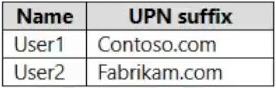
The domain syncs to an Azure AD tenant named contoso.com as shown in the exhibit. (Click the Exhibit tab.)

User2 fails to authenticate to Azure AD when signing in as [email protected].
You need to ensure that User2 can access the resources in Azure AD.
Solution: From the Microsoft Entra admin center, you assign User2 the Security Reader role. You instruct User2 to sign in as [email protected].
Does this meet the goal?

Correct Answer: B
This is not a permissions issue so you do not need to assign the Security Reader role.
The on-premises Active Directory domain is named contoso.com. User2 could sign on as [email protected] but you would first need to change the UPN of User2 to [email protected].
insert code

Question 200

HOTSPOT
Your network contains an on-premises Active Directory domain.
You have a Microsoft 365 E5 subscription.
You plan to implement directory synchronization.
You need to identify potential synchronization issues for the domain. The solution must use the principle of least privilege.
What should you use? To answer, select the appropriate options in the answer area.
NOTE: Each correct selection is worth one point.

Correct Answer:

Explanation:

Box 1: IdFix
Query and fix invalid object attributes with the IdFix tool
Microsoft is working to reduce the time required to remediate identity issues when onboarding to Microsoft
365. A portion of this effort is intended to address the time involved in remediating the Windows Server Active Directory (Windows Server AD) errors reported by the directory synchronization tools such as Azure AD Connect and Azure AD Connect cloud sync. The focus of IdFix is to enable you to accomplish this task in a simple, expedient fashion.
The IdFix tool provides you the ability to query, identify, and remediate the majority of object synchronization errors in your Window's Server AD forests in preparation for deployment to Microsoft 365. The utility does not fix all errors, but it does find and fix the majority. This remediation will then allow you to successfully synchronize users, contacts, and groups from on-premises Active Directory into Microsoft 365. Note: IdFix might identify errors beyond those that emerge during synchronization. The most common example is compliance with rfc 2822 for smtp addresses. Although invalid attribute values can be synchronized to the cloud, the product group recommends that these errors be corrected.
Incorrect:
* AccessChk
Box 2: Enterprise Admins
IdFix permissions requirements
The user account that you use to run IdFix must have read and write access to the AD DS domain.
If you aren't sure if your user account meets these requirements, and you're not sure how to check, you can still download and run IdFix. If your user account doesn't have the right permissions, IdFix will simply display an error when you try to run it.
* Enterprise Admins
The Enterprise Admins group exists only in the root domain of an Active Directory forest of domains. The group is a Universal group if the domain is in native mode. The group is a Global group if the domain is in mixed mode. Members of this group are authorized to make forest-wide changes in Active Directory, like adding child domains.
Incorrect:
* Domain Admins
Members of the Domain Admins security group are authorized to administer the domain. By default, the Domain Admins group is a member of the Administrators group on all computers that have joined a domain, including the domain controllers. The Domain Admins group is the default owner of any object that's created in Active Directory for the domain by any member of the group. If members of the group create other objects, such as files, the default owner is the Administrators group.
* Server Operator
Server Operators can log on to a server interactively; create and delete network shares; start and stop services; back up and restore files; format the hard disk of the computer; and shut down the computer. Any service that accesses the system has the Service identity.
* Domain Users - too few permissions
The Domain Users group includes all user accounts in a domain. When you create a user account in a domain, it's automatically added to this group.
Reference:
https://microsoft.github.io/idfix/
https://learn.microsoft.com/en-us/windows-server/identity/ad-ds/manage/understand-security-groups
insert code
  • ««
  • «
  • …
  • 36
  • 37
  • 38
  • 39
  • 40
  • 41
  • 42
  • 43
  • 44
  • 45
  • …
  • »
  • »»
[×]

Download PDF File

Enter your email address to download Microsoft.MS-102.v2024-11-11.q350 Dumps

Email:

FreeQAs

Our website provides the Largest and the most Latest vendors Certification Exam materials around the world.

Using dumps we provide to Pass the Exam, we has the Valid Dumps with passing guranteed just which you need.

  • DMCA
  • About
  • Contact Us
  • Privacy Policy
  • Terms & Conditions
©2026 FreeQAs

www.freeqas.com materials do not contain actual questions and answers from Cisco's certification exams.
