FreeQAs
 Request Exam  Contact
  • Home
  • View All Exams
  • New QA's
  • Upload
PRACTICE EXAMS:
  • Oracle
  • Fortinet
  • IBM
  • Juniper
  • Microsoft
  • Cisco
  • Citrix
  • CompTIA
  • VMware
  • ISC
  • SAP
  • EMC
  • PMI
  • HP
  • Salesforce
  • Other
  • Oracle
    Oracle
  • Fortinet
    Fortinet
  • IBM
    IBM
  • Juniper
    Juniper
  • Microsoft
    Microsoft
  • Cisco
    Cisco
  • Citrix
    Citrix
  • CompTIA
    CompTIA
  • VMware
    VMware
  • ISC
    ISC
  • SAP
    SAP
  • EMC
    EMC
  • PMI
    PMI
  • HP
    HP
  • Salesforce
    Salesforce
  1. Home
  2. Microsoft Certification
  3. MS-203 Exam
  4. Microsoft.MS-203.v2022-10-07.q117 Dumps
  • «
  • 1
  • 2
  • 3
  • 4
  • 5
  • 6
  • 7
  • 8
  • 9
  • 10
  • …
  • »
  • »»
Download Now

Question 11

Please wait while the virtual machine loads. Once loaded, you may proceed to the lab section. This may take a few minutes, and the wait time will not be deducted from your overall test time.
When the Next button is available, click it to access the lab section. In this section, you will perform a set of tasks in a live environment. While most functionality will be available to you as it would be in a live environment, some functionality (e.g., copy and paste, ability to navigate to external websites) will not be possible by design.
Scoring is based on the outcome of performing the tasks stated in the lab. In other words, it doesn't matter how you accomplish the task, if you successfully perform it, you will earn credit for that task.
Labs are not timed separately, and this exam may have more than one lab that you must complete. You can use as much time as you would like to complete each lab. But, you should manage your time appropriately to ensure that you are able to complete the lab(s) and all other sections of the exam in the time provided.
Please note that once you submit your work by clicking the Next button within a lab, you will NOT be able to return to the lab.
Use the following login credentials as needed:
To enter your username, place your cursor in the Sign in box and click on the username below.
To enter your password, place your cursor in the Enter password box and click on the password below.
Microsoft 365 Username: [email protected]
Microsoft 365 Password: xxxxxx
If the Microsoft 365 portal does not load successfully in the browser, press CTRL-K to reload the portal in a new browser tab.
The following information is for technical support purposes only.
Lab Instance: XXXXXX
You need to ensure that a user named Lee Gu can view all the Exchange Online configurations of your organization. The solution must use the principle of least privilege.
To complete this task, sign in to the Microsoft 365 admin center.

Correct Answer:
1. Open the Microsoft 365 administration centre
This can be done at: https://admin.microsoft.com
2. Create a new user
Please enter a first name
Last name
Display name
Username
3. Add the necessary licence
For admin roles you sometimes need a licence. Especially in the security stack within Microsoft 365.
4. Add the Global Reader role via Roles
You can give multiple roles to the person you want.
Reference:
https://365tips.be/en/how-to-create-a-global-reader-account-for-your-it-supplier/
insert code

Question 12

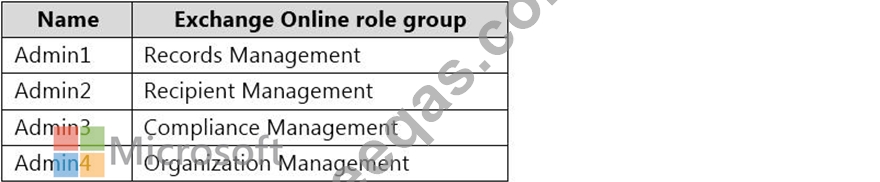
You need to recommend a procedure for closing the Brussels office that meets the technical requirements.
What should you recommend?

Correct Answer: C
References:
https://docs.microsoft.com/en-us/exchange/architecture/mailbox-servers/manage-mailbox-moves?
view=exchserver-2019
https://theitbros.com/move-exchange-mailboxes-to-another-database/
Topic 3, Fabrikam, Inc
Existing Environment
Network Environment
The on-premises network of Fabrikam contains an Active Directory domain named fabrikam.com.
Fabrikam has a Microsoft 365 tenant named fabrikam.com. All users have Microsoft 365 Enterprise E5 licenses.
User accounts sync between Active Directory Domain Services (AD DS) and the Microsoft 365 tenant.
Fabrikam.com contains the users and devices shown in the following table.

Fabrikam currently leases mobile devices from several mobile operators.
Microsoft Exchange Online Environment
All users are assigned an Outlook Web App policy named FilesPolicy.
In-Place Archiving is disabled for Exchange Online.
You have the users shown in the following table.

User1 and User3 use Microsoft Outlook for iOS and Android to access email from their mobile device. User2 uses a native Android email app.
A Safe Links policy in Microsoft Defender for Office 365 is applied to the fabrikam.com tenant. The marketing department uses a mail-enabled public folder named FabrikamProject.
Default MRM Policy is disabled for the fabrikam.com tenant.
Problem Statements
Fabrikam identifies the following issues:
Users report that they receive phishing emails containing embedded links.
Users download and save ASPX files when they use Outlook on the web.
Email between Fabrikam and Litware is unencrypted during transit.
User2 reports that he lost his mobile device.
Requirements
Planned Changes
Fabrikam plans to implement the following changes:
Configure FilesPolicy to prevent Outlook on the web users from downloading attachments that have the ASPX extension.
Purchase a new smartboard and configure the smartboard as a booking resource in Exchange Online.
Ensure that the new smartboard can only be booked for a maximum of one hour.
Allow only Admin1 to accept or deny booking requests for the new smartboard.
Standardize mobile device costs by moving to a single mobile device operator.
Migrate the FabrikamProject public folder to Microsoft SharePoint Online.
Enable In-Place Archiving for users in the marketing department.
Encrypt all email between Fabrikam and Litware.
Technical Requirements
Fabrikam identifies the following technical requirements:
Ensure that the planned Sharepoint site for FabrikamProject only contains content that was created during the last 12 months.
Any existing file types that are currently configured as blocked or allowed in the FilesPolicy policy must remain intact.
When users leave the company, remove their licenses and ensure that their mailbox is accessible to Admin1 and Admin2.
Generate a report that identifies mobile devices and the mobile device operator of each device.
Use the principle of least privilege.
Minimize administrative effort.
Retention Requirements
Fabrikam identifies the following retention requirements for all users:
Enable users to tag items for deletion after one year.
Enable users to tag items for deletion after two years.
Enable users to tag items to be archived after one year.
Automatically delete items in the Junk Email folder after 30 days.
Automatically delete items in the Sent Items folder after 300 days.
Ensure that any items without a retention tag are moved to the Archive mailbox two years after they were created and permanently deleted seven years after they were created.
insert code

Question 13

You have a Microsoft Exchange Server 2019 organization.
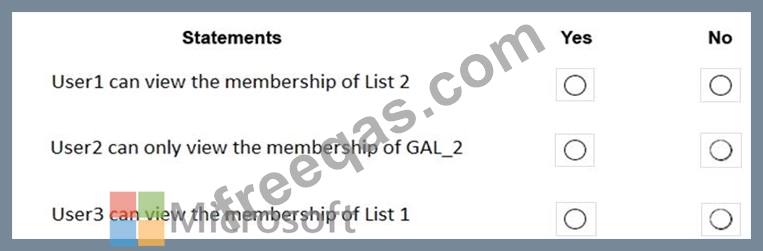
You have the Address Book Policies (ABP) and address lists in the following table.

You have the users in the following table.

You assign ABP1 to User1 and User2.
User3 is NOT assigned to an Address Book Policy.
For each of the following statements, select Yes if the statement is true. Otherwise, select No.
NOTE: Each correct selection is worth one point.
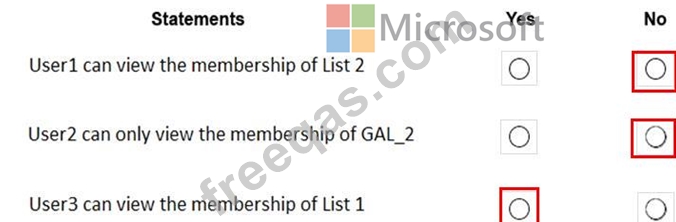
Correct Answer:

References:
https://docs.microsoft.com/en-us/exchange/email-addresses-and-address-books/address-book-policies/address-book-policies?view=exchserver-2019
insert code

Question 14

Your company named ADatum Corporation has a Microsoft Exchange Online subscription that contains the sharing policies shown in the following table.

The subscription contains the mailboxes shown in the following table.

ADatum does business with the partner companies shown in the following table.

For each of the following statements, select Yes if the statement is true. Otherwise, select No.
NOTE: Each correct selection is worth one point.
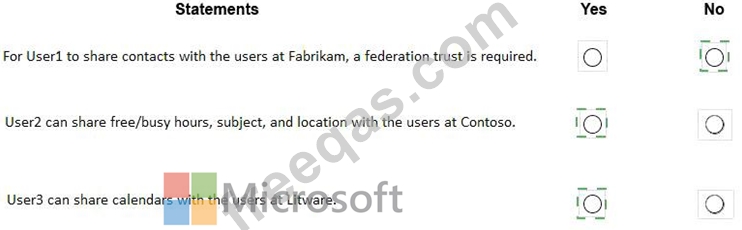
Correct Answer:

Explanation
insert code

Question 15

Note: This question is part of a series of questions that present the same scenario. Each question in the series contains a unique solution that might meet the stated goals. Some question sets might have more than one correct solution, while others might not have a correct solution.
After you answer a question in this section, you will NOT be able to return to it. As a result, these questions will not appear in the review screen.
You have a Microsoft Exchange Online tenant that uses an email domain named contoso.com.
You need to prevent all users from performing the following tasks:
Sending out-of-office replies to an email domain named fabrikam.com.
Sending automatic replies to an email domain named adatum.com.
The solution must ensure that all the users can send out-of-office replies and automatic replies to other email domains on the internet.
Solution: You create two new remote domains.
Does this meet the goal?


Correct Answer: A
Reference:
https://docs.microsoft.com/en-us/exchange/mail-flow-best-practices/remote-domains/remote-domains
insert code
  • «
  • 1
  • 2
  • 3
  • 4
  • 5
  • 6
  • 7
  • 8
  • 9
  • 10
  • …
  • »
  • »»
[×]

Download PDF File

Enter your email address to download Microsoft.MS-203.v2022-10-07.q117 Dumps

Email:

FreeQAs

Our website provides the Largest and the most Latest vendors Certification Exam materials around the world.

Using dumps we provide to Pass the Exam, we has the Valid Dumps with passing guranteed just which you need.

  • DMCA
  • About
  • Contact Us
  • Privacy Policy
  • Terms & Conditions
©2026 FreeQAs

www.freeqas.com materials do not contain actual questions and answers from Cisco's certification exams.