FreeQAs
 Request Exam  Contact
  • Home
  • View All Exams
  • New QA's
  • Upload
PRACTICE EXAMS:
  • Oracle
  • Fortinet
  • Juniper
  • Microsoft
  • Cisco
  • Citrix
  • CompTIA
  • VMware
  • ISC
  • SAP
  • EMC
  • PMI
  • HP
  • Salesforce
  • Other
  • Oracle
    Oracle
  • Fortinet
    Fortinet
  • Juniper
    Juniper
  • Microsoft
    Microsoft
  • Cisco
    Cisco
  • Citrix
    Citrix
  • CompTIA
    CompTIA
  • VMware
    VMware
  • ISC
    ISC
  • SAP
    SAP
  • EMC
    EMC
  • PMI
    PMI
  • HP
    HP
  • Salesforce
    Salesforce
  1. Home
  2. Microsoft Certification
  3. MS-203 Exam
  4. Microsoft.MS-203.v2024-01-15.q331 Dumps
  • ««
  • «
  • …
  • 11
  • 12
  • 13
  • 14
  • 15
  • 16
  • 17
  • 18
  • 19
  • 20
  • …
  • »
  • »»
Download Now

Question 71

You have hybrid deployment between a Microsoft Exchange Online tenant and an on-premises Exchange Server 2019 organization. The deployment uses Azure AD Connect. All incoming email is delivered to Exchange Online. You have 10 mail-enabled public folders hosted on an on-premises Mailbox server.
Customers receive an error when an email message is sent to a public folder.
You need to ensure that all the mail-enabled public folders can receive email messages from the internet. The solution must ensure that messages can be delivered only to valid recipients.
Solution: From Azure AD Connect, select Exchange Mail Public Folders.
Does this meet the goal?

Correct Answer: A
Explanation
From Azure AD Connect, selecting Exchange Mail Public Folders will ensure that all the mail-enabled public folders can receive email messages from the internet and that messages can be delivered only to valid recipients. This is according to the Microsoft 365 Messaging documentation (https://docs.microsoft.com/en-us/exchange/hybrid-deployment/hybrid-mail-flow).
insert code

Question 72

You have a Microsoft Exchange Server 2019 hybrid deployment.
All user mailboxes are migrated to Exchange Online.
You need to migrate the public folders from the on-premises organizations to Exchange Online.
Which three actions should you perform in sequence before you create the migration batch? To answer, move the appropriate actions from the list of actions to the answer area and arrange them in the correct order.
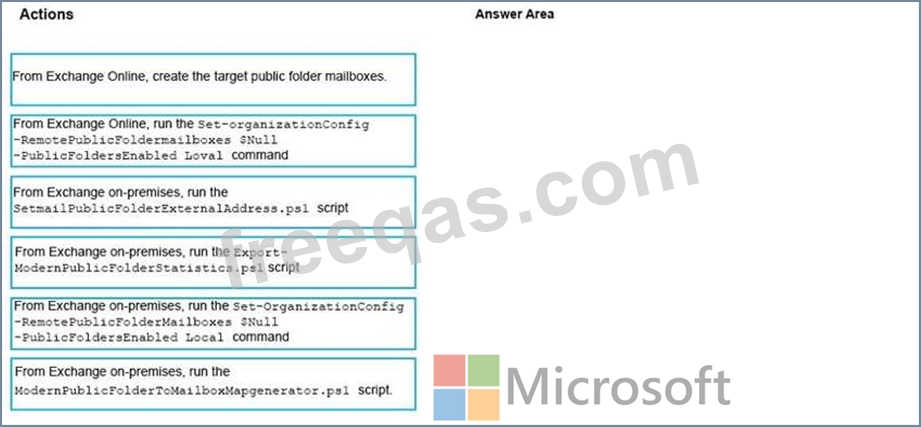
Correct Answer:

Reference:
https://docs.microsoft.com/en-us/Exchange/collaboration/public-folders/migrate-to-exchange-online?view=exchserver-2019
https://docs.microsoft.com/en-us/Exchange/collaboration/public-folders/migrate-to-exchange-online?view=exchserver-2019#step-3-generate-the-csv-files
https://docs.microsoft.com/en-us/Exchange/collaboration/public-folders/migrate-to-exchange-online?view=exchserver-2019#step-4-create-the-public-folder-mailboxes-in-exchange-online
insert code

Question 73

Your company has a Microsoft Exchange Server 2019 hybrid deployment.
The company has four departments that have the mailboxes shown in the following table.

The mailboxes are configured as shown in the following table.

You have two administrators named Admin1 and Admin2 that are assigned the permissions shown in the following table.

For each of the following statement, select yes if the statement is true. otherwise, select No.
NOTE: Each correct selection is worth one point.

Correct Answer:

References:
https://docs.microsoft.com/en-us/exchange/discovery-management-exchange-2013-help
https://docs.microsoft.com/en-us/powershell/module/exchange/mailboxes/search-mailbox?view=exchange-ps
insert code

Question 74

Your company named Contoso, Ltd. has a Microsoft Exchange Server 2019 hybrid deployment.
A partner company named Fabrikam, Inc. uses an Exchange Online subscription for email.
You need to ensure that all the users at Fabrikam can view the free/busy information of the users at Contoso.
What should you configure? To answer, drag the appropriate components to the correct companies. Each component may be used once, more than once, or not at all. You may need to drag the split bar between panes or scroll to view content.
NOTE: Each correct selection is worth one point.

Correct Answer:

Reference:
https://docs.microsoft.com/en-us/exchange/sharing-exchange-2013-help
https://docs.microsoft.com/en-us/exchange/sharing/organization-relationships/organization-relationships
insert code

Question 75

You have a Microsoft Exchange Online tenant that contains the users shown in the following table.

From the Exchange admin center, you issue a Wipe Data command for User1 and User2.
What occurs on the device of each user? To answer, select the appropriate options in the answer area.
NOTE: Each correct selection is worth one point.
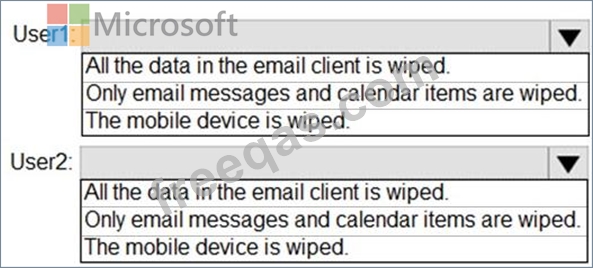
Correct Answer:

Reference:
https://docs.microsoft.com/en-us/exchange/clients/exchange-activesync/remote-wipe?view=exchserver-2019
insert code
  • ««
  • «
  • …
  • 11
  • 12
  • 13
  • 14
  • 15
  • 16
  • 17
  • 18
  • 19
  • 20
  • …
  • »
  • »»
[×]

Download PDF File

Enter your email address to download Microsoft.MS-203.v2024-01-15.q331 Dumps

Email:

FreeQAs

Our website provides the Largest and the most Latest vendors Certification Exam materials around the world.

Using dumps we provide to Pass the Exam, we has the Valid Dumps with passing guranteed just which you need.

  • DMCA
  • About
  • Contact Us
  • Privacy Policy
  • Terms & Conditions
©2026 FreeQAs

www.freeqas.com materials do not contain actual questions and answers from Cisco's certification exams.
