FreeQAs
 Request Exam  Contact
  • Home
  • View All Exams
  • New QA's
  • Upload
PRACTICE EXAMS:
  • Oracle
  • Fortinet
  • IBM
  • Juniper
  • Microsoft
  • Cisco
  • Citrix
  • CompTIA
  • VMware
  • ISC
  • SAP
  • EMC
  • PMI
  • HP
  • Salesforce
  • Other
  • Oracle
    Oracle
  • Fortinet
    Fortinet
  • IBM
    IBM
  • Juniper
    Juniper
  • Microsoft
    Microsoft
  • Cisco
    Cisco
  • Citrix
    Citrix
  • CompTIA
    CompTIA
  • VMware
    VMware
  • ISC
    ISC
  • SAP
    SAP
  • EMC
    EMC
  • PMI
    PMI
  • HP
    HP
  • Salesforce
    Salesforce
  1. Home
  2. Microsoft Certification
  3. MS-600 Exam
  4. Microsoft.MS-600.v2022-04-04.q138 Dumps
  • ««
  • «
  • …
  • 20
  • 21
  • 22
  • 23
  • 24
  • 25
  • 26
  • 27
  • 28
  • 29
Download Now

Question 136

You are building a Microsoft Teams application.
For each of the following statements, select Yes if the statement is true. Otherwise, select No.
NOTE: Each correct selection is worth one point.

Correct Answer:

Explanation

Box 1: Yes
Once an outgoing webhook is added to a team, it acts like bot, listening in channels for messages using
@mention, sending notifications to external web services, and responding with rich messages that can include cards and images.
Box 2: Yes
Webhooks are a great way for Teams to integrate with external apps. A webhook is essentially a POST request sent to a callback URL. In Teams, outgoing webhooks provide a simple way to allow users to send messages to your web service without having to go through the full process of creating bots via the Microsoft Bot Framework. Outgoing webhooks post data from Teams to any chosen service capable of accepting a JSON payload.
Box 3: Yes
Create an outgoing webhook
* Select the appropriate team and select Manage team from the (* * * ) drop-down menu.
* Choose the Apps tab from the navigation bar.
* From the window's lower right corner select Create an outgoing webhook.
* In the resulting popup window complete the required fields:
* Name - The webhook title and @mention tap.
* Callback URL - The HTTPS endpoint that accepts JSON payloads and will receive POST requests from Teams.
Reference:
https://docs.microsoft.com/en-us/microsoftteams/platform/webhooks-and-connectors/how-to/add-outgoing-webh
insert code

Question 137

Which type of authentication flow should you recommend for the planned integration with Office 365?

Correct Answer: C
To use Microsoft Graph to read and write resources on behalf of a user, your app must get an access token from the Microsoft identity platform and attach the token to requests that it sends to Microsoft Graph.
One common flow used by native and mobile apps and also by some Web apps is the OAuth 2.0 authorization code grant flow.
Scenario: Email the generated invoices to customers on behalf of the current signed-in user. Any emails generated by the system will contain the invoiced.
Use Azure AD to manage identities, authentication, and authorization.
insert code

Question 138

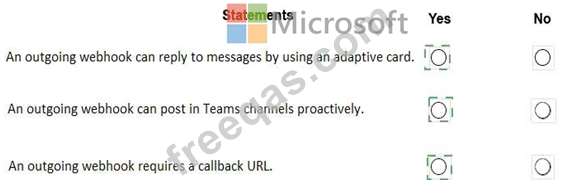
You are building a Microsoft teams application by using an outgoing webhook.
For each of the following statements, select Yes if the statement is true. Otherwise, select No.
NOTE: Each correct selection is worth one point.

Correct Answer:
insert code
  • ««
  • «
  • …
  • 20
  • 21
  • 22
  • 23
  • 24
  • 25
  • 26
  • 27
  • 28
  • 29
[×]

Download PDF File

Enter your email address to download Microsoft.MS-600.v2022-04-04.q138 Dumps

Email:

FreeQAs

Our website provides the Largest and the most Latest vendors Certification Exam materials around the world.

Using dumps we provide to Pass the Exam, we has the Valid Dumps with passing guranteed just which you need.

  • DMCA
  • About
  • Contact Us
  • Privacy Policy
  • Terms & Conditions
©2026 FreeQAs

www.freeqas.com materials do not contain actual questions and answers from Cisco's certification exams.
