Your company has a Microsoft 365 subscription that uses Microsoft Teams.
The company has a team named Customer Support.
Guest users from outside the company regularly access the Customer Support team.
You need to configure the Guest access settings to meet the following requirements:
Guest users must be able to view only a single application during screen sharing sessions.
Guest users must be prevented from creating channels in Customer Support.
Guest users must be admitted to meetings manually.
Which settings should you configure for each requirement? To answer, drag the appropriate settings to the correct requirements. Each setting may be used once, more than once, or not at all. You may need to drag the split bar between panes or scroll to view content.

Your company has a Microsoft 365 subscription.
You need to configure Microsoft Teams to meet the requirements shown in the following table.
uirement? To answer, select the appropriate options in the answer area.
NOTE: Each correct selection is worth one point.

Your company uses Teams.
All users are assigned a Microsoft 365 E? license.
You need to purchase add-on licenses that will enable the following features for the Teams environment Microsoft Purview Information Barriers Data loss prevention (DIP) for Teams chat and channel messages Safe attachments for Microsoft SharePoint OneDrive and Teams To answer, drag the appropriate reports to the correct requirements. Each report may be used once, more than once, or not at all.


You have a Microsoft Teams team named Team1.
Team1 is deleted accidentally.
You need to recover Team1.
How should you complete the PowerShell script? To answer, select the appropriate options in the answer area.
NOTE: Each correct selection is worth one point.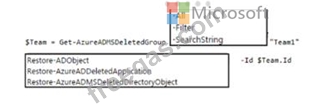

You are Microsoft Teams administrator for your company.
You have the Org-wide app settings shown in the App Settings exhibit. (Click the App Settings tab.)
The company's global app permission policy is configured as shown in the Permission Policy exhibit. (Click the Permission Policy tab.)
The company's global app setup policy is configured as shown in the Setup Policy exhibit. (Click the Setup Policy tab.)
For each of the following statements, select Yes if the statement is true. Otherwise, select No.
NOTE: Each correct selection is worth one point.


