FreeQAs
 Request Exam  Contact
  • Home
  • View All Exams
  • New QA's
  • Upload
PRACTICE EXAMS:
  • Oracle
  • Fortinet
  • IBM
  • Juniper
  • Microsoft
  • Cisco
  • Citrix
  • CompTIA
  • VMware
  • ISC
  • SAP
  • EMC
  • PMI
  • HP
  • Salesforce
  • Other
  • Oracle
    Oracle
  • Fortinet
    Fortinet
  • IBM
    IBM
  • Juniper
    Juniper
  • Microsoft
    Microsoft
  • Cisco
    Cisco
  • Citrix
    Citrix
  • CompTIA
    CompTIA
  • VMware
    VMware
  • ISC
    ISC
  • SAP
    SAP
  • EMC
    EMC
  • PMI
    PMI
  • HP
    HP
  • Salesforce
    Salesforce
  1. Home
  2. Microsoft Certification
  3. PL-100 Exam
  4. Microsoft.PL-100.v2022-11-25.q114 Dumps
  • «
  • 1
  • 2
  • 3
  • 4
  • 5
  • 6
  • 7
  • 8
  • 9
  • 10
  • …
  • »
  • »»
Download Now

Question 21

You need to create a model-driven app without using code.
Which tools should you use? To answer, select the appropriate options in the answer area.
NOTE: Each correct selection is worth one point.

Correct Answer:

Reference:
https://docs.microsoft.com/en-us/powerapps/maker/model-driven-apps/create-edit-views-app-designer
https://docs.microsoft.com/en-us/powerapps/maker/model-driven-apps/create-site-map-app
insert code

Question 22

HOTSPOT
A coworker creates a canvas app.
The canvas app contains the following formula. The formula is attached to the OnVisible property of the first screen that users see:
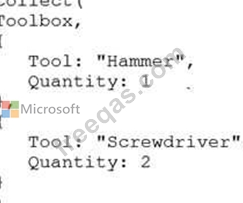
You are updating the canvas app.
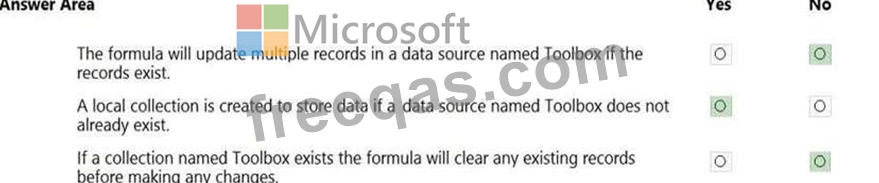
For each of the following statements, select Yes if the statement is true. Otherwise, select No.
NOTE: Each correct selection is worth one point.
Hot Area:
Correct Answer:

Explanation:
Box 1: No
Records are added, not updated.
Box 2: Yes
The Collect function adds records to a data source.
Syntax: Collect( DataSource, Item, ... )
DataSource - Required. The data source that you want to add data to. If it doesn't already exist, a new collection is created.
Item(s) - Required. One or more records or tables to add to the data source.
Box 3: No
No records are cleared.
Reference:
https://docs.microsoft.com/en-us/powerapps/maker/canvas-apps/functions/function-clear-collect-clearcollect
insert code

Question 23

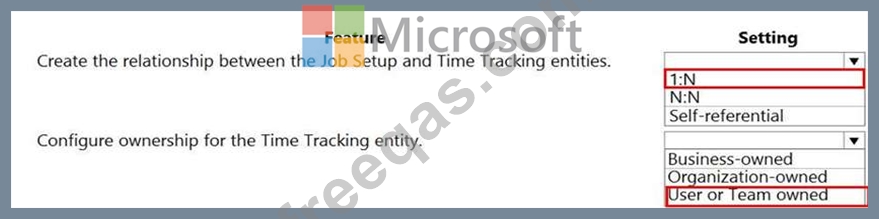
You need to configure the system to meet the requirements.
What should you use? To answer, select the appropriate options in the answer area.
NOTE: Each correct selection is worth one point.
Correct Answer:

Reference:
https://docs.microsoft.com/en-us/powerapps/maker/common-data-service/types-of-entities
insert code

Question 24

HOTSPOT
You need to roll back the mobile app to an earlier version.
What should you do? To answer, select the appropriate options in the answer area.
NOTE: Each correct selection is worth one point.
Hot Area:

Correct Answer:

Explanation:
Box 1: View the sessions details page for the app in Power Apps Studio
Use PowerApps Studio, select the App, and choose and you will be directed to the app's Versions tab in PowerApps portal. There should be one version marked Live.

Box 2: Select Restore on the previous version of the app.
Restore an app from your account
1. Open powerapps.com, and then click or tap Apps in the left navigation bar.
2. Near the right edge, click or tap the info icon for the app that you want to restore.
3. Click or tap the Versions tab, and then click or tap Restore for the version that you want to restore.

Reference:
https://powerapps.microsoft.com/sk-sk/blog/saveandpublish/
https://docs.microsoft.com/en-us/powerapps/maker/canvas-apps/restore-an-app
insert code

Question 25

HOTSPOT
You need to roll back the mobile app to an earlier version.
What should you do? To answer, select the appropriate options in the answer area.
NOTE: Each correct selection is worth one point.
Hot Area:


Correct Answer:

Explanation/Reference:
Explanation:
Box 1: View the sessions details page for the app in Power Apps Studio
Use PowerApps Studio, select the App, and choose and you will be directed to the app's Versions tab in PowerApps portal. There should be one version marked Live.

Box 2: Select Restore on the previous version of the app.
Restore an app from your account
1. Open powerapps.com, and then click or tap Apps in the left navigation bar.
2. Near the right edge, click or tap the info icon for the app that you want to restore.
3. Click or tap the Versions tab, and then click or tap Restore for the version that you want to restore.

Reference:
https://powerapps.microsoft.com/sk-sk/blog/saveandpublish/
https://docs.microsoft.com/en-us/powerapps/maker/canvas-apps/restore-an-app
insert code
  • «
  • 1
  • 2
  • 3
  • 4
  • 5
  • 6
  • 7
  • 8
  • 9
  • 10
  • …
  • »
  • »»
[×]

Download PDF File

Enter your email address to download Microsoft.PL-100.v2022-11-25.q114 Dumps

Email:

FreeQAs

Our website provides the Largest and the most Latest vendors Certification Exam materials around the world.

Using dumps we provide to Pass the Exam, we has the Valid Dumps with passing guranteed just which you need.

  • DMCA
  • About
  • Contact Us
  • Privacy Policy
  • Terms & Conditions
©2026 FreeQAs

www.freeqas.com materials do not contain actual questions and answers from Cisco's certification exams.