You are a Dynamics 365 Customer Service developer.
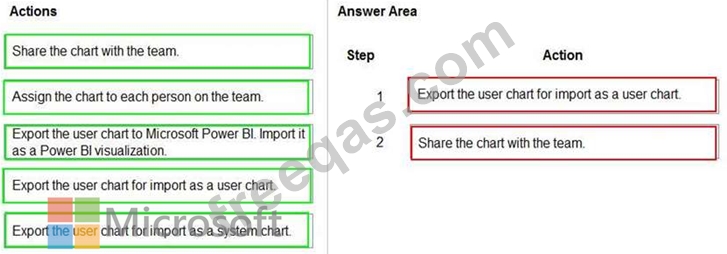
A salesperson creates a chart.
You need to ensure that the chart is available to all users on the team.
Which actions should the salesperson perform? To answer, drag the appropriate actions to the correct users. Each action may be used once, more than once, or not at all. You may need to drag the split bar between panes or scroll to view content.
NOTE: Each correct selection is worth one point.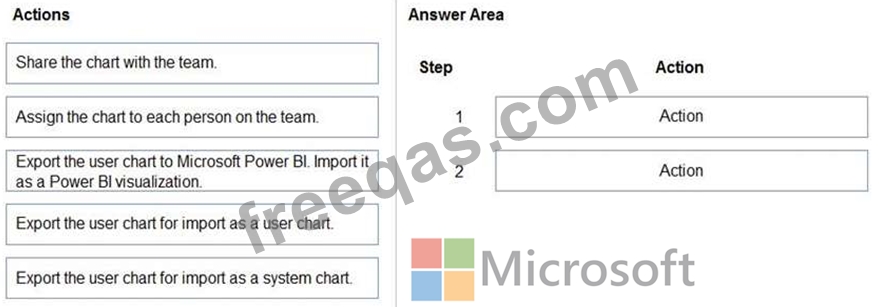
You create a canvas app for a sales team. The app has an embedded Power BI tile that shows year-to-date sales. Sales users do not have access to the data source that the tile uses.
Sales team users must be able to see data in the Power BI tile. You must minimize the level of permissions that you grant and minimize administrative overhead.
You need to share another Power BI component to make the data visible.
What should you share?
You create a report by using Power Bl Desktop and publish the report to the Power Bl service. You enable Power Bl visualization embedding in a model-driven app.
You need to configure the model-driven app to display a Power Bi tile
Which four actions should you perform in sequence? To answer, move the appropriate actions from the list of actions to the answer area and arrange them in the correct order.

You configure an alert in Power Bl.
You need to alert users when the value of a tile exceeds a threshold. To answer, select the appropriate options in the answer area.
NOTE: Each correct selection is worth one point.


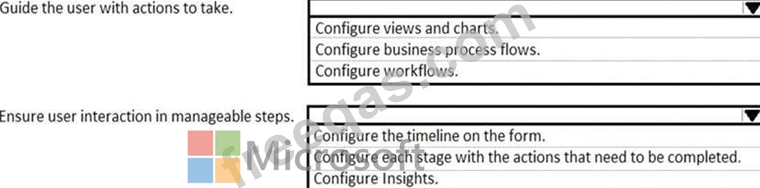
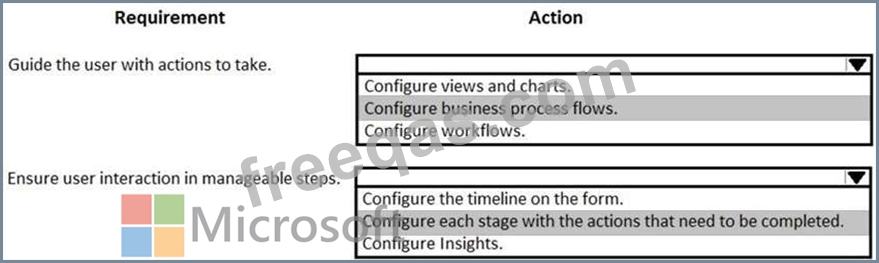
You are a Dynamics 365 Customer Engagement administrator. You create a new solution in Dynamics 365.
You need to help end users understand which actions to take next and ensure that user interaction occurs in manageable steps.
Which actions should you perform? To answer, select the appropriate options in the answer area.
NOTE: Each correct selection is worth one point.