FreeQAs
 Request Exam  Contact
  • Home
  • View All Exams
  • New QA's
  • Upload
PRACTICE EXAMS:
  • Oracle
  • Fortinet
  • Juniper
  • Microsoft
  • Cisco
  • Citrix
  • CompTIA
  • VMware
  • ISC
  • SAP
  • EMC
  • PMI
  • HP
  • Salesforce
  • Other
  • Oracle
    Oracle
  • Fortinet
    Fortinet
  • Juniper
    Juniper
  • Microsoft
    Microsoft
  • Cisco
    Cisco
  • Citrix
    Citrix
  • CompTIA
    CompTIA
  • VMware
    VMware
  • ISC
    ISC
  • SAP
    SAP
  • EMC
    EMC
  • PMI
    PMI
  • HP
    HP
  • Salesforce
    Salesforce
  1. Home
  2. Microsoft Certification
  3. PL-900 Exam
  4. Microsoft.PL-900.v2024-07-07.q254 Dumps
  • ««
  • «
  • …
  • 32
  • 33
  • 34
  • 35
  • 36
  • 37
  • 38
  • 39
  • 40
  • 41
  • …
  • »
  • »»
Download Now

Question 176

A company evaluates Microsoft tools for its employees.
The company uses Microsoft Excel to enter potential customer information from trade shows.
When potential customers create their first sale with the company, a Microsoft SharePoint list records them as converted to a customer.
The company must report which trade shows convert the most potential customers to actual customers.
You need to identify the tools that meet the requirements.
Which tools should you use? To answer, drag the appropriate solutions to the correct requirements. Each solution may be used once, more than once, or not at all. You may need to drag the split bar between panes or scroll to view content NOTE: Each correct selection is worth one point.

Correct Answer:

Explanation:
insert code

Question 177

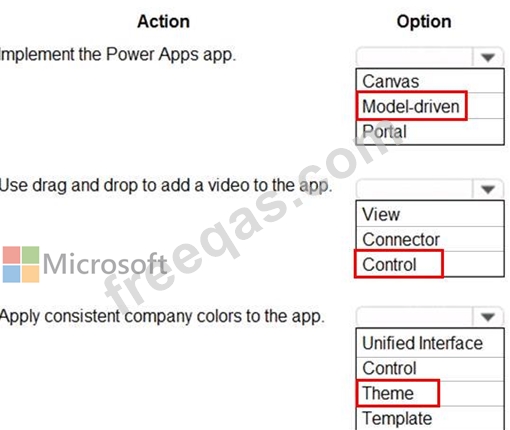
You are a retail director for a large clothing company. Each week you use the corporate YouTube channel to create a video that highlights new initiatives, and goals for retail operations.
You need to design a Power Apps app that streams the videos to internal users.
Which objects should you use? To answer, select the appropriate options in the answer area.
NOTE: Each correct selection is worth one point.
Correct Answer:

Reference:
https://powerapps.microsoft.com/en-us/blog/microsoft-stream-videos-and-channels-in-canvas-apps/
https://docs.microsoft.com/en-us/powerapps/maker/model-driven-apps/create-themes-organization-branding
https://docs.microsoft.com/en-us/powerapps/maker/canvas-apps/controls/control-stream-video
insert code

Question 178

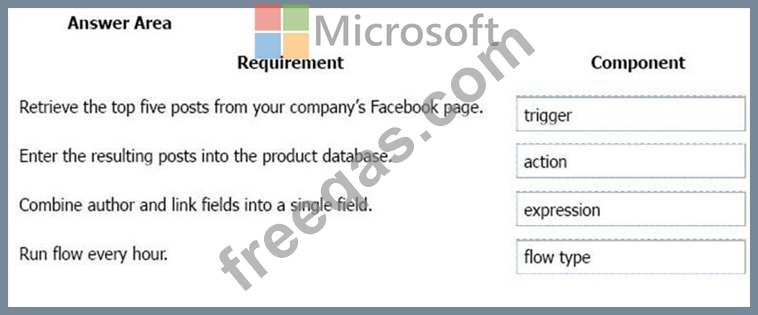
You plan to use Microsoft Flow to monitor what people are saying about your company's products. You store the feedback for research and development purposes.
You need to recommend Flow components to use for the solution.
To answer, drag the appropriate components to the correct requirements. Each component may be used once, more than once, or not at all. You may need to drag the split bar between panes or scroll to view content.
NOTE: Each correct selection is worth one point.

Correct Answer:

Explanation

Box 1: Trigger
A trigger is something that triggers or starts the workflow. It could be a new file uploaded to a document library, a new item created in the list or an email sent to your Inbox - something that will start (kick-off the workflow).
There are two types of triggers:
* Automatic trigger is pre-programmed into the workflow based on a certain rule (i.e. new document or item created, email sent, etc.)
* Manual Trigger is a trigger initiated by a user. Unlike with automatic trigger above, the workflow will only start when initiated manually by the end user (for example, from the Document Library for a selected file). Manual trigger is only supported for certain types of workflows (i.e. Get feedback from your manager for the selected file) Box 2: action An action is something that occurs as a result of the workflow.
Box 3: expression
Sometimes users just need to do basic operations like getting the current time, adding numbers together, or replacing a part of a string of text. That's possible inline in any flow action. Microsoft Flow leverages the same Workflow Definition Language used by Azure Logic apps. For new users who are unfamiliar with the expression language, there is an inline help experience that shows how to use each expression as they build out their flow.
Box 4: flow type
There are four different Flow types that you can choose from when starting out. You can create a scheduled flow, automated flow, instant flow, or a business process flow.
Reference:
https://sharepointmaven.com/3-major-components-microsoft-flow/
https://www.avepoint.com/blog/office-365/office-365-automation/
https://flow.microsoft.com/de-de/blog/use-expressions-in-actions/
insert code

Question 179

A company plans to create an information portal that managers can use to view critical information about their teams.
You need to recommend the type of Power BI components that the company should use.
What should you recommend? To answer, drag the appropriate components to the correct requirements. Each component may be used once, more than once, or not at all. You may need to drag the split bar between panes or scroll to view content.
NOTE. Each correct selection is worth one point.

Correct Answer:

Explanation

Box 1: Report
Reports are more detailed data displayed in many formats like chart, graphs list and in tabular, etc.
Box 2: Dashboard
Dashboards are a business key performance indicator view where it displays key values that can change business profits and can be glanced at one screen.
Box 3: Report
Power BI dashboards cannot slice and dice, but reports have many ways to filter and slice.
Note: Power BI dashboards are one placeholder to display the most important decision-making facts to run a business. But reports are more detailed data displayed in many formats like chart, graphs list and in tabular, etc. Reports are based on one dataset or one business unit data for example reports of a store belonging to California.
Reference:
https://www.educba.com/power-bi-dashboard-vs-report/
insert code

Question 180

A company plans to use Power Platform to build apps which address specific business challenges.
You need to recommend the appropriate types of Power Apps to use.
What should you recommend? To answer, select the appropriate option in the answer area.
NOTE: Each correct selection is worth one point.

Correct Answer:

Explanation:

Reference:
https://docs.microsoft.com/en-us/powerapps/maker/canvas-apps/getting-started
https://docs.microsoft.com/en-us/powerapps/maker/model-driven-apps/model-driven-app-overview
https://docs.microsoft.com/en-us/powerapps/maker/portals/overview
insert code
  • ««
  • «
  • …
  • 32
  • 33
  • 34
  • 35
  • 36
  • 37
  • 38
  • 39
  • 40
  • 41
  • …
  • »
  • »»
[×]

Download PDF File

Enter your email address to download Microsoft.PL-900.v2024-07-07.q254 Dumps

Email:

FreeQAs

Our website provides the Largest and the most Latest vendors Certification Exam materials around the world.

Using dumps we provide to Pass the Exam, we has the Valid Dumps with passing guranteed just which you need.

  • DMCA
  • About
  • Contact Us
  • Privacy Policy
  • Terms & Conditions
©2026 FreeQAs

www.freeqas.com materials do not contain actual questions and answers from Cisco's certification exams.
