You have a Microsoft 365 subscription that uses Microsoft 365 Defender.
You need to identify all the entities affected by an incident.
Which tab should you use in the Microsoft 365 Defender portal?
You have a Microsoft 365 subscription that uses Microsoft Defender for Endpoint and contains the devices shown in the following table.
You initiate a live response session on each device.
You need to collect a Defender for Endpoint investigation package from each device.
On which devices can you collect the package by running advanced live response commands from the command-line interface (CLI)?
You are informed of an increase in malicious email being received by users.
You need to create an advanced hunting query in Microsoft 365 Defender to identify whether the accounts of the email recipients were compromised. The query must return the most recent 20 sign-ins performed by the recipients within an hour of receiving the known malicious email.
How should you complete the query? To answer, select the appropriate options in the answer area.
NOTE: Each correct selection is worth one point.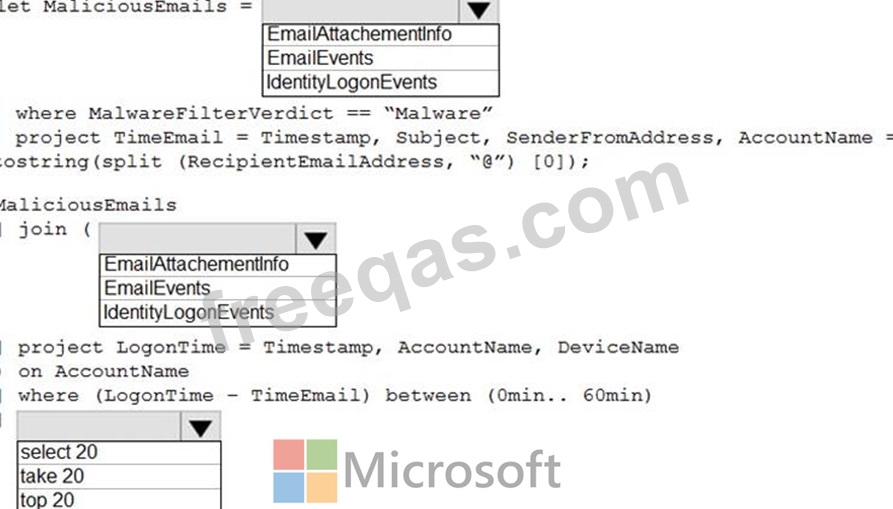

You have a Microsoft 365 subscription that uses Microsoft Defender for Endpoint and contains a user named user1 and a Microsoft 365 group named Group1. All users are assigned a Defender for Endpoint Plan 1 license.
You enable Microsoft Defender XDR Unified role-based access control (RBAC) for Endpoints & Vulnerability Management.
You need to ensure that User1 can configure alerts that will send email notifications to Group1. The solution must follow the principle of least privilege.
Which permissions should you assign to User1?
Your company has an on-premises network that uses Microsoft Defender for Identity.
The Microsoft Secure Score for the company includes a security assessment associated with unsecure Kerberos delegation.
You need remediate the security risk.
What should you do?

