While creating a retention label, you discover that the following options are missing:
Mark items as a record
Mark items as a regulatory record
You need to ensure that the options are available when you create retention labels in the Microsoft 365 compliance center.
How should you complete the PowerShell script? To answer, select the appropriate options in the answer area.
NOTE: Each correct selection is worth one point.

You have a Microsoft 365 subscription.
You have a user named User1. Several users have full access to the mailbox of User1.
Some email messages sent to User1 appear to have been read and deleted before the user viewed them.
When you search the audit log in the Microsoft Purview compliance portal to identify who signed in to the mailbox of User1, the results are blank.
You need to ensure that you can view future sign-ins to the mailbox of User1.
YOU run the Set-AdminAuditLogConfig -AdminAuditLogEnabled $true -AdminiAuditLogCmdlets "Mailbox* command.
Does that meet the goal?
You have the retention label policy shown in the Policy exhibit. (Click the Policy tab.)
Users apply the retention label policy to files and set the asset ID as shown in the following table.
On December 1, 2020, you create the event shown in the Event exhibit. (Click the Event tab.)
For each of the following statements, select Yes if the statement is true. Otherwise, select No.
NOTE: Each correct selection is worth one point.

You have a data loss prevention (DLP) policy that applies to the Devices location. The policy protects documents that contain States passport numbers.
Users reports that they cannot upload documents to a travel management website because of the policy.
You need to ensure that the users can upload the documents to the travel management website. The solution must prevent the protected content from being uploaded to other locations.
Which Microsoft 365 Endpoint data loss prevention (Endpoint DLP) setting should you configure?
You have the files shown in the following table.
You configure a retention policy as shown in the exhibit.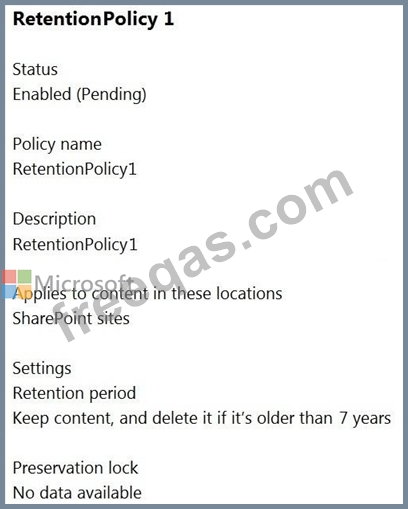
The start of the retention period is based on when items are created. The current date is January 01, 2021.
For each of the following statements, select Yes if the statement is true. Otherwise, select No.
NOTE: Each correct selection is worth one point.


