FreeQAs
 Request Exam  Contact
  • Home
  • View All Exams
  • New QA's
  • Upload
PRACTICE EXAMS:
  • Oracle
  • Fortinet
  • Juniper
  • Microsoft
  • Cisco
  • Citrix
  • CompTIA
  • VMware
  • ISC
  • SAP
  • EMC
  • PMI
  • HP
  • Salesforce
  • Other
  • Oracle
    Oracle
  • Fortinet
    Fortinet
  • Juniper
    Juniper
  • Microsoft
    Microsoft
  • Cisco
    Cisco
  • Citrix
    Citrix
  • CompTIA
    CompTIA
  • VMware
    VMware
  • ISC
    ISC
  • SAP
    SAP
  • EMC
    EMC
  • PMI
    PMI
  • HP
    HP
  • Salesforce
    Salesforce
  1. Home
  2. MuleSoft Certification
  3. MCD-Level-1 Exam
  4. MuleSoft.MCD-Level-1.v2022-12-10.q161 Dumps
  • «
  • 1
  • 2
  • 3
  • 4
  • 5
  • 6
  • 7
  • 8
  • 9
  • 10
  • …
  • »
  • »»
Download Now

Question 11

Refer to the exhibit.

What is the correct DataWeave expression for the Set Payload transformer to call the createCustomerObject flow with values for the first and last names of a new customer?

Correct Answer: C
insert code

Question 12

How does APIkit determine the number of flows to generate from a RAML specification?

Correct Answer: B
APIKIt Creates a separate flow for each HTTP method
insert code

Question 13

A Utlility.dwl is located in a Mule project at src/main/resources/modules. The Utility.dwl file defines a function named encryptString that encrypts a String What is the correct DataWeave to call the encryptString function in a Transform Message component?

Correct Answer: B
Correct answer is
%dw 2.0
output application/json
import modules::Utility
---
Utility::encryptString( "John Smith" )
DataWeave 2.0 functions are packaged in modules. Before you begin, note that DataWeave 2.0 is for Mule 4 apps. For Mule 3 apps, refer to DataWeave Operators in the Mule 3.9 documentation. For other Mule versions, you can use the version selector for the Mule Runtime table of contents.
Functions in the Core (dw::Core) module are imported automatically into your DataWeave scripts. To use other modules, you need to import the module or functions you want to use by adding the import directive to the head of your DataWeave script, for example:
import dw::core::Strings
import camelize, capitalize from dw::core::Strings
import * from dw::core::Strings
The way you import a module impacts the way you need to call its functions from a DataWeave script. If the directive does not list specific functions to import or use * from to import all functions from a function module, you need to specify the module when you call the function from your script. For example, this import directive does not identify any functions to import from the String module, so it calls the pluralize function like this: Strings::pluralize("box").
Transform
%dw 2.0
import dw::core::Strings
output application/json
---
{ 'plural': Strings::pluralize("box") }
insert code

Question 14

Refer to the exhibits.


A
web client submits a request to http://localhQst:8081 /flights. What is the result at the end of the flow?

Correct Answer: A
insert code

Question 15

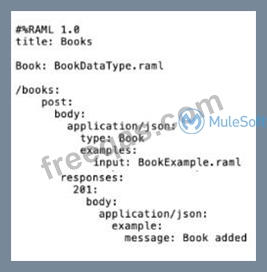
Refer to the exhibits. A company has defined this Book data type and Book example to be used in APIs. What is valid RAML for an API that uses this Book data type and Book example?

A)
B)

C)

D)

Correct Answer: C
insert code
  • «
  • 1
  • 2
  • 3
  • 4
  • 5
  • 6
  • 7
  • 8
  • 9
  • 10
  • …
  • »
  • »»
[×]

Download PDF File

Enter your email address to download MuleSoft.MCD-Level-1.v2022-12-10.q161 Dumps

Email:

FreeQAs

Our website provides the Largest and the most Latest vendors Certification Exam materials around the world.

Using dumps we provide to Pass the Exam, we has the Valid Dumps with passing guranteed just which you need.

  • DMCA
  • About
  • Contact Us
  • Privacy Policy
  • Terms & Conditions
©2026 FreeQAs

www.freeqas.com materials do not contain actual questions and answers from Cisco's certification exams.
