Let's say you don't have remote access to the Windows server (RDP) where Qlik Sense is installed, but you have Root Admin rules in QMC. So how can you make a copy of the Qlik Sense file, which your colleague created to make some quick changes using Qlik Sense Hub?
A system administrator receives an app tha was developed using Qlik Sense Desktop. The app must be published to stream A and stream B.
Which steps should the system administrator take to meet this requirement?
A Qlik Sense environment has users from Active Directory. A system administrator creates a task to synchronize the users from Active Directory with Qlik Sense.
The system administrator adds a new user to Active Directory, and manually executes the synchronization task in Qlik Sense. The administrator observes that the new user was NOT added to the Qlik Sense environment.
What should the system administrator do to ensure the new user is added?
Refer to the exhibit.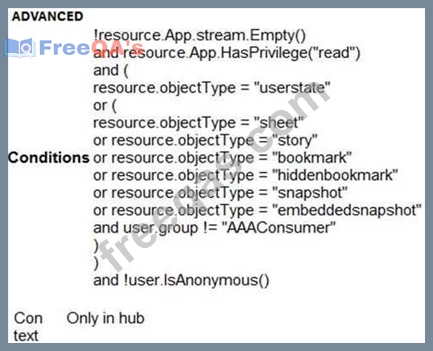
A system administrator creates the security rule shown. No other custom security rules exist. What effect will the security rule have when applied to a user?
A system administrator needs to configure load balancing rules to ensure that reload tasks for heavy applications are distributed across two nodes, Node A and Node B.
What steps should the administrator take in QMC to set up this load balancing rule? (Choose the correct sequence) A) Open QMC and go to Load Balancing Rules.
B) Select Add New Rule.
C) Specify Node A and Node B as target nodes.
D) Assign resource filter to include all reload tasks.

