FreeQAs
 Request Exam  Contact
  • Home
  • View All Exams
  • New QA's
  • Upload
PRACTICE EXAMS:
  • Oracle
  • Fortinet
  • Juniper
  • Microsoft
  • Cisco
  • Citrix
  • CompTIA
  • VMware
  • ISC
  • SAP
  • EMC
  • PMI
  • HP
  • Salesforce
  • Other
  • Oracle
    Oracle
  • Fortinet
    Fortinet
  • Juniper
    Juniper
  • Microsoft
    Microsoft
  • Cisco
    Cisco
  • Citrix
    Citrix
  • CompTIA
    CompTIA
  • VMware
    VMware
  • ISC
    ISC
  • SAP
    SAP
  • EMC
    EMC
  • PMI
    PMI
  • HP
    HP
  • Salesforce
    Salesforce
  1. Home
  2. RedHat Certification
  3. EX200 Exam
  4. RedHat.EX200.v2022-03-17.q136 Dumps
  • ««
  • «
  • …
  • 7
  • 8
  • 9
  • 10
  • 11
  • 12
  • 13
  • 14
  • 15
  • 16
  • …
  • »
  • »»
Download Now

Question 51

Configure a HTTP server, which can be accessed through http://station.domain40.example.com.
Please download the released page from http://ip/dir/example.html.

Correct Answer:
Answer see in the explanation.
Explanation/Reference:
# yum install -y httpd
# chkconfig httpd on
# cd /var/www/html
# wget http://ip/dir/example.html
# cp example.com index.html
# vim /etc/httpd/conf/httpd.conf
NameVirtualHost 192.168.0.254:80
<VirtualHost 192.168.0.254:80>
DocumentRoot /var/www/html/
ServerName station.domain40.example.com
</VirtualHost>
insert code

Question 52

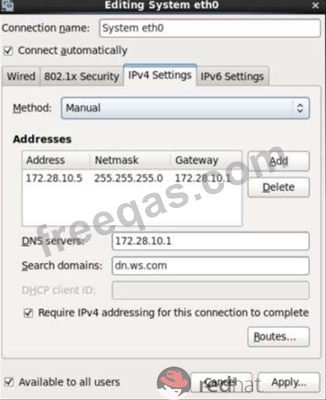
Configure your Host Name, IP Address, Gateway and DNS.
Host name: dtop5.dn.ws.com
IP Address: 172.28.10.5/4
Gateway: 172.28.10.1
DNS: 172.28.10.1

Correct Answer:
see explanation below.
Explanation
* Configure Host Name
* vim /etc/sysconfig/network NETWORKING=yes HOSTNAME=dtop5.dn.ws.com
GATEWAY=172.28.10.1
2. Configure IP Address, Gateway and DNS
Configure the network by Network Manager:

Note: Please remember to choose two options:
* Connect automatically
* Available to all users
Click "Apply", save and exit, and restart your network services:
# Service network restart
3. Validate these profiles:
a) Check gateway: # vim / etc / sysconfig / network
NETWORKING=yes
HOSTNAME=dtop5.dn.ws.com
GATEWAY=172.28.10.1
b) Check Host Name: # vim /etc/hosts

c) Check DNS: # vim /etc/resolv.conf
# Generated by NetworkManager
Search dn.ws.com
Nameserver 172.28.10.1
d) Check Gateway: # vim /etc/sysconfig/network-scripts/ifcfg-eth0
insert code

Question 53

Configure autofs to make sure after login successfully, it has the home directory autofs, which is shared as /rhome/ldapuser40 at the ip: 172.24.40.10. and it also requires that, other ldap users can use the home directory normally.

Correct Answer:
Answer see in the explanation.
Explanation/Reference:
# chkconfig autofs on
# cd /etc/
# vim /etc/auto.master
/rhome /etc/auto.ldap
# cp auto.misc auto.ldap
# vim auto.ladp
ldapuser40 -rw,soft,intr 172.24.40.10:/rhome/ldapuser40
* -rw,soft,intr 172.16.40.10:/rhome/&
# service autofs stop
# server autofs start
# showmount -e 172.24.40.10
# su - ladpuser40
insert code

Question 54

Make on /archive directory that only the user owner and group owner member can fully access.

Correct Answer:
see explanation below.
Explanation
* chmod 770 /archive
* Verify using : ls -ld /archive Preview should be like:
drwxrwx--- 2 root sysuser 4096 Mar 16 18:08 /archive
To change the permission on directory we use the chmod command. According to the question that only the owner user (root) and group member (sysuser) can fully access the directory so: chmod 770 /archive
insert code

Question 55

SELinux must run in force mode.

Correct Answer:
see explanation below.
Explanation
/etc/sysconfig/selinux
SELINUX=enforcing
insert code
  • ««
  • «
  • …
  • 7
  • 8
  • 9
  • 10
  • 11
  • 12
  • 13
  • 14
  • 15
  • 16
  • …
  • »
  • »»
[×]

Download PDF File

Enter your email address to download RedHat.EX200.v2022-03-17.q136 Dumps

Email:

FreeQAs

Our website provides the Largest and the most Latest vendors Certification Exam materials around the world.

Using dumps we provide to Pass the Exam, we has the Valid Dumps with passing guranteed just which you need.

  • DMCA
  • About
  • Contact Us
  • Privacy Policy
  • Terms & Conditions
©2026 FreeQAs

www.freeqas.com materials do not contain actual questions and answers from Cisco's certification exams.