FreeQAs
 Request Exam  Contact
  • Home
  • View All Exams
  • New QA's
  • Upload
PRACTICE EXAMS:
  • Oracle
  • Fortinet
  • Juniper
  • Microsoft
  • Cisco
  • Citrix
  • CompTIA
  • VMware
  • ISC
  • SAP
  • EMC
  • PMI
  • HP
  • Salesforce
  • Other
  • Oracle
    Oracle
  • Fortinet
    Fortinet
  • Juniper
    Juniper
  • Microsoft
    Microsoft
  • Cisco
    Cisco
  • Citrix
    Citrix
  • CompTIA
    CompTIA
  • VMware
    VMware
  • ISC
    ISC
  • SAP
    SAP
  • EMC
    EMC
  • PMI
    PMI
  • HP
    HP
  • Salesforce
    Salesforce
  1. Home
  2. RedHat Certification
  3. EX294 Exam
  4. RedHat.EX294.v2023-12-18.q19 Dumps
  • «
  • 1
  • 2
  • 3
  • 4
  • 5
  • »
Download Now

Question 6

In /home/sandy/ansible/ create a playbook called logvol.yml. In the play create a logical volume called Iv0 and make it of size 1500MiB on volume group vgO If there is not enough space in the volume group print a message "Not enough space for logical volume" and then make a 800MiB Iv0 instead. If the volume group still doesn't exist, create a message "Volume group doesn't exist" Create an xfs filesystem on all Iv0 logical volumes. Don't mount the logical volume.

Correct Answer:
Solution as:

Topic 1, LAB SETUP
You will need to set up your lab by creating 5 managed nodes and one control node.
So 6 machines total. Download the free RHEL8 iso from Red Hat Developers website.
***Control node you need to set up***
You need to create some static ips on your managed nodes then on the control node set them up in the
/etc/hosts file as follows:
vim /etc/hosts
10.0.2.21 node1.example.com
10.0.2.22 node2.example.com
10.0.2.23 node3.example.com
10.0.2.24 node4.example.com
10.0.2.25 node5.example.com
yum -y install ansible
useradd ansible
echo password | passwd --stdin ansible
echo "ansible ALL=(ALL) NOPASSWD:ALL
su - ansible; ssh-keygen
ssh-copy-id node1.example.com
ssh-copy-id node2.example.com
ssh-copy-id node3.example.com
ssh-copy-id node4.example.com
ssh-copy-id node5.example.com
***Each manage node setup***
First, add an extra 2GB virtual harddisk to each control node 1,2,3. Then add an extra hard disk to control
node 4. Do not add an extra hard disk to node 5. When you start up these machines the extra disks should be
automatically located at /dev/sdb (or /dev/vdb depending on your hypervisor).
useradd ansible
echo password | passwd --stdin ansible
echo "ansible ALL=(ALL) NOPASSWD:ALL" > /etc/sudoers.d/ansible
Note python3 should be installed by default, however if it is not then on both the control node and managed
nodes you can install it also set the default python3 if you are having trouble with python2 being the default.
yum -y install python3
alternatives --set python /usr/bin/python3
All machines need the repos available. You did this in RHSCA. To set up locally you just need to do the same
for each machine. Attach the rhel8 iso as a disk to virtualbox, kvm or whatever hypervisor you are using (this
will be /dev/sr0). Then inside the machine:
mount /dev/sr0 to /mnt
Then you will have all the files from the iso in /mnt.
mkdir /repo
cp -r /mnt /repo
vim /etc/yum.repos.d/base.repo
Inside this file:
[baseos]
name=baseos
baseurl=file:///repo/BaseOS
gpgcheck=0
Also the appstream
vim /etc/yum.repos.d/appstream.repo
Inside this file:
[appstream]
name=appstream
baseurl=file:///repo/AppStream
gpgcheck=0
insert code

Question 7

Create Logical volumes with lvm.yml in all nodes according to following
requirements.
----------------------------------------------------------------------------------------
* Create a new Logical volume named as 'data'
* LV should be the member of 'research' Volume Group
* LV size should be 1500M
* It should be formatted with ext4 file-system.
--> If Volume Group does not exist then it should print the message "VG Not found"
--> If the VG can not accommodate 1500M size then it should print "LV Can not be
created with
following size", then the LV should be created with 800M of size.
--> Do not perform any mounting for this LV.

Correct Answer:
Solution as:
# pwd
/home/admin/ansible
# vim lvm.yml
---
- name:
hosts: all
ignore_errors: yes
tasks:
- name:
lvol:
lv: data
vg: research
size: "1500"
- debug:
msg: "VG Not found"
when: ansible_lvm.vgs.research is not defined
- debug:
msg: "LV Can not be created with following size"
when: ansible_lvm.vgs.research.size_g < "1.5"
- name:
lvol:
lv: data
vg: research
size: "800"
when: ansible_lvm.vgs.research.size_g < "1.5"
- name:
filesystem:
fstype: ext4
dev: /dev/research/data
:wq!
# ansible-playbook lvm.yml --syntax-check
# ansible-playbook lvm.yml
insert code

Question 8

Rekey an existing Ansible vault as follows:
-----------------------------------------------
* Download Ansible vault from http:// classroom.example.com /secret.yml to /home/
admin/ansible/
* The current vault password is curabete
* The new vault password is newvare
* The vault remains in an encrypted state with the new password

Correct Answer:
Solution as:
# pwd
/home/admin/ansible/
# wget http://classroom.example.com/secret.yml
# chmod 0600 newpassword.txt
# ansible-vault rekey vault.yml --new-vault-password-file=newpassword.txt
insert code

Question 9

Create a playbook called webdev.yml in 'home/sandy/ansible. The playbook will create a directory Avcbdev on dev host. The permission of the directory are 2755 and owner is webdev. Create a symbolic link from /Webdev to /var/www/html/webdev. Serve a file from Avebdev7index.html which displays the text "Development" Curl http://node1.example.com/webdev/index.html to test
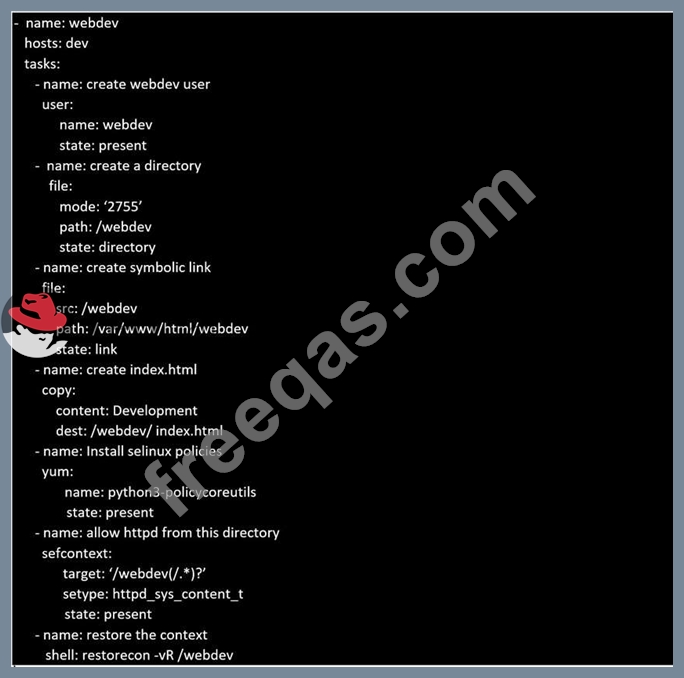
Correct Answer:
Solution as:
insert code

Question 10

Create a playbook called regulartasks.yml which has the system that append the date to /root/datefile every day at noon. Name is job 'datejob'


Correct Answer: B
insert code
  • «
  • 1
  • 2
  • 3
  • 4
  • 5
  • »
[×]

Download PDF File

Enter your email address to download RedHat.EX294.v2023-12-18.q19 Dumps

Email:

FreeQAs

Our website provides the Largest and the most Latest vendors Certification Exam materials around the world.

Using dumps we provide to Pass the Exam, we has the Valid Dumps with passing guranteed just which you need.

  • DMCA
  • About
  • Contact Us
  • Privacy Policy
  • Terms & Conditions
©2026 FreeQAs

www.freeqas.com materials do not contain actual questions and answers from Cisco's certification exams.