CORRECT TEXT
There are two different networks, 192.168.0.0/24 and 192.168.1.0/24. Your System is in 192.168.0.0/24 Network. One RHEL6 Installed System is going to use as a Router. All required configuration is already done on Linux Server. Where 192.168.0.254 and 192.168.1.254 IP Address are assigned on that Server.
How will make successfully ping to 192.168.1.0/24 Network's Host?
CORRECT TEXT
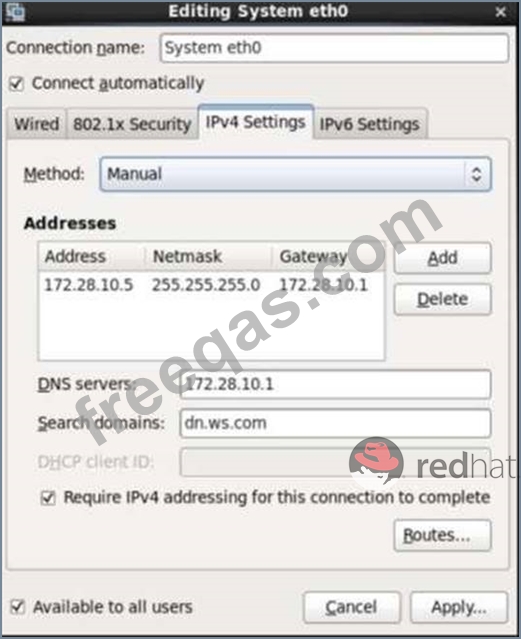
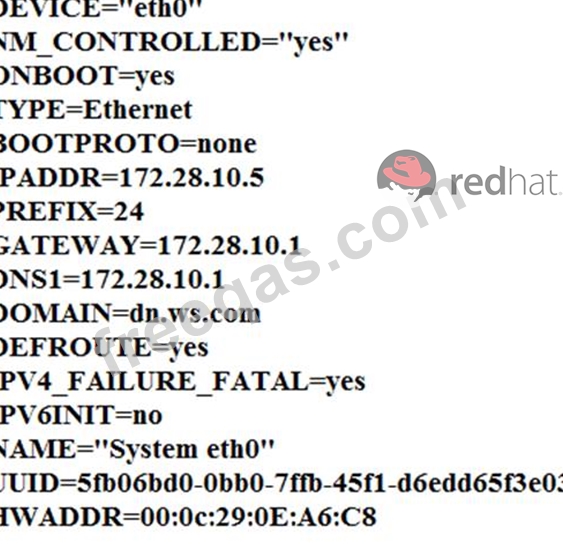
Configure your Host Name, IP Address, Gateway and DNS.
Host name: dtop5.dn.ws.com
IP Address: 172.28.10.5/4
Gateway: 172.28.10.1
DNS: 172.28.10.1

CORRECT TEXT
Add user: user1, set uid=601
Password: redhat
The user's login shell should be non-interactive.
CORRECT TEXT
You are new System Administrator and from now you are going to handle the system and your main task is Network monitoring, Backup and Restore. But you don't know the root password. Change the root password to redhat and login in default Runlevel.
CORRECT TEXT
Your System is going use as a router for 172.24.0.0/16 and 172.25.0.0/16. Enable the IP Forwarding.
1. echo "1" >/proc/sys/net/ipv4/ip_forward
2. vi /etc/sysctl.conf net.ipv4.ip_forward=1