A customer sets up two LWC OmniScripts, one embedded into another. AccountId is set in a Set Values element in the parent OmniScript. The Accountid set in the parent OmniScript is used to set another Set values element ContextAccountId in the emvedded OmniScript. The embedded OmniScript is activated.
While previewing the OmniScript flow from the parent, it is found that Account I set correct in the parent OmniScript. However ContextAccount in the embedded OmniScript is not set with the Accountid from parent OmniScript. On previewing the embedded OmniScript individually. It is found that ContextAccountId is set correctly.
What is the reason for this? Refer to the exhibit below.
A developer has an existing DataRaptorLoad that insert Contact records with inputs as LastName and firstName. The DataRaptor works as expected when previewed.
The developer creates an integration Procedure to test the DataRaptor and is using a SetValues element in the Integration Procedure toset the first name and last name for the contact record. The DataRaptor and Integration Procedure are set up as shown in the exhibit below.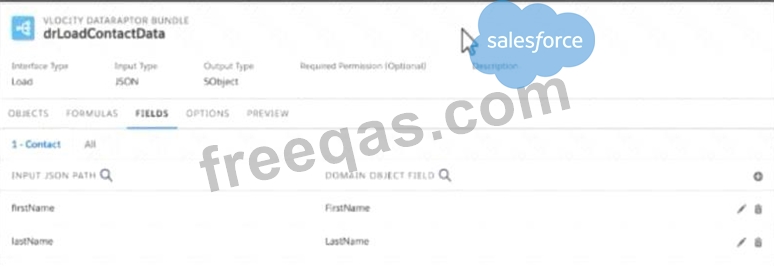
When the developer executes the Integration procedure in preview, the following error message displays:
Required fields are missing: [last Name]'',
How should the developer address this issue?
You are configuring an Integration Procedure Action in an OmniScript. The OmniScript needs a JSON response from the Integration Procedure, but you do not want to wait for the response for the user to proceed.
What feature do you enable?
Why woulda developerclone an Integration Procedure instead of versioning it?
You configured a FlexCard with a DataRaptor data source which uses the params.id as an input. When you click View Data on the FlexCard, valid data displays. However, when you preview the layout, the FlexCard does not display.
What could cause this error? Choose 2 answers
Enter your email address to download Salesforce.OmniStudio-Developer.v2024-05-02.q95 Dumps

