Recently a Salesforce org's integration failed because it exceeded the number of allowed API calls in a 24-hour period. The integration handles a near real-time, complex insertion of data into Salesforce.
The flow of data is as follows:
* The integration looks up Contact records with a given email address and, if found, the integration adds a Task to the first matching Contact it finds.
* If a match is not found, the integration looks up Lead records with a given email address and, if found, the integration adds a Task to the first matching Lead it finds.
* If a match is not found, the integration will create a Lead and a Task for that newly created Lead.
What is one way in which the integration can stay near real-time, but not exceed the number of allowed API calls in a 24-hour period?
Which two relationship queries use the proper syntax? (Choose two.)
SELECT Id, Name, Account__r.Name FROM Contact WHERE Account__r.Industry
A developer is developing a reusable Aura component that will reside on an sObject Lightning page with the following HTML snippet:
How can the component"5 controller get the context of the Lightning page that the sObject is on without requiring additional test coverage?
<lightning:layout multipleRows="true">
<lightning:layoutItem size="12">{!v.account.Name}
</lightning:layoutItem>
<lightning:layoutItem size="12">{!v.account.AccountNumber}
</lightning:layoutItem>
<lightning:layoutItem size="12">{!v.account.Industry}
</lightning:layoutItem>
</lightning:layout>
Refer to the component code above. The information displays as expected (in three rows) on a mobile device.
However, the information is not displaying as desired (in a single row) on a desktop or tablet.
Which option has the correct component changes to display correctly on desktops and tablets?
<lightning:layout multipleRows="true">
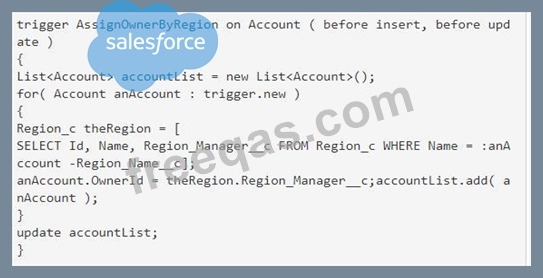
Consider the above trigger intended to assign the Account to the manager of the Account''s region. Which two changes should a developer make in this trigger to adhere to best practices? Choose 2 answers

